Unlock a world of possibilities! Login now and discover the exclusive benefits awaiting you.

- Qlik Community
- :
- All Forums
- :
- QlikView App Dev
- :
- Get Values and Display
- Subscribe to RSS Feed
- Mark Topic as New
- Mark Topic as Read
- Float this Topic for Current User
- Bookmark
- Subscribe
- Mute
- Printer Friendly Page

- Mark as New
- Bookmark
- Subscribe
- Mute
- Subscribe to RSS Feed
- Permalink
- Report Inappropriate Content
Get Values and Display
Hi All,
Just want to ask on how can i display the selected value in the title of my chart.
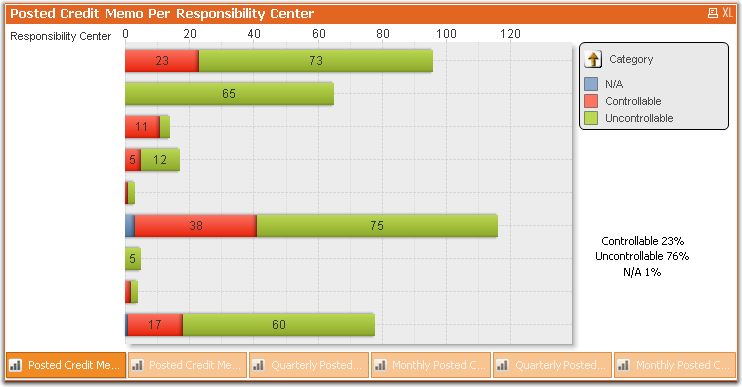
In the screenshot shown: If I select Controllable in the Category, it should display the list of controllables, and the title should be: Posted Credit Memo Per Responsibility Center - Controllable
Thanks All
-Donna
- Mark as New
- Bookmark
- Subscribe
- Mute
- Subscribe to RSS Feed
- Permalink
- Report Inappropriate Content
Maybe something like:
='Posted Credit Memo Per Responsibility Center - ' & if(len(Category)=0,'All', Category)
- Mark as New
- Bookmark
- Subscribe
- Mute
- Subscribe to RSS Feed
- Permalink
- Report Inappropriate Content
my Category is currently under a Drilldown Group. How can I show it if it is in a group? Thanks 
- Mark as New
- Bookmark
- Subscribe
- Mute
- Subscribe to RSS Feed
- Permalink
- Report Inappropriate Content
Hi,
in my point of view Groups Cant shown on title. But i dont no exactly

 udit_kumar_sana
- Mark as New
- Bookmark
- Subscribe
- Mute
- Subscribe to RSS Feed
- Permalink
- Report Inappropriate Content
Hi,
You can try this expression in Windows tile of your chart:
=if(WildMatch(category,'Controllable'), 'Posted Credit Memo Per Responsibility Center - Controllable',
if(WildMatch(category,'UnControllable'), 'xyz' ,
if(WildMatch(category,'N/A'), 'abc' )))
Regards,
Udit

 sushil353
- Mark as New
- Bookmark
- Subscribe
- Mute
- Subscribe to RSS Feed
- Permalink
- Report Inappropriate Content
can u upload the sample application.
you can also try to use getselectedvalue function.
HTh
Sushil

 jagan
jagan
- Mark as New
- Bookmark
- Subscribe
- Mute
- Subscribe to RSS Feed
- Permalink
- Report Inappropriate Content
Hi,
You can get the current dimension in the drilldown group by using GetCurrentField(), and you can get the selected values by getfieldselections ( ), now concatenating this you can frame the title.
= 'Some string ' & GetCurrentField(DrillDownGroupName) & getfieldselections ( FieldName [, ValueSep [, MaxValues]])
Hope this helps you.
Regards,
Jagan.