Unlock a world of possibilities! Login now and discover the exclusive benefits awaiting you.

Announcements
Save $650 on Qlik Connect, Dec 1 - 7, our lowest price of the year. Register with code CYBERWEEK: Register
- Qlik Community
- :
- All Forums
- :
- QlikView App Dev
- :
- Re: Highlight selection in pivot table
Options
- Subscribe to RSS Feed
- Mark Topic as New
- Mark Topic as Read
- Float this Topic for Current User
- Bookmark
- Subscribe
- Mute
- Printer Friendly Page
Turn on suggestions
Auto-suggest helps you quickly narrow down your search results by suggesting possible matches as you type.
Showing results for

Anonymous
Not applicable
2014-02-26
11:22 AM
- Mark as New
- Bookmark
- Subscribe
- Mute
- Subscribe to RSS Feed
- Permalink
- Report Inappropriate Content
Highlight selection in pivot table
Hi friends,
I have pivot table. When I click on any tag, this tag should change background color.
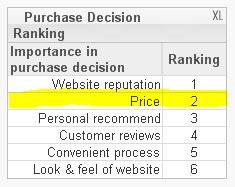
Please see my attached file.
Thanks,
- Tags:
- new_to_qlikview
618 Views
1 Solution
Accepted Solutions

 marcus_sommer
MVP
2014-02-26
11:29 AM
- Mark as New
- Bookmark
- Subscribe
- Mute
- Subscribe to RSS Feed
- Permalink
- Report Inappropriate Content
Try an expression in background like:
=if(GetFieldSelections(Decision_Factors) = Decision_Factors, yellow())
- Marcus
5 Replies
marcus_sommer
MVP
2014-02-26
11:29 AM
- Mark as New
- Bookmark
- Subscribe
- Mute
- Subscribe to RSS Feed
- Permalink
- Report Inappropriate Content
Try an expression in background like:
=if(GetFieldSelections(Decision_Factors) = Decision_Factors, yellow())
- Marcus
Anonymous
Not applicable
2014-02-26
11:33 AM
Author
- Mark as New
- Bookmark
- Subscribe
- Mute
- Subscribe to RSS Feed
- Permalink
- Report Inappropriate Content
There is no way to highlight dimension???
503 Views
Anonymous
Not applicable
2014-02-26
11:53 AM
Author
- Mark as New
- Bookmark
- Subscribe
- Mute
- Subscribe to RSS Feed
- Permalink
- Report Inappropriate Content
The same expression works for dimensions background color.
marcus_sommer
MVP
2014-02-26
11:54 AM
- Mark as New
- Bookmark
- Subscribe
- Mute
- Subscribe to RSS Feed
- Permalink
- Report Inappropriate Content
For me it worked - see the attachment.
- Marcus
503 Views
Anonymous
Not applicable
2014-02-26
12:00 PM
Author
- Mark as New
- Bookmark
- Subscribe
- Mute
- Subscribe to RSS Feed
- Permalink
- Report Inappropriate Content
Sorry, thanks
503 Views