Unlock a world of possibilities! Login now and discover the exclusive benefits awaiting you.

- Qlik Community
- :
- All Forums
- :
- QlikView App Dev
- :
- Re: How do I Set Sort Order in chart with Calcula...
- Subscribe to RSS Feed
- Mark Topic as New
- Mark Topic as Read
- Float this Topic for Current User
- Bookmark
- Subscribe
- Mute
- Printer Friendly Page

- Mark as New
- Bookmark
- Subscribe
- Mute
- Subscribe to RSS Feed
- Permalink
- Report Inappropriate Content
How do I Set Sort Order in chart with Calculated Dimension?
I have created a chart with calculated DImension
The chart shown below
The calculated Dimension is as follows
=Replace(class(POINTS,$(vClassVol)),'<= x <', ' - ')
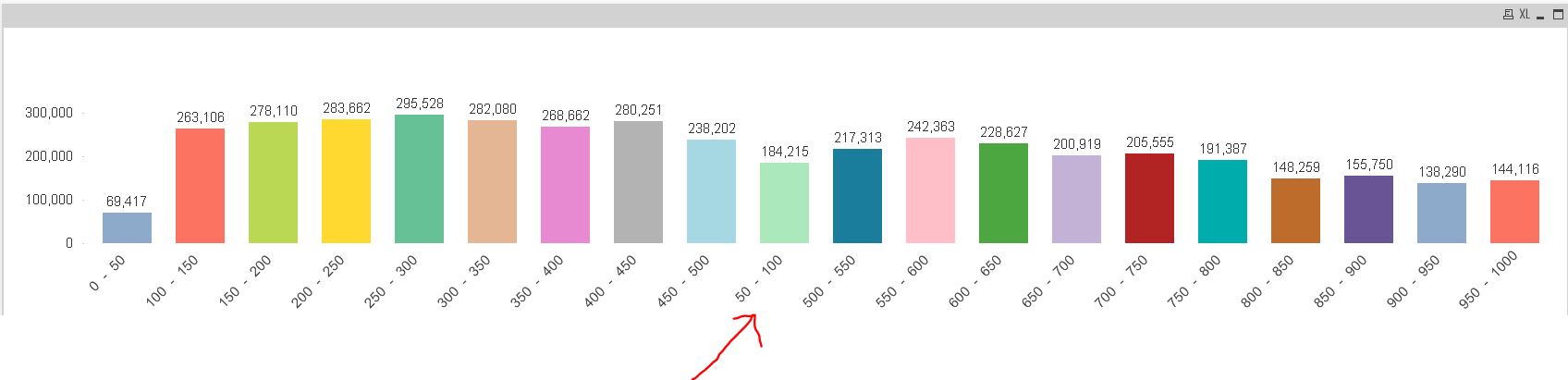
How do I set the sort order so that the 50-100 after 0-100
Thank you
- « Previous Replies
-
- 1
- 2
- Next Replies »
- Mark as New
- Bookmark
- Subscribe
- Mute
- Subscribe to RSS Feed
- Permalink
- Report Inappropriate Content
Could you please explain why Dual function is used here and what exactly Dual function does??

 MK_QSL
- Mark as New
- Bookmark
- Subscribe
- Mute
- Subscribe to RSS Feed
- Permalink
- Report Inappropriate Content
=DUAL(Replace(class(POINTS,$(vClassVol)),'<= x <', ' - '),class(POINTS,$(vClassVol)))
Dual Function is Storing Data as String and Number both format.
1st Part Replace(class(POINTS,$(vClassVol)),'<= x <', ' - ') as String
and 2nd Part class(POINTS,$(vClassVol)) as Number
Now when you sort by number it will consider the second part.
Why I use Dual ?
Class Function is storing data as Numeric Format but when you tried Replace, it will converted to text/string format.
If you try only class(POINTS,$(vClassVol)) in class format without replace, you can sort the data by the same sorting method I have described above, but due to replace function now it will not work.
Hope this will help..
- Mark as New
- Bookmark
- Subscribe
- Mute
- Subscribe to RSS Feed
- Permalink
- Report Inappropriate Content
Thanks Manish. Nice of you giving detailed explanation. This makes understanding much better and easy. Appreciate 
- « Previous Replies
-
- 1
- 2
- Next Replies »