Unlock a world of possibilities! Login now and discover the exclusive benefits awaiting you.

- Qlik Community
- :
- All Forums
- :
- QlikView App Dev
- :
- How to RESIZE STRAIGHT TABLE
- Subscribe to RSS Feed
- Mark Topic as New
- Mark Topic as Read
- Float this Topic for Current User
- Bookmark
- Subscribe
- Mute
- Printer Friendly Page

- Mark as New
- Bookmark
- Subscribe
- Mute
- Subscribe to RSS Feed
- Permalink
- Report Inappropriate Content
How to RESIZE STRAIGHT TABLE
I have the following settings ON; Under Caption----> allow minimize, allow maximize, auto minimize,
under Layout ------->Options -------> allow copy/clone , allow size to data, allow move/size. Under documents and secuity also all the boxes are checked. I am still unable to resize the table horizontally. I can resize it only vertically, NOT diagonally or Horizontally. weird. Has anyone faced similar issues?
Accepted Solutions

 ramoncova06
- Mark as New
- Bookmark
- Subscribe
- Mute
- Subscribe to RSS Feed
- Permalink
- Report Inappropriate Content
Get rid of the size to data and try to column size that Daniel recommended

 danieloberbilli
- Mark as New
- Bookmark
- Subscribe
- Mute
- Subscribe to RSS Feed
- Permalink
- Report Inappropriate Content
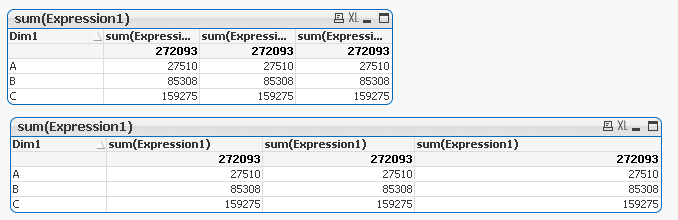
to change the size from right to left it might be (in your case) a matter of the table column sizes. try to enlarge the size of the single columns:
ramoncova06
- Mark as New
- Bookmark
- Subscribe
- Mute
- Subscribe to RSS Feed
- Permalink
- Report Inappropriate Content
Get rid of the size to data and try to column size that Daniel recommended