Unlock a world of possibilities! Login now and discover the exclusive benefits awaiting you.

- Qlik Community
- :
- All Forums
- :
- QlikView App Dev
- :
- Re: How to define breaks
- Subscribe to RSS Feed
- Mark Topic as New
- Mark Topic as Read
- Float this Topic for Current User
- Bookmark
- Subscribe
- Mute
- Printer Friendly Page

 ecabanas
- Mark as New
- Bookmark
- Subscribe
- Mute
- Subscribe to RSS Feed
- Permalink
- Report Inappropriate Content
How to define breaks
Hi all,
I'm designing a new function and I need your help.
What I have: two tables, one is data base the other a result to sum all the invoices and group per customer and month: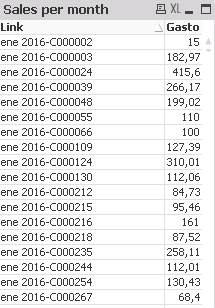
what I need, I need to know per month the amount that breaks the 10%line. the 30% line and the 60% line.
What I though, create a new table with the "link" that breaks it, per month
I dont know how to do it 😞
Many thank's
- « Previous Replies
-
- 1
- 2
- Next Replies »
Accepted Solutions

 sunny_talwar
- Mark as New
- Bookmark
- Subscribe
- Mute
- Subscribe to RSS Feed
- Permalink
- Report Inappropriate Content
Can you check if this script gets you to what you are trying to achieve:
Customer_sales:
LOAD MonthName(created_at) &'-'&Custaccount as Link,
MonthName(created_at) as MonthYear,
created_at,
Custaccount,
total
FROM
[test_file.xls]
(biff, embedded labels, table is Sheet1$);
Join(Customer_sales)
Load MonthYear,
Sum(total) as Gasto
Resident [Customer_sales]
Group By MonthYear;
FinalTable:
LOAD *,
If(Peek('MonthYear') = MonthYear and Peek('FlagTemp') = FlagTemp, Null(), FlagTemp) as Flag;
LOAD *,
If(AccuPercentage >= 0.10 and AccuPercentage <= 0.30, 1,
If(AccuPercentage >= 0.30 and AccuPercentage <= 0.60, 2,
If(AccuPercentage >= 0.60, 3))) as FlagTemp;
LOAD *,
If(Peek('MonthYear') = MonthYear, RangeSum(Percentage, Peek('AccuPercentage')), Percentage) as AccuPercentage;
LOAD *,
total/Gasto as Percentage
Resident Customer_sales
Order By MonthYear, total desc;
DROP Table Customer_sales;
Here Flag = 1 is assigned to the first time AccumulatedPercentage is greater than 10%
Flag = 2 is assigned to the first time AccumulatedPercentage is greater than 30%
Flag = 3 is assigned to the first time AccumulatedPercentage is greater than 60%
sunny_talwar
- Mark as New
- Bookmark
- Subscribe
- Mute
- Subscribe to RSS Feed
- Permalink
- Report Inappropriate Content
what I need, I need to know per month the amount that breaks the 10%line. the 30% line and the 60% line.
Not sure I understand your requirement here. Would you be able to elaborate a little?
ecabanas
- Mark as New
- Bookmark
- Subscribe
- Mute
- Subscribe to RSS Feed
- Permalink
- Report Inappropriate Content
Hi Sunny,
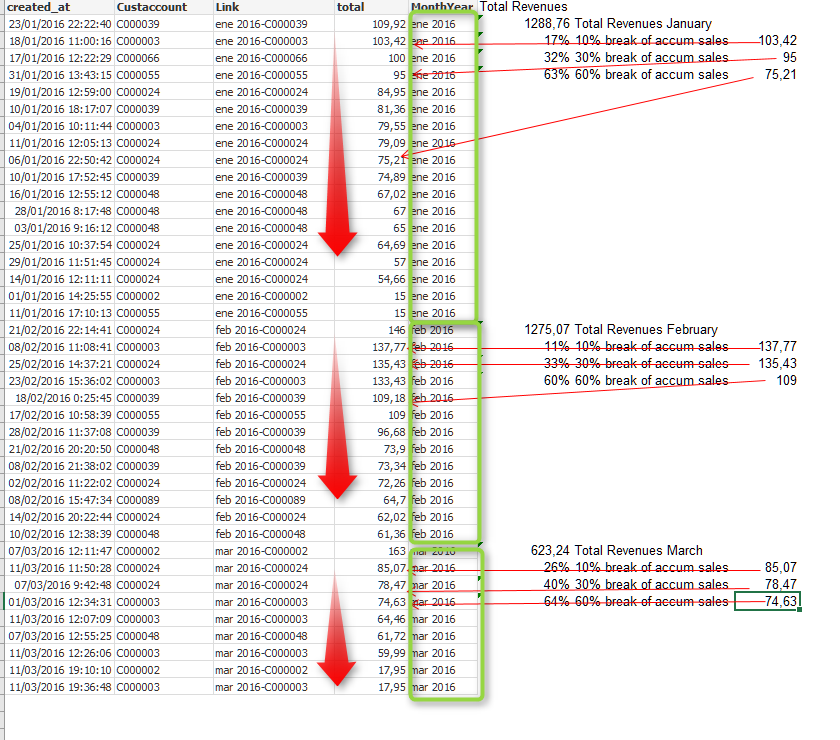
You are right, so sorry, see what I need in the excel attached. For every month, we need the total that breaks the 10%,30% and 60% accum revenues.
Better explained in the excel 😉
Many thank's
sunny_talwar
- Mark as New
- Bookmark
- Subscribe
- Mute
- Subscribe to RSS Feed
- Permalink
- Report Inappropriate Content
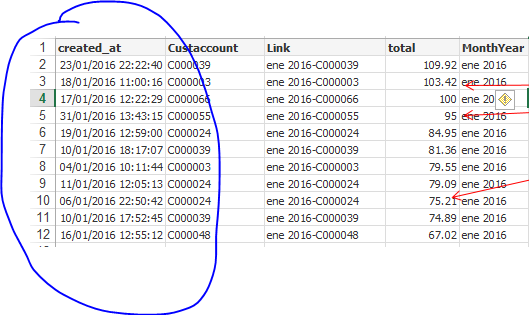
In your example the total fields seems to be unsorted. the accumulated 10%, 30% values are correctly calculated? no sorting on created date or Custaccount needed? Randomly sorted data might show a different 10% value if something changes in your data which might change the sorting of the datasource. Is that acceptable?
ecabanas
- Mark as New
- Bookmark
- Subscribe
- Mute
- Subscribe to RSS Feed
- Permalink
- Report Inappropriate Content
Hi Sunny,
No, no, the data is sorted by, MonthYear and the total desc
sunny_talwar
- Mark as New
- Bookmark
- Subscribe
- Mute
- Subscribe to RSS Feed
- Permalink
- Report Inappropriate Content
Right, but no sorting within a single MonthYear?
sunny_talwar
- Mark as New
- Bookmark
- Subscribe
- Mute
- Subscribe to RSS Feed
- Permalink
- Report Inappropriate Content
Look at the screenshot I have posted above
ecabanas
- Mark as New
- Bookmark
- Subscribe
- Mute
- Subscribe to RSS Feed
- Permalink
- Report Inappropriate Content
Hi Sunny,
The excel is sorted by MonthYear Asc and the total Desc. See the screenshot below
sunny_talwar
- Mark as New
- Bookmark
- Subscribe
- Mute
- Subscribe to RSS Feed
- Permalink
- Report Inappropriate Content
I got it. My bad 
ecabanas
- Mark as New
- Bookmark
- Subscribe
- Mute
- Subscribe to RSS Feed
- Permalink
- Report Inappropriate Content
don't worry
Many thank's Sunny

- « Previous Replies
-
- 1
- 2
- Next Replies »