Unlock a world of possibilities! Login now and discover the exclusive benefits awaiting you.

- Qlik Community
- :
- All Forums
- :
- QlikView App Dev
- :
- Re: Limiting contents of a list box
- Subscribe to RSS Feed
- Mark Topic as New
- Mark Topic as Read
- Float this Topic for Current User
- Bookmark
- Subscribe
- Mute
- Printer Friendly Page

- Mark as New
- Bookmark
- Subscribe
- Mute
- Subscribe to RSS Feed
- Permalink
- Report Inappropriate Content
Limiting contents of a list box
I have a list box with a Field Name entitle 'ANATOMICAL MAIN GROUP' Under this field, there are the following records:
- ALIMENTARY TRACT AND METABOLISM
- BLOOD AND BLOOD FORMING ORGANS
- CARDIOVASCULAR SYSTEM
- DERMATOLOGICALS
- GENITOURINARY SYSTEM
- HOMORNAL SYSTEM
- ANTI-INFECTIVES
- ANTINEOPLASTICS
How can i limit the contents of the list box to say:
- CARDIOVASCULAR SYSTEM
- ALIMENTARY TRACT AND METABOLISM
- ANTI-INFECTIVES
Thank you in advance
- Tags:
- qlikview
- « Previous Replies
-
- 1
- 2
- Next Replies »
Accepted Solutions

 ali_hijazi
- Mark as New
- Bookmark
- Subscribe
- Mute
- Subscribe to RSS Feed
- Permalink
- Report Inappropriate Content
ali_hijazi
- Mark as New
- Bookmark
- Subscribe
- Mute
- Subscribe to RSS Feed
- Permalink
- Report Inappropriate Content
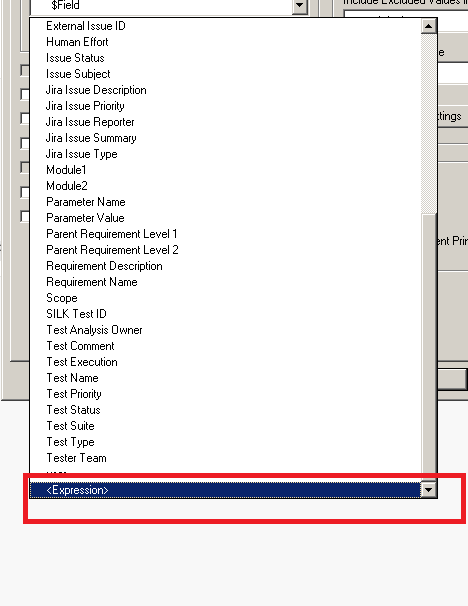
you can add an expression instead of choosing the available columns
I would suggest to add first a column in your script next to Anatomical main group this column name it flag and give it the value of 1 next to ones that you want to display then in the expression add the following
if(flag=1, [Anatomical main group])
- Mark as New
- Bookmark
- Subscribe
- Mute
- Subscribe to RSS Feed
- Permalink
- Report Inappropriate Content
Dear Ali
Many thanks, i tried the following script:
[Anatomical Main Group]:
LOAD ATCLevelOneCode,
ATCLevelOneDescript as [Anatomical Main Group],
Flag,
if(Flag = 1, ATCLevelOneDescript)
FROM
[$(vFolderSourceData)tblWHOATCLevelOneCodeDescript.xls]
(biff, embedded labels, table is tblWHOATCLevelOneCodeDescript$);
and it is still loading all other items. What could i be doing wrong?
ali_hijazi
- Mark as New
- Bookmark
- Subscribe
- Mute
- Subscribe to RSS Feed
- Permalink
- Report Inappropriate Content
NO NO
[Anatomical Main Group]:
LOAD ATCLevelOneCode,
ATCLevelOneDescript as [Anatomical Main Group],
Flag
FROM
[$(vFolderSourceData)tblWHOATCLevelOneCodeDescript.xls]
(biff, embedded labels, table is tblWHOATCLevelOneCodeDescript$);
then create a new Listbox and choose the expression as I showed you in the image
there you write if(Flag=1,[Anatomical Main Group])

 swarup_malli
- Mark as New
- Bookmark
- Subscribe
- Mute
- Subscribe to RSS Feed
- Permalink
- Report Inappropriate Content
In the expression field of the listbox :
copy paste the following
if([ANATOMICAL MAIN GROUP]= 'CARDIOVASCULAR SYSTEM'
or
[ANATOMICAL MAIN GROUP]='ALIMENTARY TRACT AND METABOLISM'
or
[ANATOMICAL MAIN GROUP]='ANTI-INFECTIVES',
[ANATOMICAL MAIN GROUP])
ali_hijazi
- Mark as New
- Bookmark
- Subscribe
- Mute
- Subscribe to RSS Feed
- Permalink
- Report Inappropriate Content
but what if they want to add a new value?
the Flag is much simpler as data is coming from excel so you only put 1 next to the group you want to show and reload
- Mark as New
- Bookmark
- Subscribe
- Mute
- Subscribe to RSS Feed
- Permalink
- Report Inappropriate Content
Many thanks, i have done that and put the expression under expression in the properties of the list box and the list box continues to show every thing.
 shane_spencer
- Mark as New
- Bookmark
- Subscribe
- Mute
- Subscribe to RSS Feed
- Permalink
- Report Inappropriate Content
I use something like this:
=if( match([ANATOMICAL MAIN GROUP],'CARDIOVASCULAR SYSTEM', 'ALIMENTARY TRACT AND METABOLISM','ANTI-INFECTIVES'), [ANATOMICAL MAIN GROUP])
ali_hijazi
- Mark as New
- Bookmark
- Subscribe
- Mute
- Subscribe to RSS Feed
- Permalink
- Report Inappropriate Content
it seems you gave 1 as flag for all groups, put zeros for the ones that you want to hide and 1 for the ones that you want to show it will work
 kristoferahlin
- Mark as New
- Bookmark
- Subscribe
- Mute
- Subscribe to RSS Feed
- Permalink
- Report Inappropriate Content
If the "row number" (1, 2, 3...) is included in the field you can use
if(left( [Anatomical Main Group], 1) <=3, [Anatomical Main Group])
- « Previous Replies
-
- 1
- 2
- Next Replies »