Unlock a world of possibilities! Login now and discover the exclusive benefits awaiting you.

- Qlik Community
- :
- All Forums
- :
- QlikView App Dev
- :
- Re: Master Calendar Interval () step error
- Subscribe to RSS Feed
- Mark Topic as New
- Mark Topic as Read
- Float this Topic for Current User
- Bookmark
- Subscribe
- Mute
- Printer Friendly Page

 jleefjcapital
- Mark as New
- Bookmark
- Subscribe
- Mute
- Subscribe to RSS Feed
- Permalink
- Report Inappropriate Content
Master Calendar Interval () step error
Hello,
I'm using the following code for the master calendar. It had worked with no problem with other data sets, but I get the following error message, when I try to use it with a particular data table (Alabama_employ).
I hope someone would be able to help me.
Thank you,
Jessica
Error message when I try to load:

Here is the master calendar code I'm using:
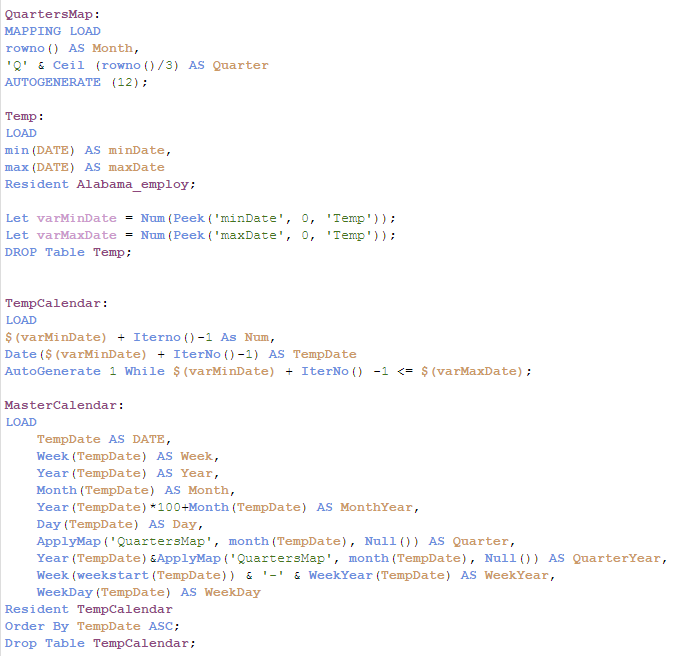
Here is the table I'm referencing:


 sunny_talwar
- Mark as New
- Bookmark
- Subscribe
- Mute
- Subscribe to RSS Feed
- Permalink
- Report Inappropriate Content
So it seems that DATE2 is blank? Same is true for DATE1? Can you add filters for year and period also?
jleefjcapital
- Mark as New
- Bookmark
- Subscribe
- Mute
- Subscribe to RSS Feed
- Permalink
- Report Inappropriate Content
I just did that and both return no value....
jleefjcapital
- Mark as New
- Bookmark
- Subscribe
- Mute
- Subscribe to RSS Feed
- Permalink
- Report Inappropriate Content
This is the Rest Connection I used to pull the data from an official cite.
RestConnectorMasterTable:
SQL SELECT
"status",
"responseTime",
"__KEY_root",
(SELECT
"@Value",
"__FK_message"
FROM "message" FK "__FK_message" ArrayValueAlias "@Value"),
(SELECT
"__FK_Results",
"__KEY_Results",
(SELECT
"seriesID",
"__FK_series",
"__KEY_series",
(SELECT
"series_title",
"series_id",
"seasonality",
"survey_name",
"measure_data_type",
"commerce_industry",
"commerce_sector",
"area",
"__FK_catalog"
FROM "catalog" FK "__FK_catalog"),
(SELECT
"year",
"period",
"periodName",
"value",
"__FK_data",
"__KEY_data",
(SELECT
"@Value" AS "@Value_u0",
"__FK_footnotes"
FROM "footnotes" FK "__FK_footnotes" ArrayValueAlias "@Value_u0"),
(SELECT
"__FK_calculations",
"__KEY_calculations",
(SELECT
"1",
"3",
"6",
"12",
"__FK_net_changes"
FROM "net_changes" FK "__FK_net_changes"),
(SELECT
"1" AS "1_u0",
"3" AS "3_u0",
"6" AS "6_u0",
"12" AS "12_u0",
"__FK_pct_changes"
FROM "pct_changes" FK "__FK_pct_changes")
FROM "calculations" PK "__KEY_calculations" FK "__FK_calculations")
FROM "data" PK "__KEY_data" FK "__FK_data")
FROM "series" PK "__KEY_series" FK "__FK_series")
FROM "Results" PK "__KEY_Results" FK "__FK_Results")
FROM JSON (wrap on) "root" PK "__KEY_root";
sunny_talwar
- Mark as New
- Bookmark
- Subscribe
- Mute
- Subscribe to RSS Feed
- Permalink
- Report Inappropriate Content
So your DATE field is still not fixed, you need to share how period and year look like. Can you share a screenshot of those as a filter?
jleefjcapital
- Mark as New
- Bookmark
- Subscribe
- Mute
- Subscribe to RSS Feed
- Permalink
- Report Inappropriate Content
Or I should say, this is the response code generated by Qlik.
jleefjcapital
- Mark as New
- Bookmark
- Subscribe
- Mute
- Subscribe to RSS Feed
- Permalink
- Report Inappropriate Content
Neither year nor period seems to have been loaded. It's strange. I just sent you the original load statement.
jleefjcapital
- Mark as New
- Bookmark
- Subscribe
- Mute
- Subscribe to RSS Feed
- Permalink
- Report Inappropriate Content
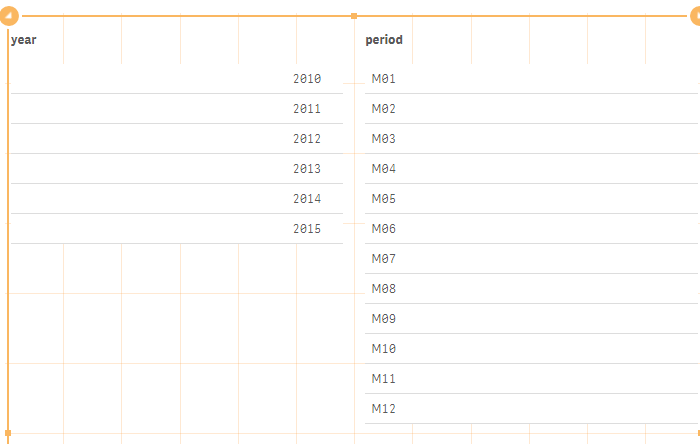
When I tried loading it in its original form (I modified the load statement for Alabama), I can view all the fields. Here they are:

 rupamjyotidas
- Mark as New
- Bookmark
- Subscribe
- Mute
- Subscribe to RSS Feed
- Permalink
- Report Inappropriate Content
Try this, Al tough if you share your app, it would be more helpful
AutoGenerate 1 while ($(varMinDate) + Iterno())-1<=$(varMaxDate);
jleefjcapital
- Mark as New
- Bookmark
- Subscribe
- Mute
- Subscribe to RSS Feed
- Permalink
- Report Inappropriate Content
Sunny,
The other code you gave me worked for the date - Date(Makedate([year],right([period],2)), 'M/D/YYYY') as Date,
But it doesn't seem to like the Where statement: WHERE NOT IsNull([__FK_data]) and [seriesID] = 'SMS01000000000000001';
Once I add the [seriesID] where statement fields show up with no values.
sunny_talwar
- Mark as New
- Bookmark
- Subscribe
- Mute
- Subscribe to RSS Feed
- Permalink
- Report Inappropriate Content
One of the where statement is new. Where did that one come from?
NOT IsNull([__FK_data])
Without any other manipulation to date, but with your Where clause, are you getting any results? I am not sure what the new issue is now?
