Unlock a world of possibilities! Login now and discover the exclusive benefits awaiting you.

Announcements
FLASH SALE: Save $500! Use code FLASH2026 at checkout until Feb 14th at 11:59PM ET. Register Now!
- Qlik Community
- :
- All Forums
- :
- QlikView App Dev
- :
- Re: Need help on layout
Options
- Subscribe to RSS Feed
- Mark Topic as New
- Mark Topic as Read
- Float this Topic for Current User
- Bookmark
- Subscribe
- Mute
- Printer Friendly Page
Turn on suggestions
Auto-suggest helps you quickly narrow down your search results by suggesting possible matches as you type.
Showing results for

Not applicable
2014-04-23
04:26 AM
- Mark as New
- Bookmark
- Subscribe
- Mute
- Subscribe to RSS Feed
- Permalink
- Report Inappropriate Content
Need help on layout
Hi All,
I have a table chart where i have a field CV_ID as shown in the attached image.
can someone tell me how to remove the drop down symbols that comes next to CV_ID column in the chart.
thanks

1,082 Views
1 Solution
Accepted Solutions

 tresB
tresB
Champion III
2014-04-23
04:29 AM
- Mark as New
- Bookmark
- Subscribe
- Mute
- Subscribe to RSS Feed
- Permalink
- Report Inappropriate Content
Goto Sort tab, select your CV_ID field, uncheck 'Allow Interactive Sort'
1,013 Views
6 Replies
tresB
Champion III
2014-04-23
04:29 AM
- Mark as New
- Bookmark
- Subscribe
- Mute
- Subscribe to RSS Feed
- Permalink
- Report Inappropriate Content
Goto Sort tab, select your CV_ID field, uncheck 'Allow Interactive Sort'
1,014 Views

 rustyfishbones
Master II
2014-04-23
04:30 AM
- Mark as New
- Bookmark
- Subscribe
- Mute
- Subscribe to RSS Feed
- Permalink
- Report Inappropriate Content
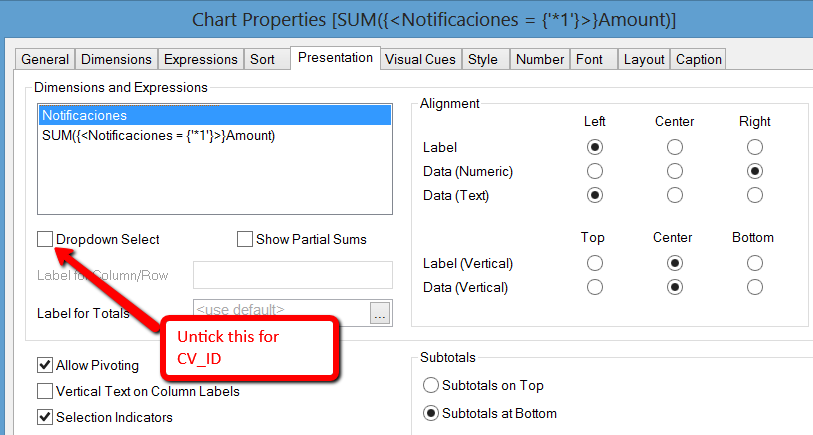
Yes
 ashfaq_haseeb
Champion III
2014-04-23
04:30 AM
- Mark as New
- Bookmark
- Subscribe
- Mute
- Subscribe to RSS Feed
- Permalink
- Report Inappropriate Content
Hi,
This is sorting symbol,
In order to remove that go to table properties --> sort tab --> select your field and deselect all sorting option.
Hope it help.
Regards
ASHFAQ
rustyfishbones
Master II
2014-04-23
04:32 AM
- Mark as New
- Bookmark
- Subscribe
- Mute
- Subscribe to RSS Feed
- Permalink
- Report Inappropriate Content
Apologies, I misread your request,
tresesco is correct
1,013 Views
Not applicable
2014-04-23
04:39 AM
Author
- Mark as New
- Bookmark
- Subscribe
- Mute
- Subscribe to RSS Feed
- Permalink
- Report Inappropriate Content
Thank you all.
1,013 Views
Not applicable
2014-04-23
04:40 AM
Author
- Mark as New
- Bookmark
- Subscribe
- Mute
- Subscribe to RSS Feed
- Permalink
- Report Inappropriate Content
In Presentation uncheck the option Sort indicator.
Hope this will help u..!
1,013 Views