Unlock a world of possibilities! Login now and discover the exclusive benefits awaiting you.

- Qlik Community
- :
- All Forums
- :
- QlikView App Dev
- :
- Re: Stright Table
- Subscribe to RSS Feed
- Mark Topic as New
- Mark Topic as Read
- Float this Topic for Current User
- Bookmark
- Subscribe
- Mute
- Printer Friendly Page

 NavinReddy
- Mark as New
- Bookmark
- Subscribe
- Mute
- Subscribe to RSS Feed
- Permalink
- Report Inappropriate Content
Stright Table
Hi,
how can i make it one line dark in stright table
Thanks in Advance
Niranjan

- « Previous Replies
- Next Replies »

- Mark as New
- Bookmark
- Subscribe
- Mute
- Subscribe to RSS Feed
- Permalink
- Report Inappropriate Content
hi Niru ,
please find attachment
do u need like this
hope this helps
Thanks and regards

 sujeetsingh
- Mark as New
- Bookmark
- Subscribe
- Mute
- Subscribe to RSS Feed
- Permalink
- Report Inappropriate Content
Hope this is what you want
- Mark as New
- Bookmark
- Subscribe
- Mute
- Subscribe to RSS Feed
- Permalink
- Report Inappropriate Content
Hi Niru,
You can fix a line object in ur chart where u want that sit.
NavinReddy
- Mark as New
- Bookmark
- Subscribe
- Mute
- Subscribe to RSS Feed
- Permalink
- Report Inappropriate Content
Hi,
where can i set like that , i need to set A3 line only like bold colour
Best Regards,
Niranjan
- Mark as New
- Bookmark
- Subscribe
- Mute
- Subscribe to RSS Feed
- Permalink
- Report Inappropriate Content
hi niru ,
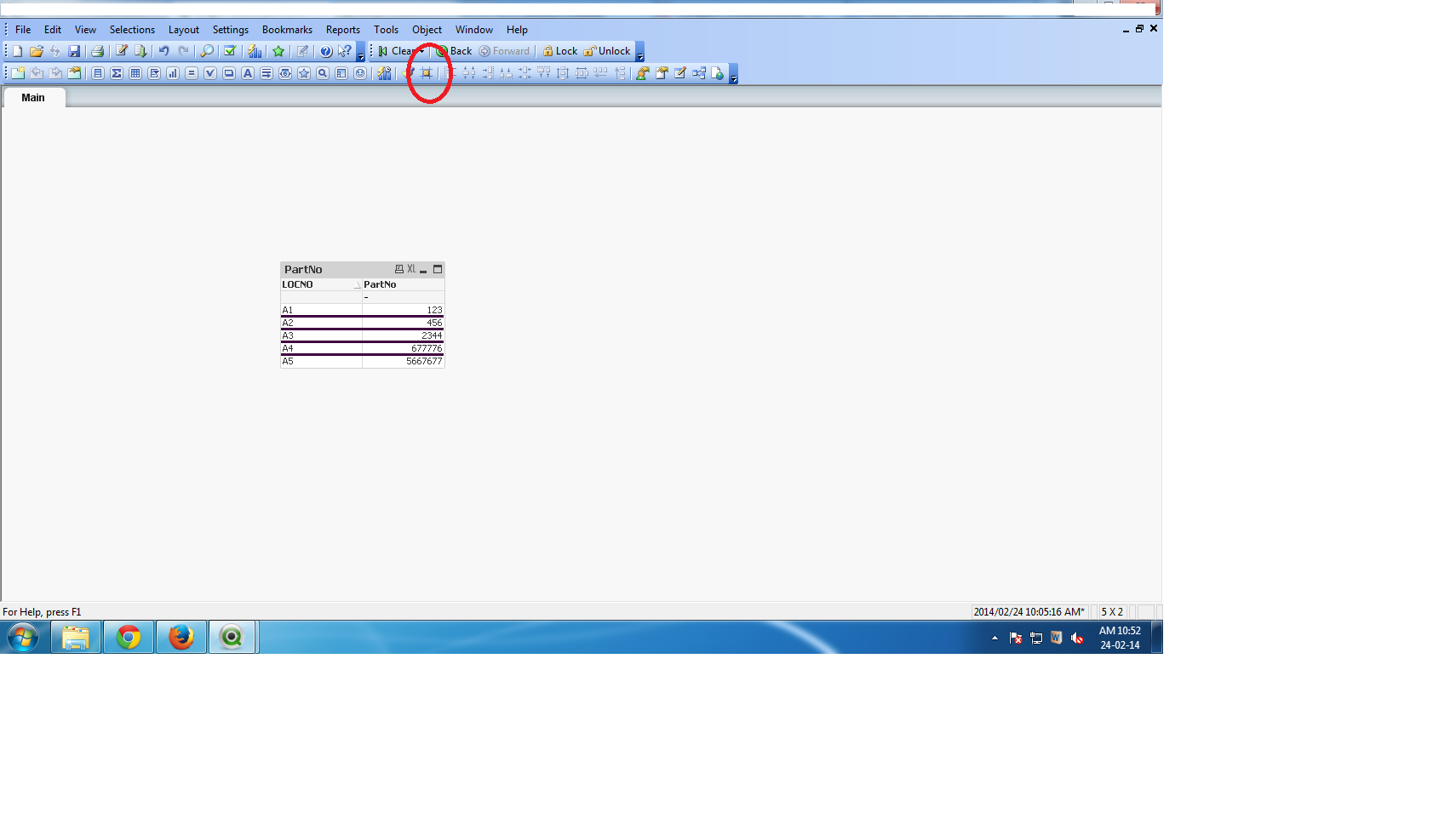
first Click on Design grid
after that
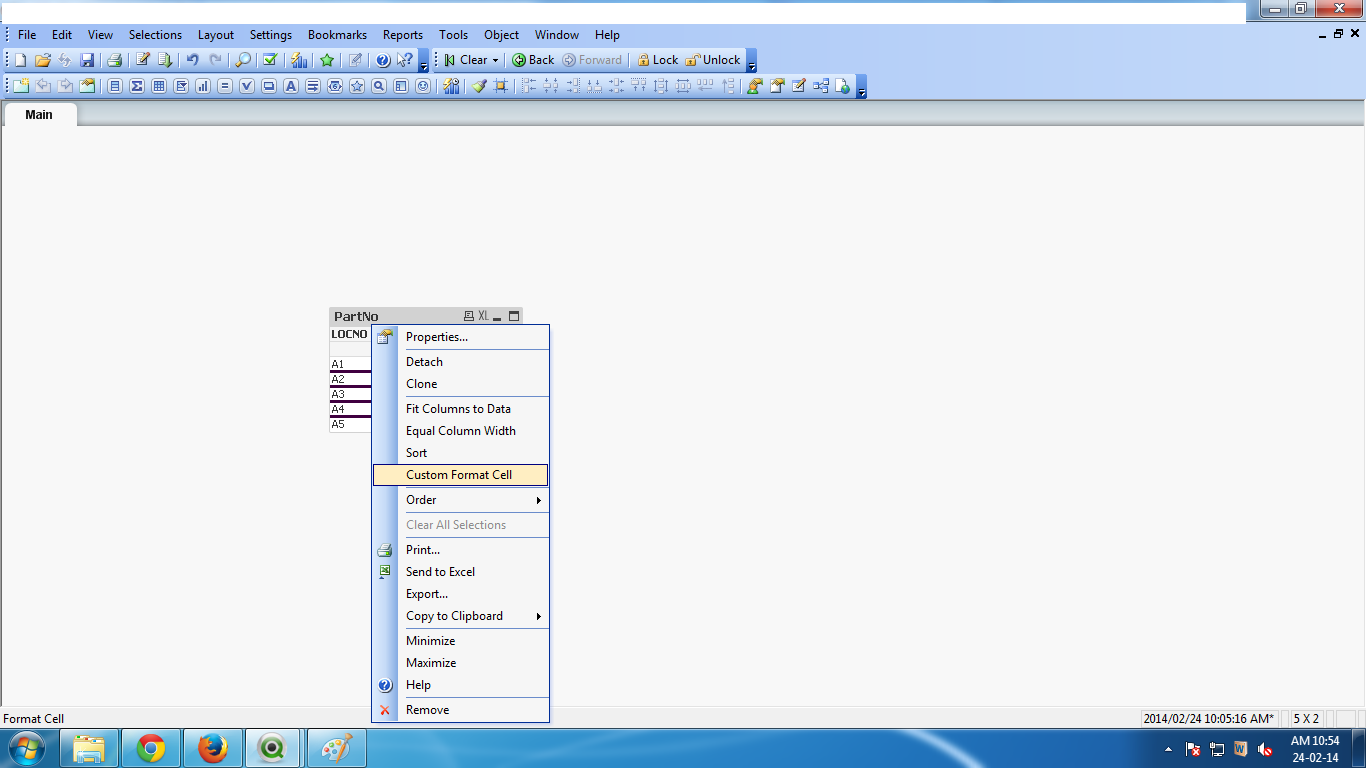
right click On which cell u want custom then Select Custom format cell
from their u can Do what type design U want to do
but it has Some limitation also
Thanks
- Mark as New
- Bookmark
- Subscribe
- Mute
- Subscribe to RSS Feed
- Permalink
- Report Inappropriate Content
Hi, qlik learn
How do you get this done? I looked at it under Style and saw you added [custom], but cannot figure out which part being customized?
Thanks.
dong
- Mark as New
- Bookmark
- Subscribe
- Mute
- Subscribe to RSS Feed
- Permalink
- Report Inappropriate Content
NavinReddy
- Mark as New
- Bookmark
- Subscribe
- Mute
- Subscribe to RSS Feed
- Permalink
- Report Inappropriate Content
Hi,
Sorry ,i tried but not working me for that
Best Regards
Niranjan
- Mark as New
- Bookmark
- Subscribe
- Mute
- Subscribe to RSS Feed
- Permalink
- Report Inappropriate Content
Hi Niru ,
First u click on grid as above qlik learn is located in the screenshot after that u select the straight table chart
and column also in which u want to set the bold line , after that right click on the chart and click on custom formate cell then select the line whatever u want if u want whole the column then it is also possible or selected cells also.
Hope this would be help u.
- « Previous Replies
- Next Replies »