Unlock a world of possibilities! Login now and discover the exclusive benefits awaiting you.

- Qlik Community
- :
- All Forums
- :
- QlikView App Dev
- :
- YTD Calculation
- Subscribe to RSS Feed
- Mark Topic as New
- Mark Topic as Read
- Float this Topic for Current User
- Bookmark
- Subscribe
- Mute
- Printer Friendly Page

- Mark as New
- Bookmark
- Subscribe
- Mute
- Subscribe to RSS Feed
- Permalink
- Report Inappropriate Content
YTD Calculation
H all,
i want to calculate a YTD of year that i select.
For example if i select 2016-02 i want a sum of value of 2016-01 and 2016-02 etc...
Like field I have year_month (eg. YYYY-MM)
Can somebody help me?
- « Previous Replies
- Next Replies »
Accepted Solutions

 sunny_talwar
- Mark as New
- Bookmark
- Subscribe
- Mute
- Subscribe to RSS Feed
- Permalink
- Report Inappropriate Content
This?

Current
=RangeSum(Before(Sum({$<ReportYearMonth={">=$(=YearStart(Max(ReportYearMonth)))<=$(=Max(ReportYearMonth))"}, Flag = {'CY'}>}Qta), 0, ColumnNo()))
Previous
=RangeSum(Before(Sum({$<ReportYearMonth={">=$(=YearStart(Max(ReportYearMonth)))<=$(=Max(ReportYearMonth))"}, Flag = {'PY'}>}Qta), 0, ColumnNo()))

 ziadm
ziadm
- Mark as New
- Bookmark
- Subscribe
- Mute
- Subscribe to RSS Feed
- Permalink
- Report Inappropriate Content
Hi Cecilia
use this set analysis
set vMaxYear = Max(Year)
Set vMaxDate =date(max(Date), 'DD MMM YYYY')
sum({<Year={$(vMaxYear)},Date={'<=$(vMaxDate)'},Month=>}Qta)
Thanks
sunny_talwar
- Mark as New
- Bookmark
- Subscribe
- Mute
- Subscribe to RSS Feed
- Permalink
- Report Inappropriate Content
Did you get time to look at my response here -> Re: Prior year for year_month field
ziadm
- Mark as New
- Bookmark
- Subscribe
- Mute
- Subscribe to RSS Feed
- Permalink
- Report Inappropriate Content
of Follow the following thread
 satishkurra
- Mark as New
- Bookmark
- Subscribe
- Mute
- Subscribe to RSS Feed
- Permalink
- Report Inappropriate Content
Check the attached
- Mark as New
- Bookmark
- Subscribe
- Mute
- Subscribe to RSS Feed
- Permalink
- Report Inappropriate Content
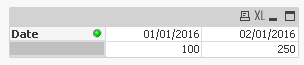
Hi Satish, if we use a text object the solution works, but i would see the value 350 in the following table, below the date 02/01/2016, but it doesn't appear  .
.
What can i do?
Thanks
satishkurra
- Mark as New
- Bookmark
- Subscribe
- Mute
- Subscribe to RSS Feed
- Permalink
- Report Inappropriate Content
Hi
I understand u have done this using pivot table. Now go to presentation tab and select Date dimension and check show partial sum option. Now you can see total
Let me know
- Mark as New
- Bookmark
- Subscribe
- Mute
- Subscribe to RSS Feed
- Permalink
- Report Inappropriate Content
I Satish, i explain you better what I would. I attach a qvw with the pivot table in which I want below 02/01/2016 the value 350, below 03/01/2016 the value 700 and so on…. Like a progressive values…
I hope I have explain my issue better.


 satishkurra
- Mark as New
- Bookmark
- Subscribe
- Mute
- Subscribe to RSS Feed
- Permalink
- Report Inappropriate Content
I don't think we can achieve this...
sunny_talwar
- Mark as New
- Bookmark
- Subscribe
- Mute
- Subscribe to RSS Feed
- Permalink
- Report Inappropriate Content
Why not Satish? Try this:
=RangeSum(Before(Sum({$<Date={">=$(=YearStart(Max(Date)))<=$(=Max(Date))"}>}[Sales]) , 0, ColumnNo()))

- « Previous Replies
- Next Replies »