Unlock a world of possibilities! Login now and discover the exclusive benefits awaiting you.

- Qlik Community
- :
- All Forums
- :
- QlikView App Dev
- :
- Re: label color change
- Subscribe to RSS Feed
- Mark Topic as New
- Mark Topic as Read
- Float this Topic for Current User
- Bookmark
- Subscribe
- Mute
- Printer Friendly Page

 ssriramin19
- Mark as New
- Bookmark
- Subscribe
- Mute
- Subscribe to RSS Feed
- Permalink
- Report Inappropriate Content
label color change
Please help me in how to change the color of the label as mentioned below.
This is not for all the dimension labels only for the selected.
!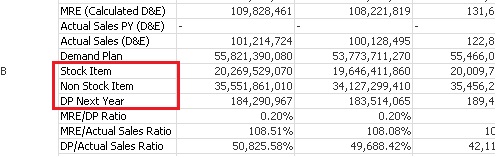
As mentioned above only the highlighted label names needs to be colored.
How this needs to be achieved?
Thanks
Sriram

 tresesco
- Mark as New
- Bookmark
- Subscribe
- Mute
- Subscribe to RSS Feed
- Permalink
- Report Inappropriate Content
Try to share a sample qvw.

- Mark as New
- Bookmark
- Subscribe
- Mute
- Subscribe to RSS Feed
- Permalink
- Report Inappropriate Content
Looks like you need to color the expression and not the dimension. In that case you can go to to expression and then hit '+' symbol and make a condition in the 'Backgroud Color'.
If(MixMatch('Your Expression', 'Stock Item', 'No Stock Item','DP Next Year'), ARGB(200,200,200,200))

 krishna20
- Mark as New
- Bookmark
- Subscribe
- Mute
- Subscribe to RSS Feed
- Permalink
- Report Inappropriate Content
Hi,
Have u tried custom cell format???
ssriramin19
- Mark as New
- Bookmark
- Subscribe
- Mute
- Subscribe to RSS Feed
- Permalink
- Report Inappropriate Content
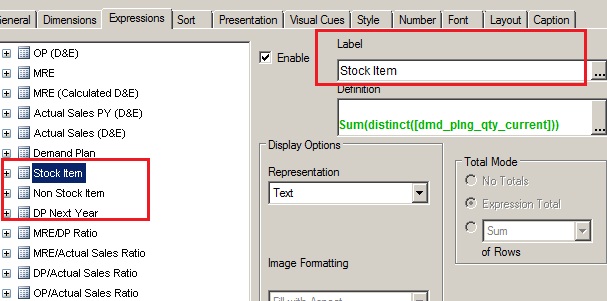
I need to change the color of the label mentioned above for the three expressions to red color.Its only the label in the expression needs to be changed.
ssriramin19
- Mark as New
- Bookmark
- Subscribe
- Mute
- Subscribe to RSS Feed
- Permalink
- Report Inappropriate Content
Custom cell format changes color for all the expression label not to any particular mentioned expression label.

 mohammadkhatimi
- Mark as New
- Bookmark
- Subscribe
- Mute
- Subscribe to RSS Feed
- Permalink
- Report Inappropriate Content
In Text Color expression of MRE(Calculation D&E):
If(Match(DimensionName, 'Stock Item', 'No Stock Item','DP Next Year'), Yellow())
Hope this will helps You..!!
Regards,
Mohammad
ssriramin19
- Mark as New
- Bookmark
- Subscribe
- Mute
- Subscribe to RSS Feed
- Permalink
- Report Inappropriate Content
its not the dimension its the expression label which needs to be made to different color
tresesco
- Mark as New
- Bookmark
- Subscribe
- Mute
- Subscribe to RSS Feed
- Permalink
- Report Inappropriate Content
AFAIK, unfortunately that can't be done for specific labels. 
ssriramin19
- Mark as New
- Bookmark
- Subscribe
- Mute
- Subscribe to RSS Feed
- Permalink
- Report Inappropriate Content
Then how that should be achieved. Any other suggestion or work around to achieve this. Shall I inform the user that it is not possible to make color changes to label as desired?
mohammadkhatimi
- Mark as New
- Bookmark
- Subscribe
- Mute
- Subscribe to RSS Feed
- Permalink
- Report Inappropriate Content
Above expreesion u have to write in expression MRE(Calculation D&E):
Click on + and in that text expression..
Regards,
Mohammad