Unlock a world of possibilities! Login now and discover the exclusive benefits awaiting you.

- Qlik Community
- :
- All Forums
- :
- QlikView App Dev
- :
- pivot table numbers
- Subscribe to RSS Feed
- Mark Topic as New
- Mark Topic as Read
- Float this Topic for Current User
- Bookmark
- Subscribe
- Mute
- Printer Friendly Page

- Mark as New
- Bookmark
- Subscribe
- Mute
- Subscribe to RSS Feed
- Permalink
- Report Inappropriate Content
pivot table numbers
Hi All,
I am facing issue. I have following tables: Date_Table & Account.
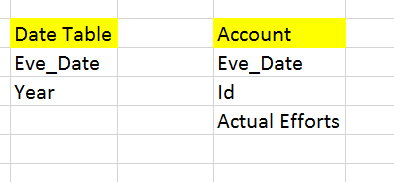
Both table has Eve_date column common. I am using Eve_Date ( Date Table) in dimension & Sum(Actual Efforts ) from Account table in pivot. It should show all the dates from Date Table. But it is not showing.
I have used supres 0 values. I have join both table with Left Keep, but still it is not showing expected output.
Please help.
- « Previous Replies
-
- 1
- 2
- Next Replies »


- Mark as New
- Bookmark
- Subscribe
- Mute
- Subscribe to RSS Feed
- Permalink
- Report Inappropriate Content
Then, Instead of NA in presentation tab use Space to hide. Why you want to show in condition.
- Mark as New
- Bookmark
- Subscribe
- Mute
- Subscribe to RSS Feed
- Permalink
- Report Inappropriate Content
I am using Dimension "city" and formula that =If(sum(Emp)>0, Green, Red). where there are some city that doesnot has emp, it shows null & applying red format. I want to treat NULL as white.
- Mark as New
- Bookmark
- Subscribe
- Mute
- Subscribe to RSS Feed
- Permalink
- Report Inappropriate Content
May be Application needed for this Issue
Try this for luck
=If(sum(Emp)<0, Red(), Green())
- Mark as New
- Bookmark
- Subscribe
- Mute
- Subscribe to RSS Feed
- Permalink
- Report Inappropriate Content
Not working. Tried already.
It considered text what ever you put for null values even 0 is considering text. So < 0 is not working
- Mark as New
- Bookmark
- Subscribe
- Mute
- Subscribe to RSS Feed
- Permalink
- Report Inappropriate Content
Can you share the application please? That demonstrates the issue
- Mark as New
- Bookmark
- Subscribe
- Mute
- Subscribe to RSS Feed
- Permalink
- Report Inappropriate Content
i am working on trial version now. so can not share any file.
but my concern is that I want to format NULL ( what ever we defined in show null values) in Pivot table. Formatting means background color and font color only.
Please guide me on this.. stuck from long time.
Thanks in Adv

 tyagishaila
- Mark as New
- Bookmark
- Subscribe
- Mute
- Subscribe to RSS Feed
- Permalink
- Report Inappropriate Content
Go to Expression Tab
Explore expression(click on + sign)
click on background color then write expression
If(field or expression whatever=NA, Yellow, red or green as per your requirement)
- « Previous Replies
-
- 1
- 2
- Next Replies »