Unlock a world of possibilities! Login now and discover the exclusive benefits awaiting you.

- Qlik Community
- :
- All Forums
- :
- QlikView Integrations
- :
- Re: Google Maps - Cluster
- Subscribe to RSS Feed
- Mark Topic as New
- Mark Topic as Read
- Float this Topic for Current User
- Bookmark
- Subscribe
- Mute
- Printer Friendly Page

 Alexander_Thor
- Mark as New
- Bookmark
- Subscribe
- Mute
- Subscribe to RSS Feed
- Permalink
- Report Inappropriate Content
Google Maps - Cluster
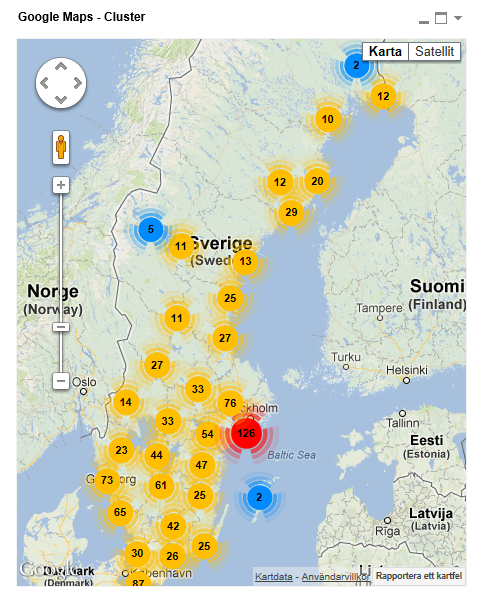
Google Maps Extension with Cluster support.
QlikTech takes no responsibility for any code and QlikTech Support Agreement does not cover issues with this extension.
Please review Googles license agreement before you put this into production.
Introduction
This is a QlikView extension object that integrates Google Maps Javascript API V3 and a third party library called MarkerClusterPlus into QlikView.
Load a set a coordinates into QlikView and visualize them together with this extension. The clustering feature is create when you have alot of data points and needs to group/cluster them together for greater visability and performance.
The maxzoom property defines at what zoom level you want your markers clustered. The grid size property controls how big or small cluster grid size you want.
You can either use the extension 'as is' or use it as a base to further customize it to fit your needs.
Download the extension and view source code at: https://github.com/mindspank/GoogleMaps-Cluster-QV11
If you build something awesome please share it with the community!
Live long and prosper.
2015-02-15
Removed download from post, please grab the latest version from Github instead.
2014-02-03
Various fixes.
2014-01-09
There has been numerous upgrades to the extension.
Now clusters now display the value of your expression and with added support to include more information in pop-up labels.
Example grayscale styled map included.
Possibility to show only a single cluster icon style if you do not want it to scale according to the number of markers in the cluster.
2013-06-17
Added custom marker support. Now you can specify a url for an custom marker. Accepts all major image file types.

- Mark as New
- Bookmark
- Subscribe
- Mute
- Subscribe to RSS Feed
- Permalink
- Report Inappropriate Content
Thank you very much Alex
Alberto
- Mark as New
- Bookmark
- Subscribe
- Mute
- Subscribe to RSS Feed
- Permalink
- Report Inappropriate Content
Dear
I got stuck at increasing the size of the cluster with respect to number of markers, for a small Idea I have been attached the file please have a look over the attached file, and if you have any idea please share with me I am looking forward your response.
thanks again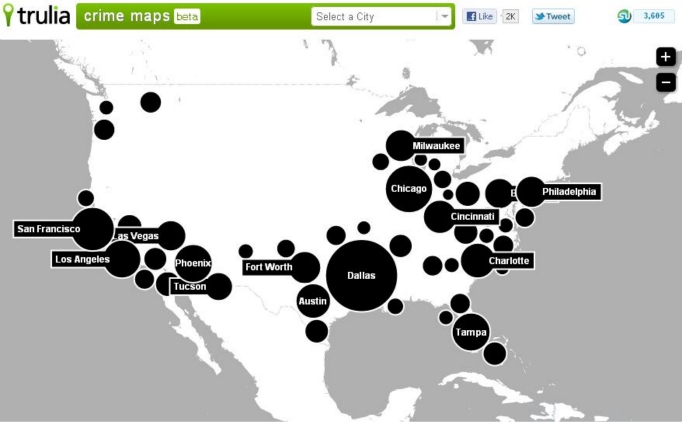
Alexander_Thor
- Mark as New
- Bookmark
- Subscribe
- Mute
- Subscribe to RSS Feed
- Permalink
- Report Inappropriate Content
Yeah, you can't scale the clusters. There is no such functionality in this extension.
If you want a variable size bubbles on a map I recommend you try the example mapping extension that ships with SR5 and higher.
- Mark as New
- Bookmark
- Subscribe
- Mute
- Subscribe to RSS Feed
- Permalink
- Report Inappropriate Content
What I did is to change the decimal puntuation to use dot (.) instead colon (,).
That'w fix the issue in my case.
- Mark as New
- Bookmark
- Subscribe
- Mute
- Subscribe to RSS Feed
- Permalink
- Report Inappropriate Content
Hi Alex, did you faced the error mesaje from IE about the script in this page is causing IE to run slowly?
I founded this URL: http://www.picnet.com.au/blogs/guido/post/2010/03/04/how-to-prevent-stop-running-this-script-message...
but I'm not an Java expert to start messing with your code.
Any idea?
Thanks in advance!!!
- Mark as New
- Bookmark
- Subscribe
- Mute
- Subscribe to RSS Feed
- Permalink
- Report Inappropriate Content
Hi Alexander,
Thank you for sharing 'Google Maps Extension with Cluster support'.
I am new to QlikView, Please I need your guidance on getting your Map Extention working on server.
The map is working fine on my desktop ( QlikView Desktop on Server ) But when open report in Access Point the map object is not showing.When I select AJAX -(Full Browser) the object does NOT show at all, when you select IE Plugin the object it comes up as Bar chart.
Server Info:
QlikView Version -11.0.11 SR2 - 64 bit
windows 2008 R2 Enterprise(64 bit)
IE-9
Extensions are copied at
C:\ProgramData\QlikTech\QlikViewServer\Extensions\Objects\GoogleMaps - Cluster
System -> QlikView Servers -> Your QVS(s) -> Security -> Make sure "Allow Extensions" IS checked
Full Browser Version where AJAX is enabled
can access to maps.google.com on IE on server
AM I missing any configuration - server setting etc.
Please your help would be much appreciated.
ManyThanks
AB
- Mark as New
- Bookmark
- Subscribe
- Mute
- Subscribe to RSS Feed
- Permalink
- Report Inappropriate Content
Hi!! According to my experience, you have to copy the files manually on server, due to they are copied don the same folder as a regular user.
Check this out!!: http://community.qlik.com/docs/DOC-1866
Diego Esteban Adum
APLA BI Manager
"PRIVACY NOTICE: In accordance with the provisions within the Mexican Federal Data Protection Law (LFPDPPP), Ecolab S. de R. L. de C.V. ("Ecolab"), a duly incorporated enterprise under the laws of Mexico, is responsible for the processing of personal data. We collect personal information for administrative purposes related to the performance of contractual and / or commercial obligations and to fulfill the obligations of applicable law, to register you as a customer or supplier, or for recruitment purposes. All the personal data that you freely and voluntarily provide or come through this source is subject to the provisions of the Privacy Notice, which is available at the website: http://www.ecolab.com/privacy-policy”
- Mark as New
- Bookmark
- Subscribe
- Mute
- Subscribe to RSS Feed
- Permalink
- Report Inappropriate Content
Hi Diego,
Thanks for your response.
I had copied the files manually on server still can't get map to work on server.
Thanks
- Mark as New
- Bookmark
- Subscribe
- Mute
- Subscribe to RSS Feed
- Permalink
- Report Inappropriate Content
It appears that bad lattitude longitude values cause the map to not appear for me. I sampled 10k records and there is 1 record that shows up as .0000 for both lat and long. Probably just unknown in our database however if I select the other 9999 records that are valid the map works. Any thoughts on this? I can try to exclude using an expression however I don't want to exclude the entire record from the data is it may be valid for other purposes.
Alexander_Thor
- Mark as New
- Bookmark
- Subscribe
- Mute
- Subscribe to RSS Feed
- Permalink
- Report Inappropriate Content
Thanks for letting me know, try the new version at mindspank/GoogleMaps-Cluster-QV11 · GitHub which should fix the issue.