Unlock a world of possibilities! Login now and discover the exclusive benefits awaiting you.

- Qlik Community
- :
- All Forums
- :
- QlikView
- :
- Action setting a variable as dimension
- Subscribe to RSS Feed
- Mark Topic as New
- Mark Topic as Read
- Float this Topic for Current User
- Bookmark
- Subscribe
- Mute
- Printer Friendly Page

 canmarroig
- Mark as New
- Bookmark
- Subscribe
- Mute
- Subscribe to RSS Feed
- Permalink
- Report Inappropriate Content
Action setting a variable as dimension
Hi, i need to create a button with an action:
if i want to set my date >= to a certain variable i can find my data set ='>='&'$(vMaxDate)'
if my date is only = to my variabile there's no action ='='&'$(vMaxDate)'
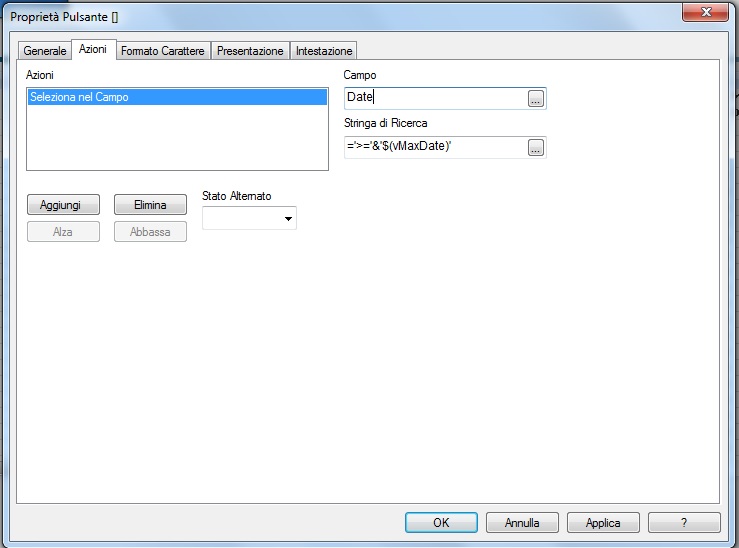
Can you help me?
Tks
- « Previous Replies
-
- 1
- 2
- Next Replies »

 sunny_talwar
- Mark as New
- Bookmark
- Subscribe
- Mute
- Subscribe to RSS Feed
- Permalink
- Report Inappropriate Content
I guess you are saying that this works
='>='&'$(vMaxDate)'
but this doesn't
='='&'$(vMaxDate)'
Is that right?
Try this may be
=$(vMaxDate)
canmarroig
- Mark as New
- Bookmark
- Subscribe
- Mute
- Subscribe to RSS Feed
- Permalink
- Report Inappropriate Content
No i've tried:
=$(vMaxDate)
also
vMaxDate
and since my variabile is a numeric value i've also tried =date(vMaxDate), not at all.
Why with '>=' it's ok?
sunny_talwar
- Mark as New
- Bookmark
- Subscribe
- Mute
- Subscribe to RSS Feed
- Permalink
- Report Inappropriate Content
Do you have a timestamp by chance? or is it 100% a date field?
canmarroig
- Mark as New
- Bookmark
- Subscribe
- Mute
- Subscribe to RSS Feed
- Permalink
- Report Inappropriate Content
No timestamp
sunny_talwar
- Mark as New
- Bookmark
- Subscribe
- Mute
- Subscribe to RSS Feed
- Permalink
- Report Inappropriate Content
Would you be able to share a sample to check what you might be doing incorrectly?
 patrickanderson
- Mark as New
- Bookmark
- Subscribe
- Mute
- Subscribe to RSS Feed
- Permalink
- Report Inappropriate Content
I would just try ='$(vMaxDate)'
canmarroig
- Mark as New
- Bookmark
- Subscribe
- Mute
- Subscribe to RSS Feed
- Permalink
- Report Inappropriate Content
I've tried also this syntax but i've still problem

 antoniotiman
- Mark as New
- Bookmark
- Subscribe
- Mute
- Subscribe to RSS Feed
- Permalink
- Report Inappropriate Content
Hi Anna,
assuming
vMaxData =Max(DateField)
have You tried
=vMaxData
 BalaBhaskar_Qli
- Mark as New
- Bookmark
- Subscribe
- Mute
- Subscribe to RSS Feed
- Permalink
- Report Inappropriate Content
Try:
='>=' & $(vMaxDate)
='=' & $(vMaxDate)

- « Previous Replies
-
- 1
- 2
- Next Replies »