Unlock a world of possibilities! Login now and discover the exclusive benefits awaiting you.

- Qlik Community
- :
- All Forums
- :
- QlikView
- :
- Adhoc report
Options
- Subscribe to RSS Feed
- Mark Topic as New
- Mark Topic as Read
- Float this Topic for Current User
- Bookmark
- Subscribe
- Mute
- Printer Friendly Page
Turn on suggestions
Auto-suggest helps you quickly narrow down your search results by suggesting possible matches as you type.
Showing results for

Not applicable
2014-10-16
02:27 AM
- Mark as New
- Bookmark
- Subscribe
- Mute
- Subscribe to RSS Feed
- Permalink
- Report Inappropriate Content
Adhoc report
Hi all
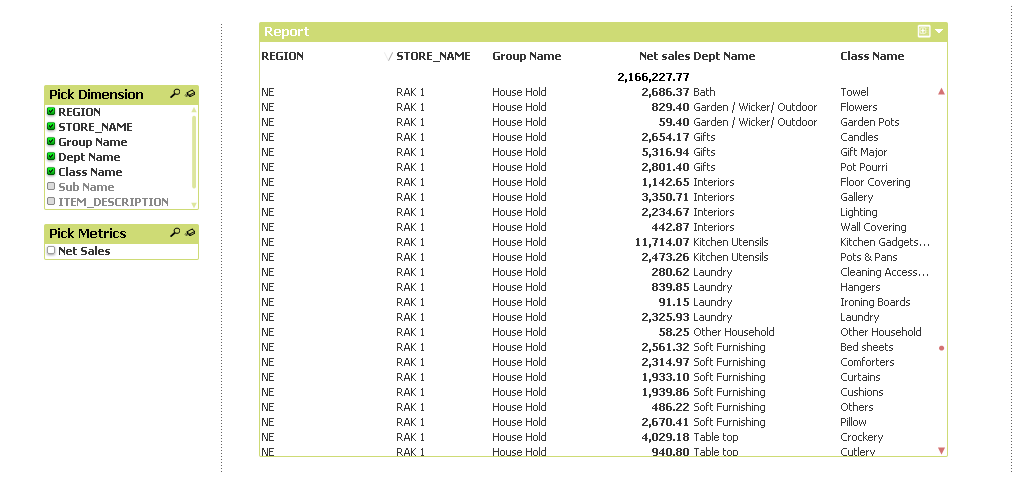
I have an Adhoc report with 7 dimension and 3 metrics. I am using Straight table, in fast change i have given Pivot.
My problem is when I select more than 3 dimension my metric column is coming in middle not coming in last. The problem only in straight table. Its working fine in pivot table.
935 Views
1 Solution
Accepted Solutions

 alexandros17
Partner - Champion III
2014-10-16
02:32 AM
- Mark as New
- Bookmark
- Subscribe
- Mute
- Subscribe to RSS Feed
- Permalink
- Report Inappropriate Content
Simply Drag the metric column to the right and save the document.
Let me know
2 Replies
alexandros17
Partner - Champion III
2014-10-16
02:32 AM
- Mark as New
- Bookmark
- Subscribe
- Mute
- Subscribe to RSS Feed
- Permalink
- Report Inappropriate Content
Simply Drag the metric column to the right and save the document.
Let me know
Not applicable
2014-10-16
02:49 AM
Author
- Mark as New
- Bookmark
- Subscribe
- Mute
- Subscribe to RSS Feed
- Permalink
- Report Inappropriate Content
Its working fine..
looks its so simple I was spending hours for this..
Thank you so much
797 Views