Unlock a world of possibilities! Login now and discover the exclusive benefits awaiting you.

- Qlik Community
- :
- All Forums
- :
- QlikView
- :
- Background colour using expression
- Subscribe to RSS Feed
- Mark Topic as New
- Mark Topic as Read
- Float this Topic for Current User
- Bookmark
- Subscribe
- Mute
- Printer Friendly Page

 ahmar811
- Mark as New
- Bookmark
- Subscribe
- Mute
- Subscribe to RSS Feed
- Permalink
- Report Inappropriate Content
Background colour using expression
Hi All
I have pivot table with three dimension (Model, Month-Year, Product).I have a requirement to change the background colour using expression like
if(Model='PERSONAL CATEOGRY', OR Model='COMMERCIAL CATEGORY' OR Model='NOT MAINTAINED' OR Model='Total',RGB(163,245,268))
It works fine,but when I arrange my dimension in horizontal direction the above expression doesn't work.
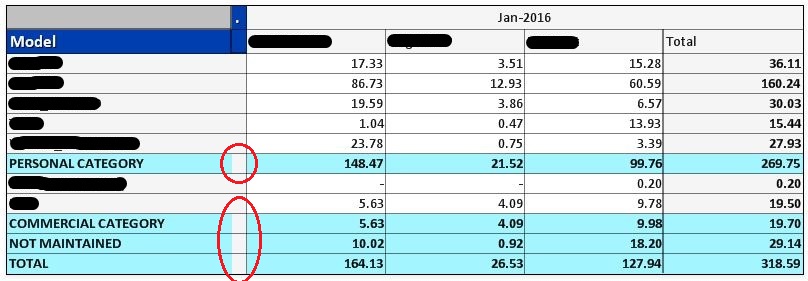
Please refer above screenshot.
Kindly suggest some solution
Thanks & Regards
Ahmar Ansari
Accepted Solutions
ahmar811
- Mark as New
- Bookmark
- Subscribe
- Mute
- Subscribe to RSS Feed
- Permalink
- Report Inappropriate Content
Thank you all
I got my solution by using macro which is
sub HideColumn
Call HideSubFunction("CH04",2)
end sub
private sub HideSubFunction(ch,n)
set ch=ActiveDocument.GetSheetObject(ch)
ch.SetPixWidh (n-1),0
end sub
Thanks & Regards
Ahmar Ansari

 robert_mika
- Mark as New
- Bookmark
- Subscribe
- Mute
- Subscribe to RSS Feed
- Permalink
- Report Inappropriate Content
maybe this will help
The second dimension... or how to use secondarydimensionality()
ahmar811
- Mark as New
- Bookmark
- Subscribe
- Mute
- Subscribe to RSS Feed
- Permalink
- Report Inappropriate Content

 marcus_sommer
- Mark as New
- Bookmark
- Subscribe
- Mute
- Subscribe to RSS Feed
- Permalink
- Report Inappropriate Content
I think there would be rather no way to access these header-column which is a kind of a help-column only to show the horizontal dimension. As a workaround you could use a second (dummy) expression maybe = '' and adjust the column-width to as small as possible (with a macro it could be nearly unvisible).
sub SetColumnWidth
set chart = ActiveDocument.GetSheetObject("CH17")
chart.SetPixWidth 3, 0
end sub
- Marcus
 dinuwanbr
- Mark as New
- Bookmark
- Subscribe
- Mute
- Subscribe to RSS Feed
- Permalink
- Report Inappropriate Content
Hi,
Are you able to upload a sample?
Rgds,
Dinu1
ahmar811
- Mark as New
- Bookmark
- Subscribe
- Mute
- Subscribe to RSS Feed
- Permalink
- Report Inappropriate Content
Thank you all
I got my solution by using macro which is
sub HideColumn
Call HideSubFunction("CH04",2)
end sub
private sub HideSubFunction(ch,n)
set ch=ActiveDocument.GetSheetObject(ch)
ch.SetPixWidh (n-1),0
end sub
Thanks & Regards
Ahmar Ansari
