Unlock a world of possibilities! Login now and discover the exclusive benefits awaiting you.

- Qlik Community
- :
- All Forums
- :
- QlikView
- :
- Re: Bar chart
- Subscribe to RSS Feed
- Mark Topic as New
- Mark Topic as Read
- Float this Topic for Current User
- Bookmark
- Subscribe
- Mute
- Printer Friendly Page

- Mark as New
- Bookmark
- Subscribe
- Mute
- Subscribe to RSS Feed
- Permalink
- Report Inappropriate Content
Bar chart
Guys,
I have the data as shown below,
| Field | Customer | ID |
|---|---|---|
| A | C1 | 1 |
| B | C2 | 2 |
| C | C1 | 3 |
| D | C2 | 1 |
Expected Output:
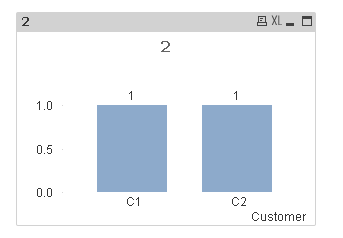
I want the no. of Fields which has same IDs. Both fields have same IDs but from different customers in the above bar chart.
Accepted Solutions

 vinieme12
- Mark as New
- Bookmark
- Subscribe
- Mute
- Subscribe to RSS Feed
- Permalink
- Report Inappropriate Content
try below
sum(AGGR(if(Count({<Customer>}DISTINCT TOTAL <ID> Customer)>1,1,0),Field,Customer,ID))
To understand how its working do the below
Use ID as Dimension and below expression to count how many times the ID field is Repeated for different customer
=Count({<Customer>}DISTINCT TOTAL Customer)
So using
Count({<Customer>}DISTINCT TOTAL <ID> Customer)>1 << gives us the same view by ID field
If a post helps to resolve your issue, please accept it as a Solution.
vinieme12
- Mark as New
- Bookmark
- Subscribe
- Mute
- Subscribe to RSS Feed
- Permalink
- Report Inappropriate Content
sum(AGGR(if(Count(DISTINCT TOTAL <ID> Customer)>1,1,0),Customer,ID))
If a post helps to resolve your issue, please accept it as a Solution.
vinieme12
- Mark as New
- Bookmark
- Subscribe
- Mute
- Subscribe to RSS Feed
- Permalink
- Report Inappropriate Content
Also you have close your earlier Thread!!
Qlik Community Tip: Marking Replies as Correct or Helpful
If a post helps to resolve your issue, please accept it as a Solution.
- Mark as New
- Bookmark
- Subscribe
- Mute
- Subscribe to RSS Feed
- Permalink
- Report Inappropriate Content
Thanks Vineeth, It's working.. but when I make a selection in Customer, there is no value in the chart. Could you please explain this expression in detail?
I couldn't understand it.
vinieme12
- Mark as New
- Bookmark
- Subscribe
- Mute
- Subscribe to RSS Feed
- Permalink
- Report Inappropriate Content
try below
sum(AGGR(if(Count({<Customer>}DISTINCT TOTAL <ID> Customer)>1,1,0),Field,Customer,ID))
To understand how its working do the below
Use ID as Dimension and below expression to count how many times the ID field is Repeated for different customer
=Count({<Customer>}DISTINCT TOTAL Customer)
So using
Count({<Customer>}DISTINCT TOTAL <ID> Customer)>1 << gives us the same view by ID field
If a post helps to resolve your issue, please accept it as a Solution.
- Mark as New
- Bookmark
- Subscribe
- Mute
- Subscribe to RSS Feed
- Permalink
- Report Inappropriate Content
Thank you so much Vineeth. But I have one more doubt on this.
Assume instead of using this expression in charts directly (in run time), I store this expression in the script using SET or LET function in a variable.
Now could you tell me which method will take loading issues in the front end from below,
1. Writing expressions in the charts directly - first data will be fetched into the model and then the expression will be processed.
2. Store those expressions in the script using SET or LET functions - Expressions are processed and will be stored in memory.
please say which method is preferable and also please intimate whether above mentioned 2 points are correct.
- Mark as New
- Bookmark
- Subscribe
- Mute
- Subscribe to RSS Feed
- Permalink
- Report Inappropriate Content
Also Vineeth, I need to know whether this expression can be done as a dimension by script wise rather than an expression.