Unlock a world of possibilities! Login now and discover the exclusive benefits awaiting you.

- Qlik Community
- :
- All Forums
- :
- QlikView
- :
- Re: Between value Selection (<= and >=)
- Subscribe to RSS Feed
- Mark Topic as New
- Mark Topic as Read
- Float this Topic for Current User
- Bookmark
- Subscribe
- Mute
- Printer Friendly Page

 settu_periasamy
- Mark as New
- Bookmark
- Subscribe
- Mute
- Subscribe to RSS Feed
- Permalink
- Report Inappropriate Content
Between value Selection (<= and >=)
Hi All,
This is regarding the between value for the data. when i give the condition using the Advanced search, it's selected the extra data.
find the below screen shot and sample data. In the below screen shot i given the condition between >=70002014000 <=70002014014. But in the BDN field, it's selected till 70002014017.
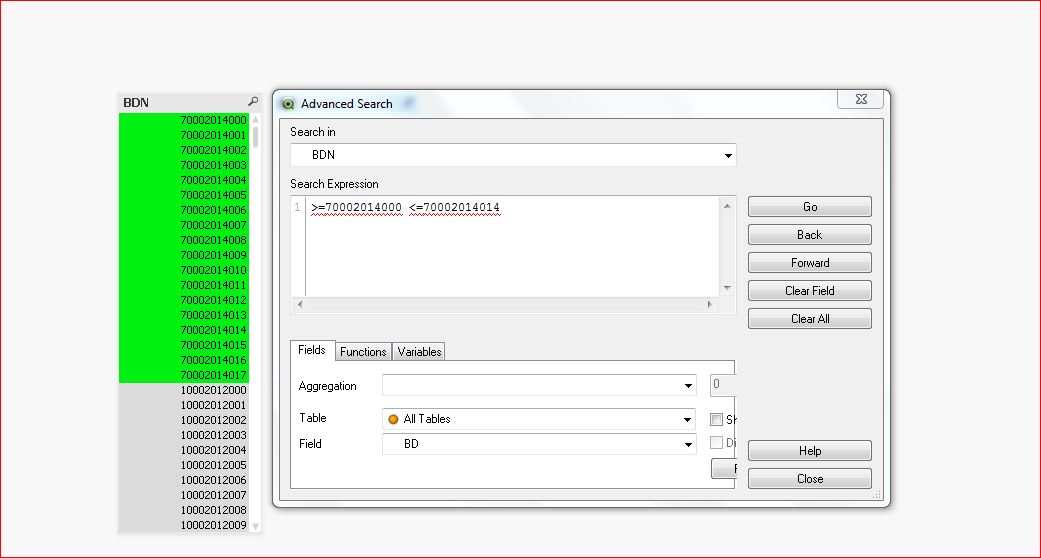
find the below sample data.
settu_periasamy
- Mark as New
- Bookmark
- Subscribe
- Mute
- Subscribe to RSS Feed
- Permalink
- Report Inappropriate Content
Hi Av7eN,
When i clicked the button Range Selection, i get the data like below (Note: i dont change anything in your data, just i clicked the range selection button.
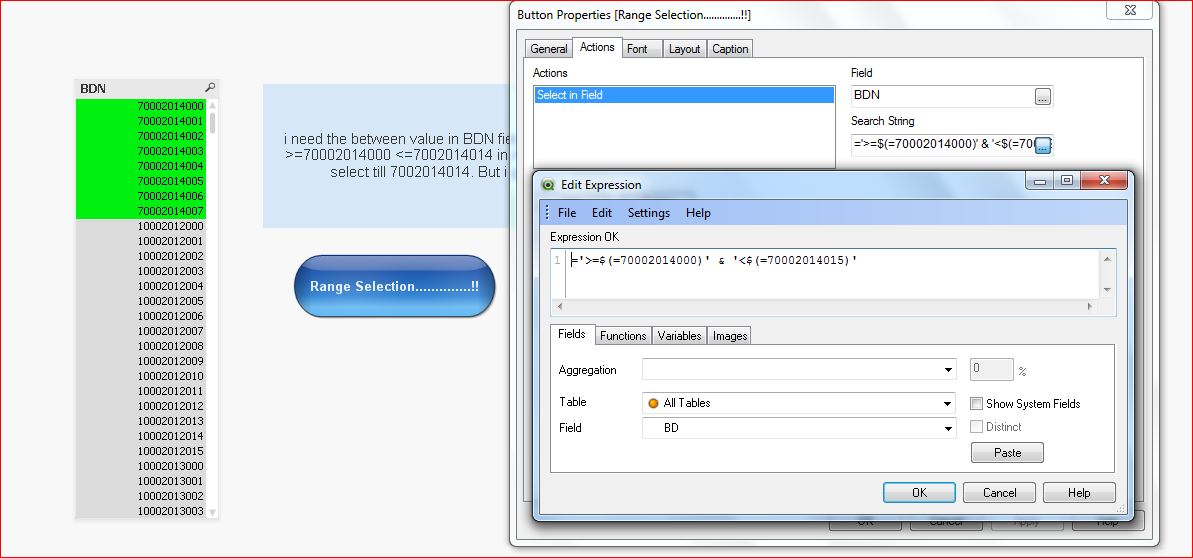
i think, it is happen, only for me.
settu_periasamy
- Mark as New
- Bookmark
- Subscribe
- Mute
- Subscribe to RSS Feed
- Permalink
- Report Inappropriate Content
this is not working manoj...

 aveeeeeee7en
- Mark as New
- Bookmark
- Subscribe
- Mute
- Subscribe to RSS Feed
- Permalink
- Report Inappropriate Content
It is working fine for me.
settu_periasamy
- Mark as New
- Bookmark
- Subscribe
- Mute
- Subscribe to RSS Feed
- Permalink
- Report Inappropriate Content
Do i need to do any setting change in document properties or user prefrence?
settu_periasamy
- Mark as New
- Bookmark
- Subscribe
- Mute
- Subscribe to RSS Feed
- Permalink
- Report Inappropriate Content
i tried daniel. But still it is not working for me. is there any setting for like integer, double like that?
 danieloberbilli
- Mark as New
- Bookmark
- Subscribe
- Mute
- Subscribe to RSS Feed
- Permalink
- Report Inappropriate Content
are you using the exact same file that you uploaded? If not - maybe you have another currently active selection(maybe by a trigger that is not obvious for you?)
aveeeeeee7en
- Mark as New
- Bookmark
- Subscribe
- Mute
- Subscribe to RSS Feed
- Permalink
- Report Inappropriate Content
PFA.
Please share the full Qlikview screen snapshot with me after doing Clear All and Selecting Range Selection Button.
Regards
Av7eN
settu_periasamy
- Mark as New
- Bookmark
- Subscribe
- Mute
- Subscribe to RSS Feed
- Permalink
- Report Inappropriate Content
Hi ,
Please find the below screen shot. and Can you tell me your version of QV. Mine is v11.00
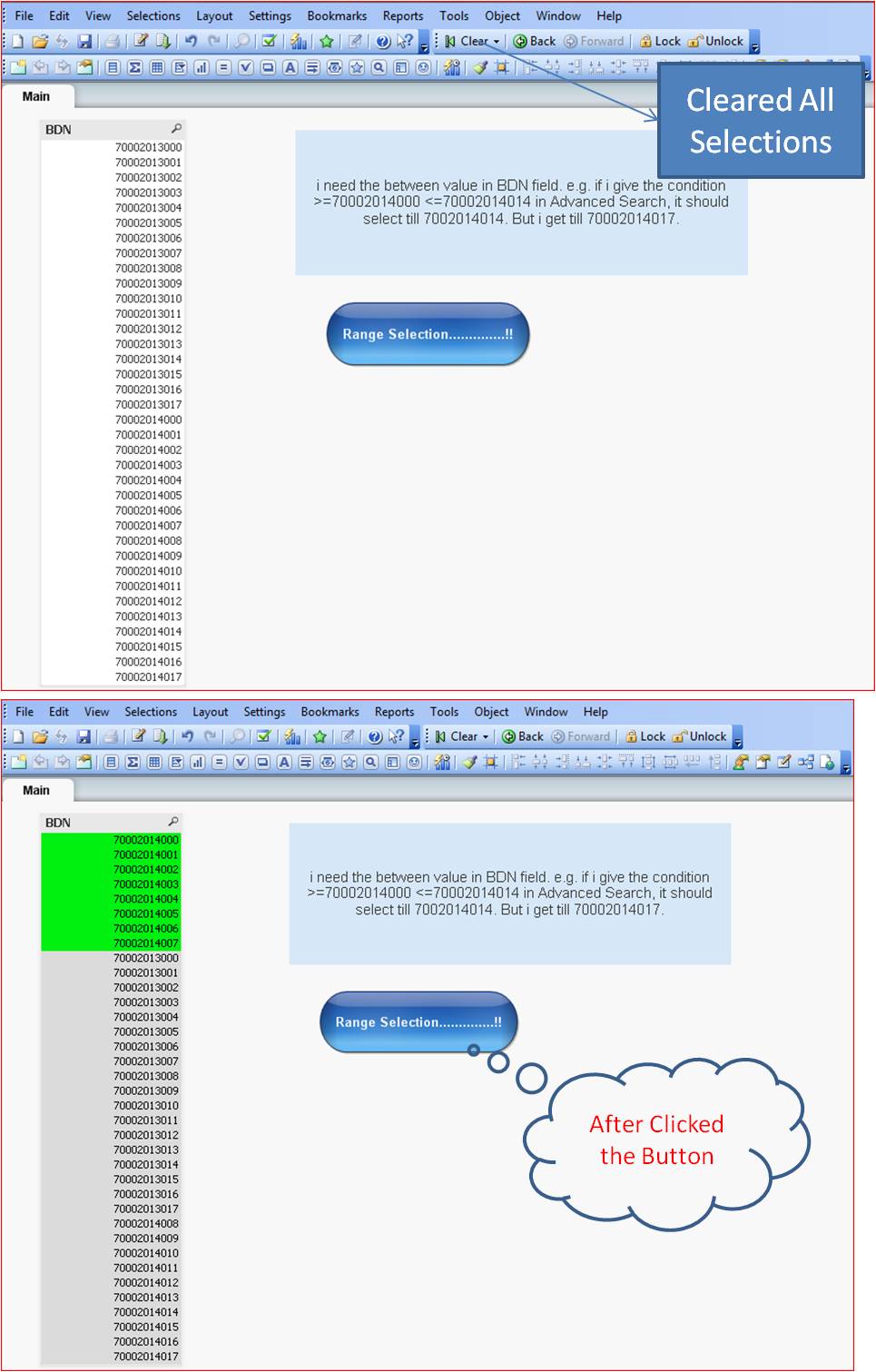
settu_periasamy
- Mark as New
- Bookmark
- Subscribe
- Mute
- Subscribe to RSS Feed
- Permalink
- Report Inappropriate Content
Yes Daniel, There is two fields only. First i cleared all then i tried. And This is not working for my collegues too..;
========================= QlikView Info ==========================
Client Build Number 11.00.11282.0409
Server Build Number -
QlikTech Product QlikView 64-bit Edition (x64)
License Key [Leased license]
PE Recoveries Remaining 2
CPU Target x64
aveeeeeee7en
- Mark as New
- Bookmark
- Subscribe
- Mute
- Subscribe to RSS Feed
- Permalink
- Report Inappropriate Content
That's a Strange behavior.
I am using 11.20 SR6
