Unlock a world of possibilities! Login now and discover the exclusive benefits awaiting you.

- Qlik Community
- :
- All Forums
- :
- QlikView
- :
- Re: Bookmarks disappear after application reload
- Subscribe to RSS Feed
- Mark Topic as New
- Mark Topic as Read
- Float this Topic for Current User
- Bookmark
- Subscribe
- Mute
- Printer Friendly Page

- Mark as New
- Bookmark
- Subscribe
- Mute
- Subscribe to RSS Feed
- Permalink
- Report Inappropriate Content
Bookmarks disappear after application reload
Hello,
I have encountered the following problem : User creates bookmarks on access point (Ajax), and is able to use them througout the day, however, the following morning after the application had been reloaded all the bookmarks disappear. I am not sure why this is happening.
Thank you in advance for your help ,
Olga
- « Previous Replies
-
- 1
- 2
- Next Replies »
Accepted Solutions
- Mark as New
- Bookmark
- Subscribe
- Mute
- Subscribe to RSS Feed
- Permalink
- Report Inappropriate Content
Hi Simon,
Sorry for the late reply. Our problem was not Qlikview related at the end. Someone created a batch process that copied all the .shared file to another directory overnight. The old files were deleted, and every morning Qlikview was creating new ones...
Olga

 salto
salto
- Mark as New
- Bookmark
- Subscribe
- Mute
- Subscribe to RSS Feed
- Permalink
- Report Inappropriate Content
Hi,
in the QMC, go to Documents -> User documents and check "Allow Creation of Server Objects" and assign the permission to the users you need.
Hth.
- Mark as New
- Bookmark
- Subscribe
- Mute
- Subscribe to RSS Feed
- Permalink
- Report Inappropriate Content
Hi, SALTO!
Thanks for your prompt reply! "Allow Creation of Server Objects" is already checked with an option 'All authenticated users'. I can see a few bookmarks/objects created by different users, none of them belong to the user in question.
Any ideas? 
salto
- Mark as New
- Bookmark
- Subscribe
- Mute
- Subscribe to RSS Feed
- Permalink
- Report Inappropriate Content
Hello Olga,
the issue is happening only with a particular user?
- Mark as New
- Bookmark
- Subscribe
- Mute
- Subscribe to RSS Feed
- Permalink
- Report Inappropriate Content
Seems to be the case for this particular user.
Thank you!
Olga
salto
- Mark as New
- Bookmark
- Subscribe
- Mute
- Subscribe to RSS Feed
- Permalink
- Report Inappropriate Content
Hello Olga,
honestly, I do not know what can be happening in this case. Sorry for not being of much help.
- Mark as New
- Bookmark
- Subscribe
- Mute
- Subscribe to RSS Feed
- Permalink
- Report Inappropriate Content
In fact, it's for all the users. I have created a bookmark with my account yesterday and it was no longer there this morning. I wonder if this has something to do with the fact that the services are being restarted at night ...
salto
- Mark as New
- Bookmark
- Subscribe
- Mute
- Subscribe to RSS Feed
- Permalink
- Report Inappropriate Content
Hi Olga,
we do restart the server periodically and the server objects remain (bookmarks, etc...). You could try not restarting it once and then check but I think that is not the issue.
To use server Objects objects you need the Enterprise Edition license in your Server.
.- first check that the document allows server objects in the Settings menu, Document properties, Server, Allow Server Objects,
Check Pages 179, 180 and 181 of the Reference Manual (v. 10), and make sure that these settings are enabled on your document and server:
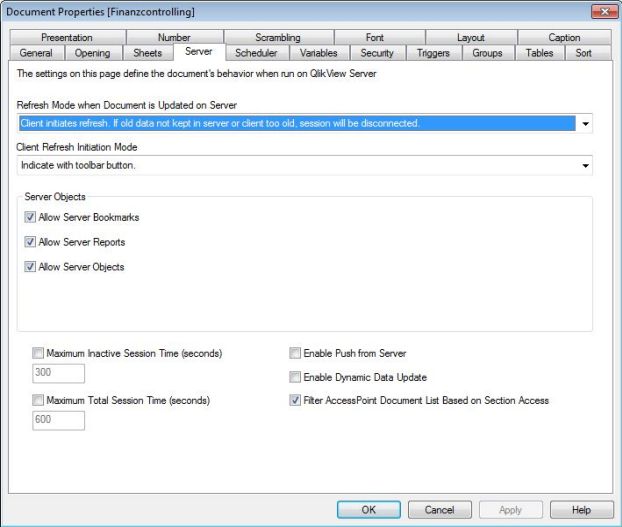
Allow Server Bookmarks
This check box must be enabled, if remote clients are to be allowed to create and share bookmarks with
this document on the QlikView Server.
Hope this helps.
- Mark as New
- Bookmark
- Subscribe
- Mute
- Subscribe to RSS Feed
- Permalink
- Report Inappropriate Content
Thanks a lot for your help, SALTO! I have checked - all the setting in both QMC and Document itself allow for creation of server objects/bookmarks. I guess I'll keep digging

 simon_minifie
- Mark as New
- Bookmark
- Subscribe
- Mute
- Subscribe to RSS Feed
- Permalink
- Report Inappropriate Content
Hi Olga,
Did you manage to get to the bottom of this one? Am seeing a similar behaviour in V11.2
Thanks,
Simon
- « Previous Replies
-
- 1
- 2
- Next Replies »