Unlock a world of possibilities! Login now and discover the exclusive benefits awaiting you.

- Qlik Community
- :
- All Forums
- :
- QlikView
- :
- Re: Conditional color for pivot table
- Subscribe to RSS Feed
- Mark Topic as New
- Mark Topic as Read
- Float this Topic for Current User
- Bookmark
- Subscribe
- Mute
- Printer Friendly Page

- Mark as New
- Bookmark
- Subscribe
- Mute
- Subscribe to RSS Feed
- Permalink
- Report Inappropriate Content
Conditional color for pivot table
Hello,
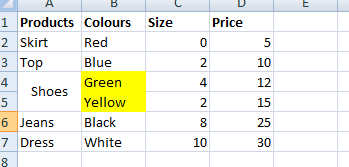
I would like some help with an expression to get conditional color for my pivot table. If one of the products appears twice in this case "Shoes" then i would like the colors "green and yellow ' to be highlighted in yellow.

Kind regards,
Esther
Accepted Solutions

 antoniotiman
- Mark as New
- Bookmark
- Subscribe
- Mute
- Subscribe to RSS Feed
- Permalink
- Report Inappropriate Content
May be
=If(Count(TOTAL <Products> Colours) > 1,Yellow())
in Conditional Color.
Regards,
Antonio
antoniotiman
- Mark as New
- Bookmark
- Subscribe
- Mute
- Subscribe to RSS Feed
- Permalink
- Report Inappropriate Content
May be
=If(Count(TOTAL <Products> Colours) > 1,Yellow())
in Conditional Color.
Regards,
Antonio
 devarasu07
- Mark as New
- Bookmark
- Subscribe
- Mute
- Subscribe to RSS Feed
- Permalink
- Report Inappropriate Content
Hi,
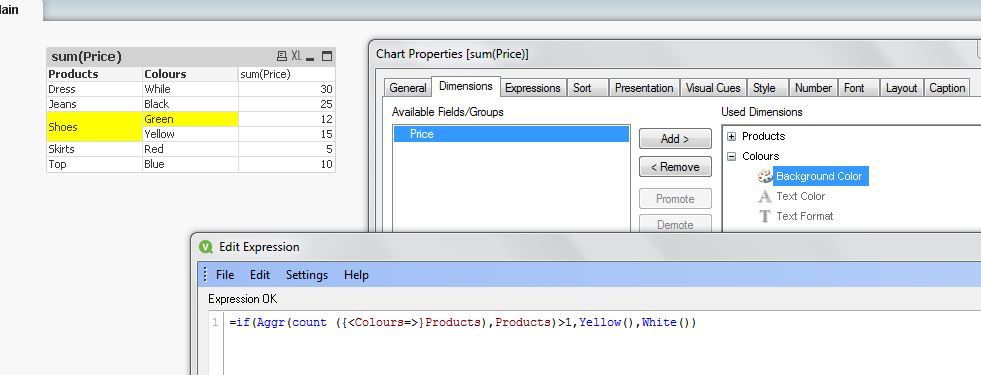
try like this.
=if(Aggr(count ({<Colours=>}Products),Products)>1,Yellow(),White())
- Mark as New
- Bookmark
- Subscribe
- Mute
- Subscribe to RSS Feed
- Permalink
- Report Inappropriate Content
Sorry I was not clear, my desired outcome is below.

 sunny_talwar
- Mark as New
- Bookmark
- Subscribe
- Mute
- Subscribe to RSS Feed
- Permalink
- Report Inappropriate Content
A little modification to Antonio's expression should work for you
=Aggr(If(Count(DISTINCT TOTAL <Products> Colours) > 1,Yellow()), Products, Colours)
Or this
Aggr(If(Count(DISTINCT Colours) > 1, Yellow()), Products)
sunny_talwar
- Mark as New
- Bookmark
- Subscribe
- Mute
- Subscribe to RSS Feed
- Permalink
- Report Inappropriate Content
A little modification to antoniotiman's expression should work for you
=Aggr(If(Count(DISTINCT TOTAL <Products> Colours) > 1,Yellow()), Products, Colours)
- Mark as New
- Bookmark
- Subscribe
- Mute
- Subscribe to RSS Feed
- Permalink
- Report Inappropriate Content
Thank you, it works 
- Mark as New
- Bookmark
- Subscribe
- Mute
- Subscribe to RSS Feed
- Permalink
- Report Inappropriate Content
Thanks