Unlock a world of possibilities! Login now and discover the exclusive benefits awaiting you.

- Qlik Community
- :
- All Forums
- :
- QlikView
- :
- Connected server OK, negotiations timed out Switch...
- Subscribe to RSS Feed
- Mark Topic as New
- Mark Topic as Read
- Float this Topic for Current User
- Bookmark
- Subscribe
- Mute
- Printer Friendly Page

- Mark as New
- Bookmark
- Subscribe
- Mute
- Subscribe to RSS Feed
- Permalink
- Report Inappropriate Content
Connected server OK, negotiations timed out Switching to HTTP tunneling Connected to server OK, No reply received.
Hi Forum
Sometimes the users obtain this message:
Connected server OK, negotiations timed out Switching to HTTP tunneling Connected to server OK, No reply received.
- The service is OK (Qlikview Server).
- The users have license.
- The port 4747 is open. (Client and server)
- Windows Firewall is disabled.
Thanks for your answers !!!

 partenope
- Mark as New
- Bookmark
- Subscribe
- Mute
- Subscribe to RSS Feed
- Permalink
- Report Inappropriate Content
hi plazas,
I see that I'm not alone!
I have the same problem, and I don't know what I can do...
In my case, only the customer PC doesn't work, but the Tunneling test page works!
If I try from my PC, closing all firewall ports and opening only 80 and 7777 (tunneling) in my network, the tunneling works good and the QlikView document works in the IE PlugIn.
In the customer network the same ports are opened, but the document doesn't work and appear the error message!
The configuration is:
- QlikServer 8.50 on a remote Server with IIS, Tunneling activate and Reverse Proxy configured to accept QlikView connections
- IE PlugIn 9.0 on my PC, only 80 and 7777 ports opened and Tunneling test page OK
- IE PlugIn 8.50 on cuspomer's PC, only 80 and 7777 ports opened and Tunneling test page OK
Anyone have some ideas?
Thanx!
- Mark as New
- Bookmark
- Subscribe
- Mute
- Subscribe to RSS Feed
- Permalink
- Report Inappropriate Content
Hi Dario We have realized some changes. We had Qlikviewserver 8.5. Now We have migrated to 9.0 And We had synchronize problems with server hour and clients. This issue have resolved (synchronize). It (Connected server OK, negotiations timed out Switching to HTTP ) cuold be a network problem.
Regards;
- Mark as New
- Bookmark
- Subscribe
- Mute
- Subscribe to RSS Feed
- Permalink
- Report Inappropriate Content
We had the same problem. The problem was that we have two internet links. Depending on the provider, the request gone in one link and returns in the other one. A rule was created and the problem was solved.
- Mark as New
- Bookmark
- Subscribe
- Mute
- Subscribe to RSS Feed
- Permalink
- Report Inappropriate Content
We are experiencing the same problem. Our QlikView installed base is still small. Until recently, all run. Now, when we open the QlikView in our machines and "open in server", "QVP😕/pd-bi-rj", the same PLAZAS error is raised: "Connected server OK, Negotiations timed out Switching to HTTP tunneling Connected to server OK, No reply received." This post is still as "Not Answered". Please, if someone found a solution, share.
Thank you,
Carlos.
- Mark as New
- Bookmark
- Subscribe
- Mute
- Subscribe to RSS Feed
- Permalink
- Report Inappropriate Content
On the server, the log (Events_xxx.log):
4 700 Information Session stop reason: can't authenticate
In "Enterprise Management Console", "System", "Directory Services Connectors", "Active Directory", the Path is ok (not changed) and the username/password is working fine.
All ports is open in my LAN. "telnet server 4747" works.
What is my problem?
Any clue?
- Mark as New
- Bookmark
- Subscribe
- Mute
- Subscribe to RSS Feed
- Permalink
- Report Inappropriate Content
Well... searching, searching, searching... I found the solution for my problem:
Posting here to (perhaps) help someone else:
connect as:
qvp://domain\user@server
- Mark as New
- Bookmark
- Subscribe
- Mute
- Subscribe to RSS Feed
- Permalink
- Report Inappropriate Content
We had the same problem. The problem was that the Windows Client and the Server had different DNS-Settings.
- Mark as New
- Bookmark
- Subscribe
- Mute
- Subscribe to RSS Feed
- Permalink
- Report Inappropriate Content
you should change your ip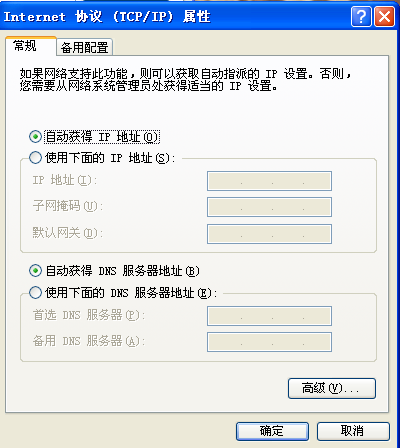
- Mark as New
- Bookmark
- Subscribe
- Mute
- Subscribe to RSS Feed
- Permalink
- Report Inappropriate Content
Una cortita: una de las cosas por la que no se conectaba al server desde Qlikview Desktop era porque IE estaba en modo Trabajar sin conexiòn, aunque no estaba ejecutado...raro no?
Saludos,

 michaelfreitas
- Mark as New
- Bookmark
- Subscribe
- Mute
- Subscribe to RSS Feed
- Permalink
- Report Inappropriate Content
One thing that I did when it happened to me: the problem is related to the user.
On two occasions I went through this problem, to authenticate the license of QlikView Developer, version 11, using the license server:
1: I was missing the password.
2: The user I was using was not in the same domain or the same group as the server. Solution: You can use the tip from our friend Carlos Antabi (QVP 😕 / domain \ user @ server) or add the user to the same domain or the same group as the server.
You can also check other things related to user, eg if the password has not expired or the user is locked.
Regards, 