Unlock a world of possibilities! Login now and discover the exclusive benefits awaiting you.

- Qlik Community
- :
- All Forums
- :
- QlikView
- :
- Re: Cost Allocation
- Subscribe to RSS Feed
- Mark Topic as New
- Mark Topic as Read
- Float this Topic for Current User
- Bookmark
- Subscribe
- Mute
- Printer Friendly Page

 colliers_sn
- Mark as New
- Bookmark
- Subscribe
- Mute
- Subscribe to RSS Feed
- Permalink
- Report Inappropriate Content
Cost Allocation
Hello,
Hope I can get some assistance with putting together a solution to allocate my costs. Ideally on the script side.
I have costs that I receive monthly that I want to allocate out to various departments based on their headcount. Sample data below.
Expenses:
| Expense Type | Amount |
|---|---|
| Telecom | 5000 |
| Network services | 8000 |
Headcount:
| Dept | Headcount |
|---|---|
| Dept 1 | 20 |
| Dept 2 | 30 |
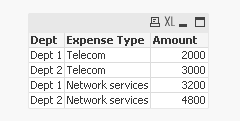
The goal is to get this result.
Alocated Expenses:
| Dept | Expense Type | Amount |
|---|---|---|
| Dept 1 | Telecom | 2000 |
| Dept 1 | Network Services | 3200 |
| Dept 2 | Telecom | 3000 |
| Dept 2 | Network Services | 4800 |
Any ideas would great be appreciated.
Accepted Solutions

 sunny_talwar
- Mark as New
- Bookmark
- Subscribe
- Mute
- Subscribe to RSS Feed
- Permalink
- Report Inappropriate Content
Try this:
HeadCount:
LOAD Dept,
Headcount
FROM
[https://community.qlik.com/thread/216883]
(html, codepage is 1252, embedded labels, table is @2);
Join(HeadCount)
LOAD Sum(Headcount) as Total
Resident HeadCount;
Join(HeadCount)
LOAD [Expense Type],
Amount
FROM
[https://community.qlik.com/thread/216883]
(html, codepage is 1252, embedded labels, table is @1);
FinalTable:
LOAD Dept,
[Expense Type],
Amount * Headcount/Total as Amount
Resident HeadCount;
DROP Table HeadCount;
sunny_talwar
- Mark as New
- Bookmark
- Subscribe
- Mute
- Subscribe to RSS Feed
- Permalink
- Report Inappropriate Content
Try this:
HeadCount:
LOAD Dept,
Headcount
FROM
[https://community.qlik.com/thread/216883]
(html, codepage is 1252, embedded labels, table is @2);
Join(HeadCount)
LOAD Sum(Headcount) as Total
Resident HeadCount;
Join(HeadCount)
LOAD [Expense Type],
Amount
FROM
[https://community.qlik.com/thread/216883]
(html, codepage is 1252, embedded labels, table is @1);
FinalTable:
LOAD Dept,
[Expense Type],
Amount * Headcount/Total as Amount
Resident HeadCount;
DROP Table HeadCount;
colliers_sn
- Mark as New
- Bookmark
- Subscribe
- Mute
- Subscribe to RSS Feed
- Permalink
- Report Inappropriate Content
Hey Sonny....that worked perfectly...thanks so much.
sunny_talwar
- Mark as New
- Bookmark
- Subscribe
- Mute
- Subscribe to RSS Feed
- Permalink
- Report Inappropriate Content
Great 
If you got what you were looking for, please close the thread by marking the correct answer
