Unlock a world of possibilities! Login now and discover the exclusive benefits awaiting you.

- Qlik Community
- :
- All Forums
- :
- QlikView
- :
- Re: Create a new field joining two dates
- Subscribe to RSS Feed
- Mark Topic as New
- Mark Topic as Read
- Float this Topic for Current User
- Bookmark
- Subscribe
- Mute
- Printer Friendly Page

- Mark as New
- Bookmark
- Subscribe
- Mute
- Subscribe to RSS Feed
- Permalink
- Report Inappropriate Content
Create a new field joining two dates
Hello
I have the following case:
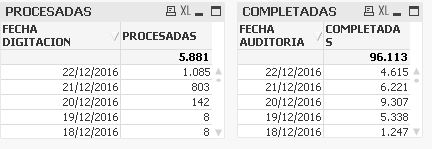
I need a new field, for example: FECHA PDN in order to create a table wich must have the sum of the FECHA DIGITACIÓN and FECHA AUDITORIA as a result. In this case, if we want to know the result of 22/12/2016 would be 5.700 (1.085+ 4.615).
Thank you very much for your comments and time.
P:D I have a personal edition license, so I can not open any .qvw you could send to me.
Accepted Solutions

 vinieme12
- Mark as New
- Bookmark
- Subscribe
- Mute
- Subscribe to RSS Feed
- Permalink
- Report Inappropriate Content
using your sample
Dimension = DateIS
Expression = sum({<DateType = {'AUDIT','DIGI'}>}Processed)
/////////////////////////////// SCRIPT //////////////////////////////////////////////////////////////////////////////
FACT:
LOAD NUMERORADICADO,
REGIONAL,
[FECHA RADICACION],
[ESTADO CM],
[FECHA AUDITORIA],
[FECHA INGRESO RADICACION],
[FECHA DIGITACION],
FASE,
[ESTADO GENERAL],
[PERIODO ACTUAL?],
LOTE,
CUMPLIMIENTO,
[PRESENTA PRECINTO?],
rand()*10 as Processed,
rand()*9 as completed
FROM
(
MasterCalendar:
LOAD NUMERORADICADO,
[FECHA AUDITORIA] as DateIS,
'AUDIT' as DateType,
Year([FECHA AUDITORIA]) as YearIS,
Month([FECHA AUDITORIA]) as MonthIS
Resident FACT;
Concatenate
LOAD NUMERORADICADO,
[FECHA DIGITACION] as DateIS,
'DIGI' as DateType,
Year([FECHA DIGITACION]) as YearIS,
Month([FECHA DIGITACION]) as MonthIS
Resident FACT;
///////////////////////////////End of SCRIPT //////////////////////////////////////////////////////////////////////////////
Read these posts
Search Recipes | Qlikview Cookbook
Tutorial - Using Common Date Dimensions and Shared Calendars
If a post helps to resolve your issue, please accept it as a Solution.

 sunny_talwar
- Mark as New
- Bookmark
- Subscribe
- Mute
- Subscribe to RSS Feed
- Permalink
- Report Inappropriate Content
This is what you need
- Mark as New
- Bookmark
- Subscribe
- Mute
- Subscribe to RSS Feed
- Permalink
- Report Inappropriate Content
Sunny, thank you so much.
I will study that document you suggest. It seems to be a little hard to understand to me.
Best regards
sunny_talwar
- Mark as New
- Bookmark
- Subscribe
- Mute
- Subscribe to RSS Feed
- Permalink
- Report Inappropriate Content
I guess without a sample it was always going to be difficult 
vinieme12
- Mark as New
- Bookmark
- Subscribe
- Mute
- Subscribe to RSS Feed
- Permalink
- Report Inappropriate Content
Are your date fields , fecha digitacion and fecha auditorium coming from different tables?
Are these tables associated?
Please post sample data that replicates your scenario
If a post helps to resolve your issue, please accept it as a Solution.
- Mark as New
- Bookmark
- Subscribe
- Mute
- Subscribe to RSS Feed
- Permalink
- Report Inappropriate Content
Thank you Vineeth
Both of them are from the same table.
I am using the following expressions:
To FECHA AUDITORIA:
count({<[ESTADO GENERAL]={'COMPLETADA'}, [PERIODO ACTUAL?]={'SI'}>} REGIONAL2)
To FECHA PROCESADAS:
count({< [ESTADO GENERAL]={'NO COMPLETADA'}, FASE={'INGRESADA A SW'}, [PERIODO ACTUAL?]={'SI'}>} REGIONAL2)
Attached a piece of the BD I am using
Thank you
vinieme12
- Mark as New
- Bookmark
- Subscribe
- Mute
- Subscribe to RSS Feed
- Permalink
- Report Inappropriate Content
using your sample
Dimension = DateIS
Expression = sum({<DateType = {'AUDIT','DIGI'}>}Processed)
/////////////////////////////// SCRIPT //////////////////////////////////////////////////////////////////////////////
FACT:
LOAD NUMERORADICADO,
REGIONAL,
[FECHA RADICACION],
[ESTADO CM],
[FECHA AUDITORIA],
[FECHA INGRESO RADICACION],
[FECHA DIGITACION],
FASE,
[ESTADO GENERAL],
[PERIODO ACTUAL?],
LOTE,
CUMPLIMIENTO,
[PRESENTA PRECINTO?],
rand()*10 as Processed,
rand()*9 as completed
FROM
(
MasterCalendar:
LOAD NUMERORADICADO,
[FECHA AUDITORIA] as DateIS,
'AUDIT' as DateType,
Year([FECHA AUDITORIA]) as YearIS,
Month([FECHA AUDITORIA]) as MonthIS
Resident FACT;
Concatenate
LOAD NUMERORADICADO,
[FECHA DIGITACION] as DateIS,
'DIGI' as DateType,
Year([FECHA DIGITACION]) as YearIS,
Month([FECHA DIGITACION]) as MonthIS
Resident FACT;
///////////////////////////////End of SCRIPT //////////////////////////////////////////////////////////////////////////////
Read these posts
Search Recipes | Qlikview Cookbook
Tutorial - Using Common Date Dimensions and Shared Calendars
If a post helps to resolve your issue, please accept it as a Solution.
- Mark as New
- Bookmark
- Subscribe
- Mute
- Subscribe to RSS Feed
- Permalink
- Report Inappropriate Content
Vineeth Pujari, thanks a lot.
It works perfectly.
very thankful
vinieme12
- Mark as New
- Bookmark
- Subscribe
- Mute
- Subscribe to RSS Feed
- Permalink
- Report Inappropriate Content
Glad to help
Can you close this thread please , by marking a response as correct
Qlik Community Tip: Marking Replies as Correct or Helpful
If a post helps to resolve your issue, please accept it as a Solution.