Unlock a world of possibilities! Login now and discover the exclusive benefits awaiting you.

- Qlik Community
- :
- All Forums
- :
- QlikView
- :
- Re: Dashboard on Monitor Won't Stay Logged In
- Subscribe to RSS Feed
- Mark Topic as New
- Mark Topic as Read
- Float this Topic for Current User
- Bookmark
- Subscribe
- Mute
- Printer Friendly Page

 MeganStarkey
- Mark as New
- Bookmark
- Subscribe
- Mute
- Subscribe to RSS Feed
- Permalink
- Report Inappropriate Content
Dashboard on Monitor Won't Stay Logged In
Hi everyone -
I have a dashboard that is connected/displayed on several monitors managed via Splashtop.
It's got critical information that needs to be viewed realtime; it logs itself out about once or twice a day, and I have to go in manually and log back in each time so that it does not disrupt the department's productivity.
I've tried updating active session times, document timeout, all of those type settings (system wide and document wide) and it still is kicked out at least once a day. I need to be able to have it be logged in 24/7.
Any suggestions?
- « Previous Replies
-
- 1
- 2
- Next Replies »
Accepted Solutions

 Chip_Matejowsky
- Mark as New
- Bookmark
- Subscribe
- Mute
- Subscribe to RSS Feed
- Permalink
- Report Inappropriate Content
You can tell which is being used by reviewing the QMC > System > About information and checking under the QVWS section. If the Product name is QlikView Web Server Service, then you're using QVWS. If the Product name is QlikView Web Server Settings Service, then you're using IIS.
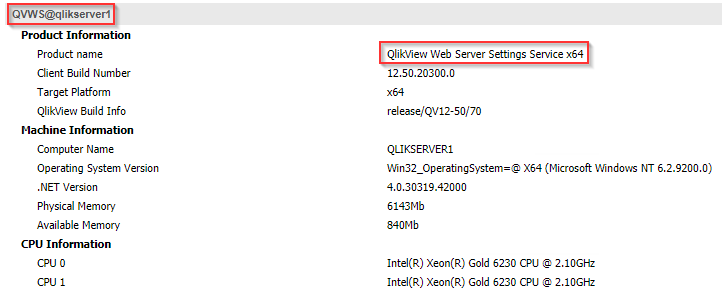
Sorry, but I don't know the setting in IIS that would govern this. You should be able to ask your internal Server team for assistance.
Best Regards
Help users find answers! Don't forget to mark a solution that worked for you!
Chip_Matejowsky
- Mark as New
- Bookmark
- Subscribe
- Mute
- Subscribe to RSS Feed
- Permalink
- Report Inappropriate Content
Hi @MeganStarkey,
Which client (AJAX or IE Plugin) and browser are you using on the AccessPoint? How often is the dashboard being reloaded with data?
Best Regards
Help users find answers! Don't forget to mark a solution that worked for you!
MeganStarkey
- Mark as New
- Bookmark
- Subscribe
- Mute
- Subscribe to RSS Feed
- Permalink
- Report Inappropriate Content
Hi @Chip_Matejowsky !
We are using Edge plugin + Edge. The data is reloaded every 60 seconds with data refresh every 10 min
Chip_Matejowsky
- Mark as New
- Bookmark
- Subscribe
- Mute
- Subscribe to RSS Feed
- Permalink
- Report Inappropriate Content
Suggest that you add a browser extension that auto-refreshes the browser. See https://browserhow.com/how-to-enable-auto-refresh-on-the-web-browsers/ for details. If you're not already doing so, you can configure the IE Plugin to "gracefully refresh" the QVW with new data without user intervention. Article How to Enable Graceful Document Refresh in QlikView will step you through how to configure.
Best Regards
Help users find answers! Don't forget to mark a solution that worked for you!
MeganStarkey
- Mark as New
- Bookmark
- Subscribe
- Mute
- Subscribe to RSS Feed
- Permalink
- Report Inappropriate Content
Thanks for getting back to me Chip!
We have an extension on the browser to auto refresh every 60 seconds, and I actually just turned it on yesterday. So that will also help with the login issue we are experiencing?
Normally, I will come in every morning and the session will be logged off so I will have to log in. This morning, the session stayed on; the only thing that was different was turning on the refresh plugin yesterday.
Thanks!
Megan
Chip_Matejowsky
- Mark as New
- Bookmark
- Subscribe
- Mute
- Subscribe to RSS Feed
- Permalink
- Report Inappropriate Content
Ah that sounds promising!
Help users find answers! Don't forget to mark a solution that worked for you!
MeganStarkey
- Mark as New
- Bookmark
- Subscribe
- Mute
- Subscribe to RSS Feed
- Permalink
- Report Inappropriate Content
It did sound promising!
Unfortunately, this morning I come in and it's logged out again. Any other suggestions?

 Or
Or
- Mark as New
- Bookmark
- Subscribe
- Mute
- Subscribe to RSS Feed
- Permalink
- Report Inappropriate Content
It's a bit more effort, but you could record a screen macro (using software intended for that) which would click the logoff button and then re-login, once per hour. That should set up a new session and prevent timeouts.
Chip_Matejowsky
- Mark as New
- Bookmark
- Subscribe
- Mute
- Subscribe to RSS Feed
- Permalink
- Report Inappropriate Content
Have a look at the QVS Session log and look for the "Exit Reason" for this particular session.
Best Regards
Help users find answers! Don't forget to mark a solution that worked for you!
MeganStarkey
- Mark as New
- Bookmark
- Subscribe
- Mute
- Subscribe to RSS Feed
- Permalink
- Report Inappropriate Content
The only Exit Reason I'm seeing for this is "Socket closed by client"

- « Previous Replies
-
- 1
- 2
- Next Replies »