Unlock a world of possibilities! Login now and discover the exclusive benefits awaiting you.

- Qlik Community
- :
- All Forums
- :
- QlikView
- :
- Re: Date Format
- Subscribe to RSS Feed
- Mark Topic as New
- Mark Topic as Read
- Float this Topic for Current User
- Bookmark
- Subscribe
- Mute
- Printer Friendly Page

- Mark as New
- Bookmark
- Subscribe
- Mute
- Subscribe to RSS Feed
- Permalink
- Report Inappropriate Content
Date Format
Hello,
I have the format MM/DD/YYYY HH:MM:SS and i am trying to MM/DD/YYYY
I don't know why this is showing.
I tried like below
date(date#(First_StartTime,'MM/DD/YYYY HH:MM:SS'),'MM/DD/YYYY')
- « Previous Replies
-
- 1
- 2
- Next Replies »
Accepted Solutions

 sunny_talwar
- Mark as New
- Bookmark
- Subscribe
- Mute
- Subscribe to RSS Feed
- Permalink
- Report Inappropriate Content
Try this:
=If([Dashboard Running] = Max(TOTAL Aggr(Count(DISTINCT Dashboard), First_StartTime)), LightRed(),
If([Dashboard Running] = Max(TOTAL Aggr(Count(DISTINCT Dashboard), First_StartTime), 2), Green(),
If([Dashboard Running] = Max(TOTAL Aggr(Count(DISTINCT Dashboard), First_StartTime), 3), Blue(), Yellow())))


 arulsettu
- Mark as New
- Bookmark
- Subscribe
- Mute
- Subscribe to RSS Feed
- Permalink
- Report Inappropriate Content
try this
date(Floor(First_StartTime)) as date

 tresB
tresB
- Mark as New
- Bookmark
- Subscribe
- Mute
- Subscribe to RSS Feed
- Permalink
- Report Inappropriate Content
Try:
=date(date#(First_StartTime,'DD/MM/YYYY HH:mm:SS'),'MM/DD/YYYY')
Note: MM/DD -> DD/MM and MM(month)->mm(minutes)
OR,
simply,
Date(First_StartTime, 'MM/DD/YYY')

- Mark as New
- Bookmark
- Subscribe
- Mute
- Subscribe to RSS Feed
- Permalink
- Report Inappropriate Content
try to use lower case characters for time
= floor(date(date#(First_StartTime,'MM/DD/YYYY hh:mm:ss'),'MM/DD/YYYY'))
- Mark as New
- Bookmark
- Subscribe
- Mute
- Subscribe to RSS Feed
- Permalink
- Report Inappropriate Content
Rudolf, I am trying similar that, Nothing use. Have you checked my attachment.
Arul: in real data, It's work -- date(Floor(First_StartTime)) as First_StartTime
Does any other solution?
And i am adding qvw here as well, in that, 10/08/2016 got the max. This scenario i want to put Red as BG
sunny_talwar
- Mark as New
- Bookmark
- Subscribe
- Mute
- Subscribe to RSS Feed
- Permalink
- Report Inappropriate Content
You want to highlight 10/08/2016 like this?
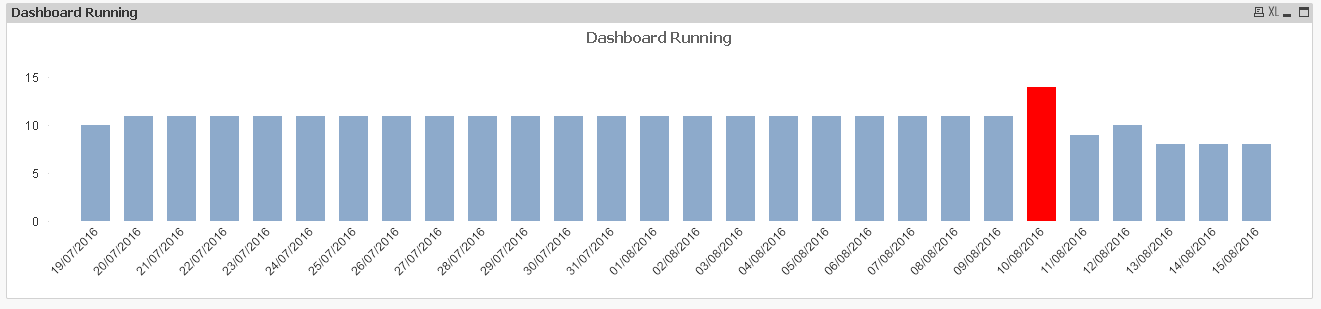
Used a background expression:
=If(Rank([Dashboard Running]) = 1, LightRed())
- Mark as New
- Bookmark
- Subscribe
- Mute
- Subscribe to RSS Feed
- Permalink
- Report Inappropriate Content
While I tried this. It's nor working
=If(Rank([Dashboard Running]) = 1, LightRed(),If(Rank([Dashboard Running]) = 2,Green(), Yellow()))
sunny_talwar
- Mark as New
- Bookmark
- Subscribe
- Mute
- Subscribe to RSS Feed
- Permalink
- Report Inappropriate Content
Are you looking to give different colors to each of the bar based on the Rank?
sunny_talwar
- Mark as New
- Bookmark
- Subscribe
- Mute
- Subscribe to RSS Feed
- Permalink
- Report Inappropriate Content
Try this:
=If(Rank([Dashboard Running], 1, 1) = 1, LightRed(), If(Rank([Dashboard Running], 1, 1) = 2,Green(), Yellow()))
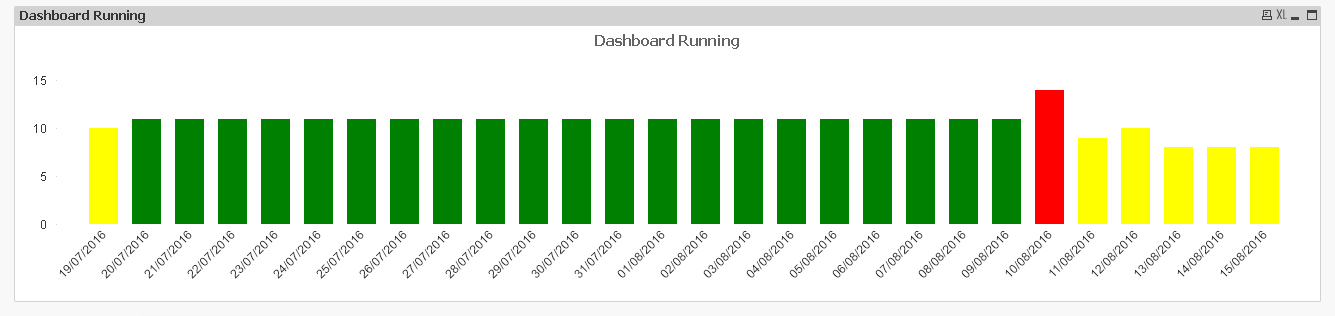
- Mark as New
- Bookmark
- Subscribe
- Mute
- Subscribe to RSS Feed
- Permalink
- Report Inappropriate Content
Seems that, But Here i want to show how many dashboards are running for each date. Which date is running more dashboards, Upto Three ranks then Yello
Like
If(Rank(Sum(Sales)=1, Green(), If(Rank(Sum(Sales)=1, Violet(), If(Rank(Sum(Sales)=1, Pink(), Red())))
- « Previous Replies
-
- 1
- 2
- Next Replies »