Unlock a world of possibilities! Login now and discover the exclusive benefits awaiting you.

- Qlik Community
- :
- All Forums
- :
- QlikView
- :
- Re: Date changing in nPrinting
- Subscribe to RSS Feed
- Mark Topic as New
- Mark Topic as Read
- Float this Topic for Current User
- Bookmark
- Subscribe
- Mute
- Printer Friendly Page

 bobbydave
- Mark as New
- Bookmark
- Subscribe
- Mute
- Subscribe to RSS Feed
- Permalink
- Report Inappropriate Content
Date changing in nPrinting
I have this app which shows Open Date.
Open Date is in the format DD/MM/YYYY HH:MM:SS
In my load script, I convert this to DD/MM/YYYY which is how I want this to appear.
However when I use nPrinting to run the report, the Open Date appears as below:
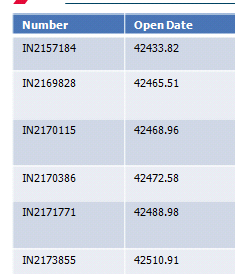
App attached.
Anyone understand why the date appears as such in nPrinting.
If I don't convert the original, it appears as DD/MM/YYYY HH:MM:SS but I don't want the time to appear in nPrinting.
Help appreciated.
**Note I have now changed the variable timestamp to only show DD/MM/YYYY as I will never need HH:MM:SS so now it shows the date. However, it still does not want to show this in nPrinting. Am I storing the Open Date incorrectly?
bobbydave
- Mark as New
- Bookmark
- Subscribe
- Mute
- Subscribe to RSS Feed
- Permalink
- Report Inappropriate Content
figured it out.
wouldn't work until I had text(.... )
text(date(timestamp([Open Date], 'DD/MM/YYYY hh:mm:ss[.fff]'), 'DD/MM/YYYY'))
