Unlock a world of possibilities! Login now and discover the exclusive benefits awaiting you.

Announcements
Share your agentic AI experience, learn from others, and earn a new badge: Put Agentic AI to Work
- Qlik Community
- :
- All Forums
- :
- QlikView
- :
- Re: Date is not recognizing.
Options
- Subscribe to RSS Feed
- Mark Topic as New
- Mark Topic as Read
- Float this Topic for Current User
- Bookmark
- Subscribe
- Mute
- Printer Friendly Page
Turn on suggestions
Auto-suggest helps you quickly narrow down your search results by suggesting possible matches as you type.
Showing results for

Anonymous
Not applicable
2018-04-17
02:54 AM
- Mark as New
- Bookmark
- Subscribe
- Mute
- Subscribe to RSS Feed
- Permalink
- Report Inappropriate Content
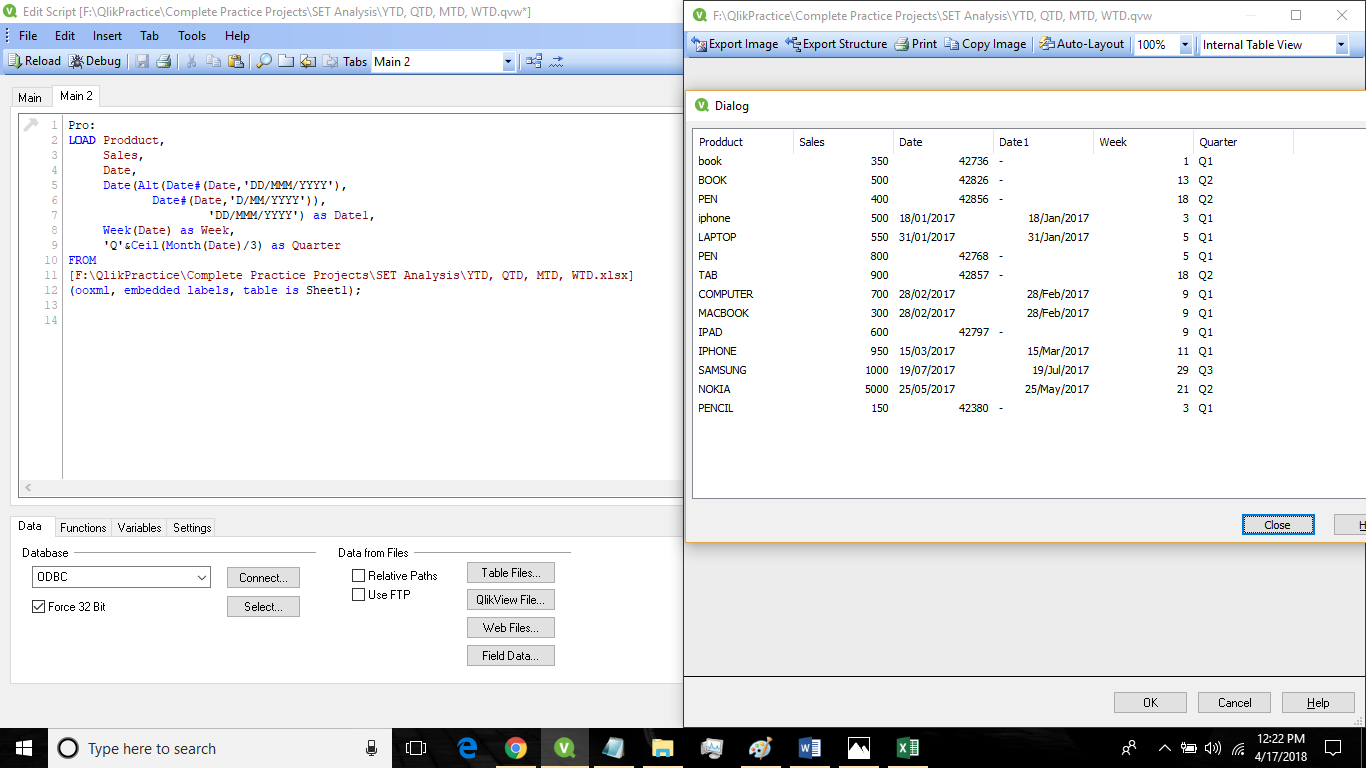
Date is not recognizing.
- Tags:
- qlikview_scripting
3,166 Views
1 Solution
Accepted Solutions

 tresB
tresB
Champion III
2018-04-17
03:01 AM
- Mark as New
- Bookmark
- Subscribe
- Mute
- Subscribe to RSS Feed
- Permalink
- Report Inappropriate Content
Few of your dates are already in number. For them you just have to format it using date(). Hence try like:
Date(Alt(Date, Date#(..), Date#(...)), 'DD/MM/YYY') as Date1
8 Replies
tresB
Champion III
2018-04-17
03:01 AM
- Mark as New
- Bookmark
- Subscribe
- Mute
- Subscribe to RSS Feed
- Permalink
- Report Inappropriate Content
Few of your dates are already in number. For them you just have to format it using date(). Hence try like:
Date(Alt(Date, Date#(..), Date#(...)), 'DD/MM/YYY') as Date1

 sasiparupudi1
Master III
2018-04-17
03:14 AM
- Mark as New
- Bookmark
- Subscribe
- Mute
- Subscribe to RSS Feed
- Permalink
- Report Inappropriate Content
May be use Trim
Date(Alt(Date#(Trim(Date),'DD/MM/YYY'),Date#(Trim(Date),'D/MM/YYY'),) 'DD/MM/YYY') as Date1
Anonymous
Not applicable
2018-04-17
05:10 AM
Author
- Mark as New
- Bookmark
- Subscribe
- Mute
- Subscribe to RSS Feed
- Permalink
- Report Inappropriate Content
Tried but didn't worked
3,006 Views
tresB
Champion III
2018-04-17
05:14 AM
- Mark as New
- Bookmark
- Subscribe
- Mute
- Subscribe to RSS Feed
- Permalink
- Report Inappropriate Content
Could you share the excel to check?
3,006 Views
Anonymous
Not applicable
2018-04-17
06:36 AM
Author
- Mark as New
- Bookmark
- Subscribe
- Mute
- Subscribe to RSS Feed
- Permalink
- Report Inappropriate Content
I changed system date and now it's working fine. Thank you guys.
3,006 Views
sasiparupudi1
Master III
2018-04-17
06:40 AM
- Mark as New
- Bookmark
- Subscribe
- Mute
- Subscribe to RSS Feed
- Permalink
- Report Inappropriate Content
Please close this thread
3,006 Views
Anonymous
Not applicable
2018-04-18
03:20 AM
Author
- Mark as New
- Bookmark
- Subscribe
- Mute
- Subscribe to RSS Feed
- Permalink
- Report Inappropriate Content
How?
3,006 Views
sasiparupudi1
Master III
2018-04-18
02:39 PM
- Mark as New
- Bookmark
- Subscribe
- Mute
- Subscribe to RSS Feed
- Permalink
- Report Inappropriate Content
3,006 Views