Unlock a world of possibilities! Login now and discover the exclusive benefits awaiting you.

- Qlik Community
- :
- All Forums
- :
- QlikView
- :
- Re: Display in Textbox
- Subscribe to RSS Feed
- Mark Topic as New
- Mark Topic as Read
- Float this Topic for Current User
- Bookmark
- Subscribe
- Mute
- Printer Friendly Page

 paulwalker
- Mark as New
- Bookmark
- Subscribe
- Mute
- Subscribe to RSS Feed
- Permalink
- Report Inappropriate Content
Display in Textbox
Hi Community,
I need to show Navigation in Textbox...
I have one Drill Down group
Division-->Category-->Product
This Drilldown group i took in Listbox..
If i am select Division drill into Category drill into Product.
Thanks in Advance..
Accepted Solutions

 Digvijay_Singh
- Mark as New
- Bookmark
- Subscribe
- Mute
- Subscribe to RSS Feed
- Permalink
- Report Inappropriate Content
Improved expression to display arrows based on selection -
=GetFieldSelections(Division)&
if(len(GetFieldSelections(Category))>0 and len(GetFieldSelections(Division))>0,'-->')&
GetFieldSelections(Category)&
if(len(GetFieldSelections(Product))>0 and len(GetFieldSelections(Category))>0 ,'-->')&
GetFieldSelections(Product)
Digvijay_Singh
- Mark as New
- Bookmark
- Subscribe
- Mute
- Subscribe to RSS Feed
- Permalink
- Report Inappropriate Content
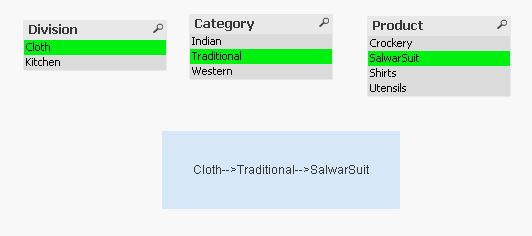
Something like below may be -
You can use getfieldselections, I am using PE, don't have access to others QVW, so sharing the sample expression in case it can help -
=GetFieldSelections(Division)&'-->'&GetFieldSelections(Category)&'-->'&GetFieldSelections(Product)
Digvijay_Singh
- Mark as New
- Bookmark
- Subscribe
- Mute
- Subscribe to RSS Feed
- Permalink
- Report Inappropriate Content
Improved expression to display arrows based on selection -
=GetFieldSelections(Division)&
if(len(GetFieldSelections(Category))>0 and len(GetFieldSelections(Division))>0,'-->')&
GetFieldSelections(Category)&
if(len(GetFieldSelections(Product))>0 and len(GetFieldSelections(Category))>0 ,'-->')&
GetFieldSelections(Product)
