Unlock a world of possibilities! Login now and discover the exclusive benefits awaiting you.

- Qlik Community
- :
- All Forums
- :
- QlikView
- :
- Error using a variable in Set Analysis
- Subscribe to RSS Feed
- Mark Topic as New
- Mark Topic as Read
- Float this Topic for Current User
- Bookmark
- Subscribe
- Mute
- Printer Friendly Page

 mla3eruva
- Mark as New
- Bookmark
- Subscribe
- Mute
- Subscribe to RSS Feed
- Permalink
- Report Inappropriate Content
Error using a variable in Set Analysis
I cannot figure out what is wrong with my Set Analysis. My variable eCurrFY returns the correct value 'FY2016' when I put it in a textbox using this formula:
=$(eCurrFY)
When I use it in a set analysis formula
=$(eCurrFY)&' '
&sum({<[Project Accounting Period]=, [Fiscal Year]={$(eCurrFY)}>} [Burdened Cost])
I get the error shown below.
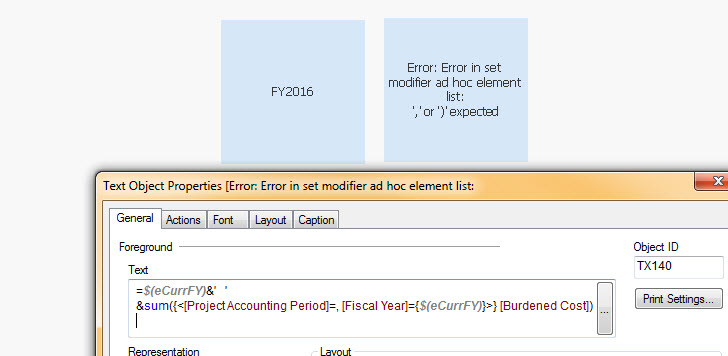
If I write the formula as
=$(eCurrFY)&' '
&sum({<[Project Accounting Period]=, [Fiscal Year]={'FY2016'}>} [Burdened Cost])
I get the correct answer.
I have also tried
=$(eCurrFY)&' '
&sum({<[Project Accounting Period]=, [Fiscal Year]={'$(eCurrFY)'}>} [Burdened Cost])
but also get the error.
My variable is defined as:
if(month(today())<7,'FY'&year(today()),'FY'&(Year(Today())+1))
Thank you in advance.

 Gabriel
- Mark as New
- Bookmark
- Subscribe
- Mute
- Subscribe to RSS Feed
- Permalink
- Report Inappropriate Content
Hi,
My question is how did you define your variable?
Did you USE SET or LET?
Secondly use the variable as it is without dollar Sign
 morgankejerhag
- Mark as New
- Bookmark
- Subscribe
- Mute
- Subscribe to RSS Feed
- Permalink
- Report Inappropriate Content
Hello Mark,
Try to add an equal sign to the start of your variable:
=if(month(today())<7,'FY'&year(today()),'FY'&(Year(Today())+1))

 hemhund2016
- Mark as New
- Bookmark
- Subscribe
- Mute
- Subscribe to RSS Feed
- Permalink
- Report Inappropriate Content
Try using as $(=eCurrFY) instead of $(eCurrFY)

 tamilarasu
- Mark as New
- Bookmark
- Subscribe
- Mute
- Subscribe to RSS Feed
- Permalink
- Report Inappropriate Content
Hi Mark,
You can get the expected result in two ways.
1. Try below expression,
=$(=eCurrFY) &' ' &
sum({<[Project Accounting Period]=, [Fiscal Year]={"$(=eCurrFY)"}>} [Burdened Cost])
OR
2. Add equal sign in front of the variable (eCurrFY) definition in variable overview window.
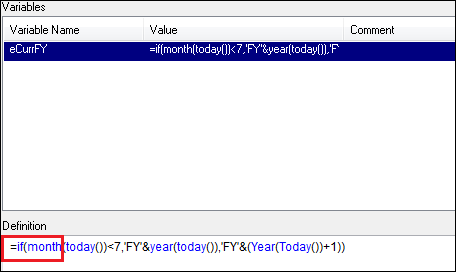
Let me know.
mla3eruva
- Mark as New
- Bookmark
- Subscribe
- Mute
- Subscribe to RSS Feed
- Permalink
- Report Inappropriate Content
Thank you Tamil,
It worked when I added an = sign in front of the variable definition. I thought that I should not include = sign in variable definitions (I'm loading all variables/expressions from Excel file. Is there a rule or guideline about when variable/expression definitions should/should not include an = sign?

 rwunderlich
- Mark as New
- Bookmark
- Subscribe
- Mute
- Subscribe to RSS Feed
- Permalink
- Report Inappropriate Content
Include the = in the variable definition when there is only one value to be calculated for the entire app. eg
=today()-7 // 7 days ago
Leave the = off when the calculation needs to be calculated row by row for a chart.
Sum(Sales) * 1.2 // calc sales with commission
In your expression, if you look at the substitution, you would see that the expression string, not "FY2016" was getting substituted into the set modifier like:
[Fiscal Year]={'if(month(today())<7,'FY'&year(today()),'FY'&(Year(Today())+1))'}
How do you see exactly what substitution is being done in the $()? Use the expression in a straight table and leave the expression label blank. The column heading will show the expression after substitution.
Here are a couple of posts that may help explain.
The Magic of Dollar Expansions
-Rob
tamilarasu
- Mark as New
- Bookmark
- Subscribe
- Mute
- Subscribe to RSS Feed
- Permalink
- Report Inappropriate Content
Hi Mark,
I always use = sign for formulas/calculations in variable window. so that the calculated value will be stored in the variable. We can use the variable by simply mentioning the variable name like $(eCurrFY) in set analysis. If you don't want to add = sign in variable window, you can specify the variable like [Fiscal Year]={"$(=$(eCurrFY))"} in set analysis.
You can test yourself ,

Set Expression: sum({<[Project Accounting Period]=, [Fiscal Year]={"$(eCurrFY)"}>} [Burdened Cost])

Set Expression: sum({<[Project Accounting Period]=, [Fiscal Year]={"$(=$(eCurrFY))"}>} [Burdened Cost])
For values

Set Expression: sum({<[Project Accounting Period]=, [Fiscal Year]={"$(eCurrFY)"}>} [Burdened Cost])
Choice is yours.
