Unlock a world of possibilities! Login now and discover the exclusive benefits awaiting you.

- Qlik Community
- :
- All Forums
- :
- QlikView
- :
- Re: Expression In Script
- Subscribe to RSS Feed
- Mark Topic as New
- Mark Topic as Read
- Float this Topic for Current User
- Bookmark
- Subscribe
- Mute
- Printer Friendly Page

- Mark as New
- Bookmark
- Subscribe
- Mute
- Subscribe to RSS Feed
- Permalink
- Report Inappropriate Content
Expression In Script
I have the below expression in the chart properties and I would like to add in the scrip. Can someone show me the best approach?
Expression in Chart - count({<Status={[Pended]}>}distinct ID)
how would that look in the scrip? Can I use a IF Statement, this is what I have below...
Count(IF(Status= 'Pended','')) as TotalPends
- Mark as New
- Bookmark
- Subscribe
- Mute
- Subscribe to RSS Feed
- Permalink
- Report Inappropriate Content
My dimensions are, Status & ID. Count the # of ID when my status = pended.
I have about 30 other calculations that I need to create in the script. Keeping as simple as I can.

 sunny_talwar
- Mark as New
- Bookmark
- Subscribe
- Mute
- Subscribe to RSS Feed
- Permalink
- Report Inappropriate Content
Would you be able to share a sample?
- Mark as New
- Bookmark
- Subscribe
- Mute
- Subscribe to RSS Feed
- Permalink
- Report Inappropriate Content
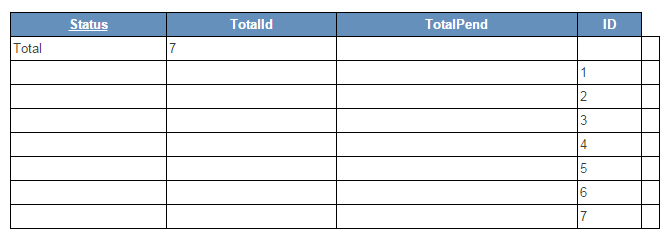
In a straight table without expression embedded in the chart I would like to see.
See attached example. I need to see (distinct)totals for the two columns that I created TotalPend and TotalId
| DESCRIPTION | ID | STATUS | COUNTstatus | TOTALPENDS |
| TOTAL | 7 | 4 | ||
| FIVE | 5 | PENDING | 1 | 1 |
| FOUR | 4 | DENIED | 1 | 0 |
| ONE | 1 | PENDING | 1 | 1 |
| SEVEN | 7 | PENDING | 1 | 1 |
| SIX | 6 | APPROVED | 1 | 0 |
| THREE | 3 | PENDING | 1 | 1 |
| TWO | 2 | APPROVED | 1 | 0 |
- Mark as New
- Bookmark
- Subscribe
- Mute
- Subscribe to RSS Feed
- Permalink
- Report Inappropriate Content
Added an example
sunny_talwar
- Mark as New
- Bookmark
- Subscribe
- Mute
- Subscribe to RSS Feed
- Permalink
- Report Inappropriate Content
Did you forget to add data to the table here?
- Mark as New
- Bookmark
- Subscribe
- Mute
- Subscribe to RSS Feed
- Permalink
- Report Inappropriate Content
ADDED DATA
sunny_talwar
- Mark as New
- Bookmark
- Subscribe
- Mute
- Subscribe to RSS Feed
- Permalink
- Report Inappropriate Content
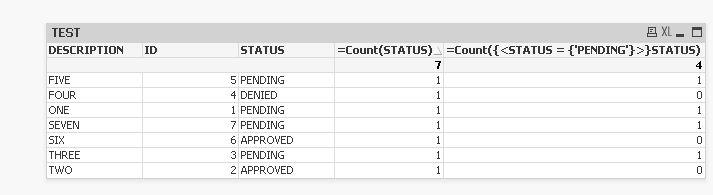
This?
- Mark as New
- Bookmark
- Subscribe
- Mute
- Subscribe to RSS Feed
- Permalink
- Report Inappropriate Content
Yes but I do not want to create expressions. There's not a way to create in the script?
sunny_talwar
- Mark as New
- Bookmark
- Subscribe
- Mute
- Subscribe to RSS Feed
- Permalink
- Report Inappropriate Content
Looking for something like this?
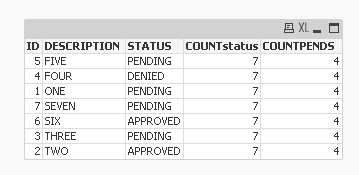
Script:
TEST:
LOAD * Inline [
ID, DESCRIPTION, STATUS
1, ONE, PENDING
2, TWO, APPROVED
3, THREE, PENDING
4, FOUR, DENIED
5, FIVE, PENDING
6, SIX, APPROVED
7, SEVEN, PENDING
];
Join(TEST)
LOAD Count(STATUS) AS COUNTstatus
Resident TEST;
Join(TEST)
LOAD Count(STATUS) AS COUNTPENDS
Resident TEST
Where STATUS = 'PENDING';
- Mark as New
- Bookmark
- Subscribe
- Mute
- Subscribe to RSS Feed
- Permalink
- Report Inappropriate Content
No, I assumed this would be a standard question but maybe I'm not being clear enough. I need what you have in your first example but without the expression in the chart. Is there not a way to create the expression in the script???