Unlock a world of possibilities! Login now and discover the exclusive benefits awaiting you.

- Qlik Community
- :
- All Forums
- :
- QlikView
- :
- Re: Filtering straight table/table box with button...
- Subscribe to RSS Feed
- Mark Topic as New
- Mark Topic as Read
- Float this Topic for Current User
- Bookmark
- Subscribe
- Mute
- Printer Friendly Page

 felipe_oliveira
- Mark as New
- Bookmark
- Subscribe
- Mute
- Subscribe to RSS Feed
- Permalink
- Report Inappropriate Content
Filtering straight table/table box with buttons
Hi Masters
I have among other objects the filter and pivot table below.
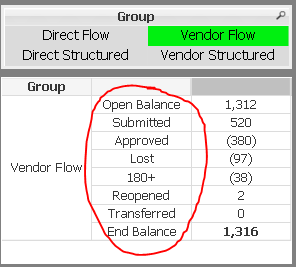
The part inside the red circle are expressions in the pivot table.
I would like to add a straight table or table box with the detail info from the pivot table above.
Since it is not possible to filter a straight table or table box by clicking on the expressions above (red circle) I would like to know how could I filter a straight table or table box without messing with the others objects in the sheet.
All the other objects in the sheet use the Alternate_State = "Pipeline"
I was wondering, as a possible solution, if it is possible to create buttons mimicking each expression from the pivot table that upon clicking on them the straight table/table box would be filtered accordingly.
Please advise
Regards
Felipe Oliveira
Accepted Solutions


- Mark as New
- Bookmark
- Subscribe
- Mute
- Subscribe to RSS Feed
- Permalink
- Report Inappropriate Content
May be one option could be Drop down from presentation tab?
- Mark as New
- Bookmark
- Subscribe
- Mute
- Subscribe to RSS Feed
- Permalink
- Report Inappropriate Content
May be one option could be Drop down from presentation tab?
