Unlock a world of possibilities! Login now and discover the exclusive benefits awaiting you.

- Qlik Community
- :
- All Forums
- :
- QlikView
- :
- Re: Find new field based on previous fields.. ?
- Subscribe to RSS Feed
- Mark Topic as New
- Mark Topic as Read
- Float this Topic for Current User
- Bookmark
- Subscribe
- Mute
- Printer Friendly Page

 Srinivas
- Mark as New
- Bookmark
- Subscribe
- Mute
- Subscribe to RSS Feed
- Permalink
- Report Inappropriate Content
Find new field based on previous fields.. ?
Hi All,
We have an urgent QlikView requirement . We have a table having Some fields. Two are Date fields Date1 & Date2. In respect of Date1 field there is a Value1 field. We need to derive the Value2 with respect to date2. Value2 is depend on 3 fields Customer, Date1 and Value1.
Example in Excel Sheet:: For C1 ,Date1 is 01/01/2016 and Value is 100.Therefore for Date2 we need to derive the value2.
Logic is that if for Same Customer Date1 <=Date2 then Value1 will be the value2.
For Column 1 Value of Value2 will be 100 because Date1=Date2.
Other case Column2 ::Date1 > Date2 ,In this case we will see the upper value of Date1 if this Date <= Date2 then Value of Value1 for that will be the Value of Value2. For Column2 Value2 will be 100.
Same for column3 Value2 will be 100 because Date1> date2. So we are always assuming the value of value2 ,according to date2 where Date1<=Date2.
If not then we assuming previous value. If the previous Date is also large then we will check upper of the previous value. This is our overall logic.
Regards
Munna
Accepted Solutions

 sunny_talwar
- Mark as New
- Bookmark
- Subscribe
- Mute
- Subscribe to RSS Feed
- Permalink
- Report Inappropriate Content
Not sure I understand your concern completely, but can you try this:
Table:
LOAD Customer,
Date1,
Value1,
Date2,
If(Date1 <= Date2, Value1) as Value2_Temp1,
If(Date1 <= Date2, 1) as Flag
FROM
[Test (8).xlsx]
(ooxml, embedded labels, table is Sales);
FinalTable:
LOAD Customer,
Date1,
Value1,
Date2,
Value2_Temp1,
Value2_Temp2,
Alt(Value2_Temp1, Value2_Temp2) as Value2;
LOAD *,
If(Peek('Flag') = 1, Peek('Value2_Temp1'), If(Date2 >= Peek('Date1'), Peek('Value1'), Peek('Value2_Temp2'))) as Value2_Temp2
Resident Table
Order By Customer, Date1;
DROP Fields Value2_Temp1, Value2_Temp2;
DROP Table Table;

 settu_periasamy
- Mark as New
- Bookmark
- Subscribe
- Mute
- Subscribe to RSS Feed
- Permalink
- Report Inappropriate Content
Hi,
Can you provide the excel formula which you explained above?
sunny_talwar
- Mark as New
- Bookmark
- Subscribe
- Mute
- Subscribe to RSS Feed
- Permalink
- Report Inappropriate Content
May be this:
Table:
LOAD Customer,
Date1,
Value1,
Date2,
Value2_Temp1,
Value2_Temp2,
Alt(Value2_Temp1, Value2_Temp2) as Value2;
LOAD *,
If(Peek('Flag') = 1, Peek('Value2_Temp1'), If(Date2 >= Peek('Date1'), Peek('Value1'), Peek('Value2_Temp2'))) as Value2_Temp2;
LOAD Customer,
Date1,
Value1,
Date2,
If(Date1 <= Date2, Value1) as Value2_Temp1,
If(Date1 <= Date2, 1) as Flag
FROM
[Test (8).xlsx]
(ooxml, embedded labels, table is Sales);
DROP Fields Value2_Temp1, Value2_Temp2;

Srinivas
- Mark as New
- Bookmark
- Subscribe
- Mute
- Subscribe to RSS Feed
- Permalink
- Report Inappropriate Content
Thanks Sunny..
sunny_talwar
- Mark as New
- Bookmark
- Subscribe
- Mute
- Subscribe to RSS Feed
- Permalink
- Report Inappropriate Content
No problem... Is the issue resolved now? If not please provide details as to what is missing. If it is, then I will request you to close this thread by marking correct and helpful responses.
Qlik Community Tip: Marking Replies as Correct or Helpful
Best,
Sunny
Srinivas
- Mark as New
- Bookmark
- Subscribe
- Mute
- Subscribe to RSS Feed
- Permalink
- Report Inappropriate Content
Hi Sunny sorry for asking again,
I have one more doubt when the customer format change then that logic would not working,But our above logic would work with date based only not customer wise. Same data I have changes like below way,
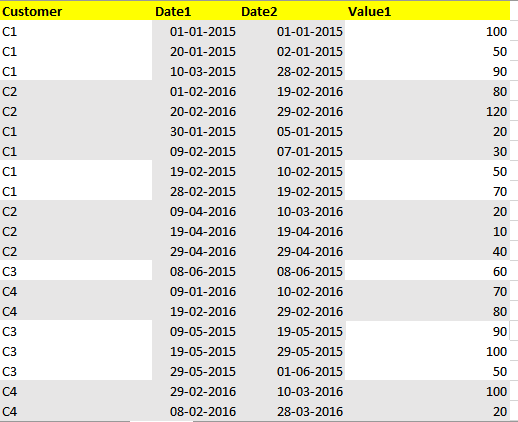 !
!
above same imaged data I have taken excel and and reloaded then it's not giving as per before we expected answer.
Advance Thanks,
MM
sunny_talwar
- Mark as New
- Bookmark
- Subscribe
- Mute
- Subscribe to RSS Feed
- Permalink
- Report Inappropriate Content
Not sure I understand your concern completely, but can you try this:
Table:
LOAD Customer,
Date1,
Value1,
Date2,
If(Date1 <= Date2, Value1) as Value2_Temp1,
If(Date1 <= Date2, 1) as Flag
FROM
[Test (8).xlsx]
(ooxml, embedded labels, table is Sales);
FinalTable:
LOAD Customer,
Date1,
Value1,
Date2,
Value2_Temp1,
Value2_Temp2,
Alt(Value2_Temp1, Value2_Temp2) as Value2;
LOAD *,
If(Peek('Flag') = 1, Peek('Value2_Temp1'), If(Date2 >= Peek('Date1'), Peek('Value1'), Peek('Value2_Temp2'))) as Value2_Temp2
Resident Table
Order By Customer, Date1;
DROP Fields Value2_Temp1, Value2_Temp2;
DROP Table Table;
