Unlock a world of possibilities! Login now and discover the exclusive benefits awaiting you.

- Qlik Community
- :
- All Forums
- :
- QlikView
- :
- Re: Gauge scale
- Subscribe to RSS Feed
- Mark Topic as New
- Mark Topic as Read
- Float this Topic for Current User
- Bookmark
- Subscribe
- Mute
- Printer Friendly Page

 woutermak
- Mark as New
- Bookmark
- Subscribe
- Mute
- Subscribe to RSS Feed
- Permalink
- Report Inappropriate Content
Gauge scale
Hi,
I have some problems with showing the scale values on a gauge.
I changed my Gauge settings to:
- min 0 and max 400;
- Turned on Show Scale with major units 20;
- Turned on Show labels on Every 4 Major Unit.
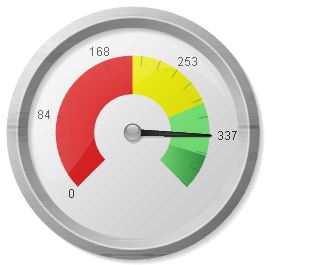
The result is not what I expected. I thought that the
scale in my gauge was showing now the values: 80, 160, 240, 320, 400. But is
shows me 84, 168, 253 and 337. Why this scale? This is not the dividing I want.
Can I get some way the dividing with 80, 160, 240, 320?
Regards,
Wouter
Accepted Solutions

 Clever_Anjos
- Mark as New
- Bookmark
- Subscribe
- Mute
- Subscribe to RSS Feed
- Permalink
- Report Inappropriate Content
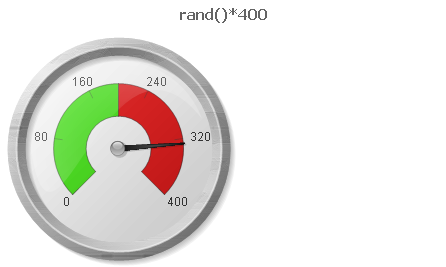
- min 0 and max 400;
- Turned on Show Scale with major units 6;
- Turned on Show labels on Every 1 Major Unit.
Clever_Anjos
- Mark as New
- Bookmark
- Subscribe
- Mute
- Subscribe to RSS Feed
- Permalink
- Report Inappropriate Content
- min 0 and max 400;
- Turned on Show Scale with major units 6;
- Turned on Show labels on Every 1 Major Unit.

- Mark as New
- Bookmark
- Subscribe
- Mute
- Subscribe to RSS Feed
- Permalink
- Report Inappropriate Content
If you want to show 80, 160, 240, 320, 400 as well as 0,which is the starting point yuo have given. That is actually 6 major units to show.
woutermak
- Mark as New
- Bookmark
- Subscribe
- Mute
- Subscribe to RSS Feed
- Permalink
- Report Inappropriate Content
Thank you both. That's it.