Unlock a world of possibilities! Login now and discover the exclusive benefits awaiting you.

- Qlik Community
- :
- All Forums
- :
- QlikView
- :
- Re: Help
Options
- Subscribe to RSS Feed
- Mark Topic as New
- Mark Topic as Read
- Float this Topic for Current User
- Bookmark
- Subscribe
- Mute
- Printer Friendly Page
Turn on suggestions
Auto-suggest helps you quickly narrow down your search results by suggesting possible matches as you type.
Showing results for

Not applicable
2014-07-07
12:29 PM
- Mark as New
- Bookmark
- Subscribe
- Mute
- Subscribe to RSS Feed
- Permalink
- Report Inappropriate Content
Help
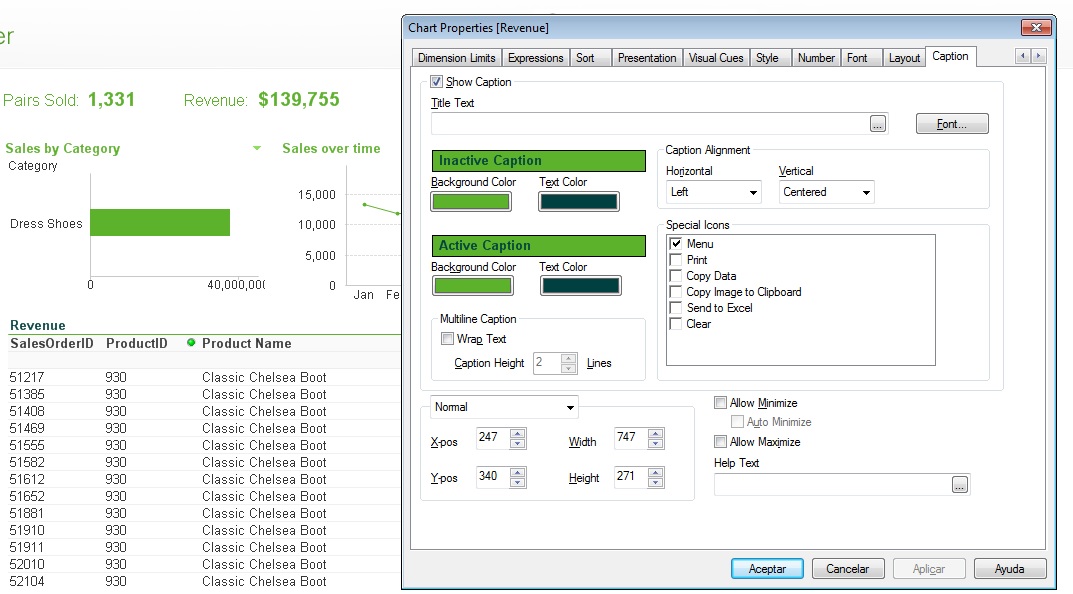
I just installed Qlikview, the Caption Backgroung color is not working... it shows as transparent (see image below, on "Revenue" chart)
What is wrong? do I need to update something other than the chart properties?
Thanks,
918 Views
1 Solution
Accepted Solutions

 maxgro
MVP
2014-07-07
12:38 PM
- Mark as New
- Bookmark
- Subscribe
- Mute
- Subscribe to RSS Feed
- Permalink
- Report Inappropriate Content
maybe
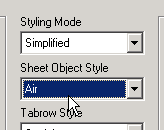
goto document menu --> properties --> general
and change this (perhaps it's Transparent)
2 Replies
maxgro
MVP
2014-07-07
12:38 PM
- Mark as New
- Bookmark
- Subscribe
- Mute
- Subscribe to RSS Feed
- Permalink
- Report Inappropriate Content
maybe
goto document menu --> properties --> general
and change this (perhaps it's Transparent)
Not applicable
2014-07-07
12:48 PM
Author
- Mark as New
- Bookmark
- Subscribe
- Mute
- Subscribe to RSS Feed
- Permalink
- Report Inappropriate Content
That's it! Thanks Massimo!
854 Views