Unlock a world of possibilities! Login now and discover the exclusive benefits awaiting you.

- Qlik Community
- :
- All Forums
- :
- QlikView
- :
- Re: Hide one Row in Pivot Table
- Subscribe to RSS Feed
- Mark Topic as New
- Mark Topic as Read
- Float this Topic for Current User
- Bookmark
- Subscribe
- Mute
- Printer Friendly Page

 cristian_av
- Mark as New
- Bookmark
- Subscribe
- Mute
- Subscribe to RSS Feed
- Permalink
- Report Inappropriate Content
Hide one Row in Pivot Table
Hi
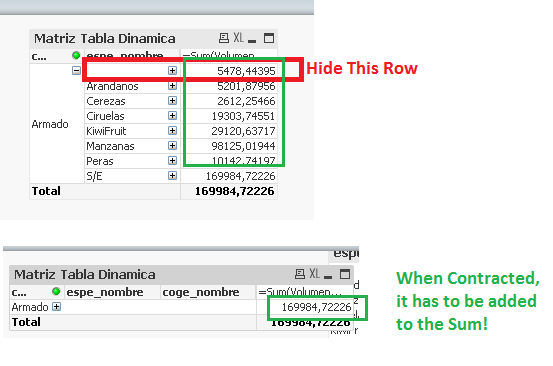
I need to hide just ONE row in a pivot table, but only when expanded. When contracted, it has to sum the value! Is that possible? Any hack or any idea? 
Thanks!
- Tags:
- pivot tavble

 sunny_talwar
- Mark as New
- Bookmark
- Subscribe
- Mute
- Subscribe to RSS Feed
- Permalink
- Report Inappropriate Content
Would you be able to share your qvw file to test this out?

 migueldelval
- Mark as New
- Bookmark
- Subscribe
- Mute
- Subscribe to RSS Feed
- Permalink
- Report Inappropriate Content
Hi Kjh,
Is your value null? If it´s null you only need to check in "Suppress When Value Is Null" at Dimenssion Tab.
Regards
Miguel del Valle

 vinieme12
- Mark as New
- Bookmark
- Subscribe
- Mute
- Subscribe to RSS Feed
- Permalink
- Report Inappropriate Content
use Dimensionality() value
If a post helps to resolve your issue, please accept it as a Solution.
cristian_av
- Mark as New
- Bookmark
- Subscribe
- Mute
- Subscribe to RSS Feed
- Permalink
- Report Inappropriate Content
Is not Null. I can make it null (it's a value calculated in load script), but if I make it null, it dissapears, but when I contract the dimension, the sum don't consider it!
cristian_av
- Mark as New
- Bookmark
- Subscribe
- Mute
- Subscribe to RSS Feed
- Permalink
- Report Inappropriate Content
I can't.. it has data from a customer!
sunny_talwar
- Mark as New
- Bookmark
- Subscribe
- Mute
- Subscribe to RSS Feed
- Permalink
- Report Inappropriate Content
May be share mocked up data my friend or look here:
Preparing examples for Upload - Reduction and Data Scrambling
vinieme12
- Mark as New
- Bookmark
- Subscribe
- Mute
- Subscribe to RSS Feed
- Permalink
- Report Inappropriate Content
see this thread for ideas
PIVOT - One row in details that has not to be showed
If a post helps to resolve your issue, please accept it as a Solution.
vinieme12
- Mark as New
- Bookmark
- Subscribe
- Mute
- Subscribe to RSS Feed
- Permalink
- Report Inappropriate Content
just upload some dummy inline data to work with
If a post helps to resolve your issue, please accept it as a Solution.
