Unlock a world of possibilities! Login now and discover the exclusive benefits awaiting you.

- Qlik Community
- :
- All Forums
- :
- QlikView
- :
- Re: Hierarchy Calendar
- Subscribe to RSS Feed
- Mark Topic as New
- Mark Topic as Read
- Float this Topic for Current User
- Bookmark
- Subscribe
- Mute
- Printer Friendly Page

- Mark as New
- Bookmark
- Subscribe
- Mute
- Subscribe to RSS Feed
- Permalink
- Report Inappropriate Content
Hierarchy Calendar
Hi all,
Below given is the sample data for calendar i have, i want to display this in hierarchy format in the dashboard.
TestCalender:
LOAD * INLINE [
Date, [Financial Year], Year, Quarter, Month
01-07-2017,FY17, 2017, Q1, July
01-08-2017,FY17, 2017, Q1, August
01-09-2017,FY17, 2017, Q1, Spetember
01-10-2017,FY17, 2017, Q2, October
01-11-2017,FY17, 2017, Q2, Novmber
01-12-2017,FY17, 2017, Q2, December
01-01-2018,FY18, 2018, Q3, January
01-02-2018,FY18, 2018, Q3, February
01-03-2018,FY18, 2018, Q3, March
01-04-2018,FY18, 2018, Q4, April
01-05-2018,FY18, 2018, Q4, May
01-06-2018,FY18, 2018, Q4, June
];
Kindly help on how to display this.
Thanks in advance
- « Previous Replies
-
- 1
- 2
- Next Replies »
Accepted Solutions
- Mark as New
- Bookmark
- Subscribe
- Mute
- Subscribe to RSS Feed
- Permalink
- Report Inappropriate Content
Hi Youssef ,
Your Suggested option donot work , as i need it for all feild like financial year, year,quarter,month.
hence i found a workaround by concatenating the fields with "/" delimiter and displayed it in the list box.
Like this : FinancialYear &'/'& Year &'/'& Quarter &'/'& MonthName As HierarchyDate
the below given is the screen shot of the drill down style calendar
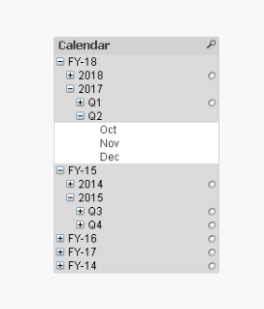
but facing issues in sorting of FY years , will find out how to deal with this.
Thanks,

 YoussefBelloum
- Mark as New
- Bookmark
- Subscribe
- Mute
- Subscribe to RSS Feed
- Permalink
- Report Inappropriate Content
Hi,
you need to show it using a hierarchy in what way ? on filters ? on dimensions on a chart ?
- Mark as New
- Bookmark
- Subscribe
- Mute
- Subscribe to RSS Feed
- Permalink
- Report Inappropriate Content
Hi Youssef, I need to show it in Hierarchy in a Filter way.
YoussefBelloum
- Mark as New
- Bookmark
- Subscribe
- Mute
- Subscribe to RSS Feed
- Permalink
- Report Inappropriate Content
Can you show us the expected output please ?
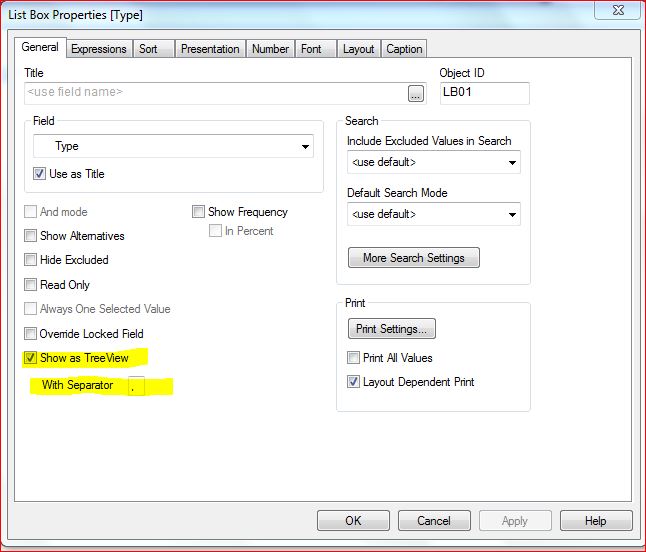
on a listbox, you can do this (choose the operator - for your date field):
- Mark as New
- Bookmark
- Subscribe
- Mute
- Subscribe to RSS Feed
- Permalink
- Report Inappropriate Content
Hi Youssef ,
Your Suggested option donot work , as i need it for all feild like financial year, year,quarter,month.
hence i found a workaround by concatenating the fields with "/" delimiter and displayed it in the list box.
Like this : FinancialYear &'/'& Year &'/'& Quarter &'/'& MonthName As HierarchyDate
the below given is the screen shot of the drill down style calendar
but facing issues in sorting of FY years , will find out how to deal with this.
Thanks,
YoussefBelloum
- Mark as New
- Bookmark
- Subscribe
- Mute
- Subscribe to RSS Feed
- Permalink
- Report Inappropriate Content
You answered your question, with this method you need only one delimiter and you added it 
to make an ascending sorting, you can try this:
uncheck only expression in the sorting and put this on ascending:
=Max(Date)
- Mark as New
- Bookmark
- Subscribe
- Mute
- Subscribe to RSS Feed
- Permalink
- Report Inappropriate Content
This works thanks Youssef.
YoussefBelloum
- Mark as New
- Bookmark
- Subscribe
- Mute
- Subscribe to RSS Feed
- Permalink
- Report Inappropriate Content
you're welcome, good luck
- Mark as New
- Bookmark
- Subscribe
- Mute
- Subscribe to RSS Feed
- Permalink
- Report Inappropriate Content
Thanks a Lot Youssef.
I just noticed that this list box is not allowing multiple selection.
for example if i select "Jan" in FY18 and select "Jan" in FY17 then the selection of FY18 will automatically get deselected.
the object's presentation is in <User Default > mode.
tried other presentation modes but those doesnt look good on UI.
Any ideas on this ??
Thanks
YoussefBelloum
- Mark as New
- Bookmark
- Subscribe
- Mute
- Subscribe to RSS Feed
- Permalink
- Report Inappropriate Content
did you try making selections and pressing CTRL button ?
- « Previous Replies
-
- 1
- 2
- Next Replies »