Unlock a world of possibilities! Login now and discover the exclusive benefits awaiting you.

- Qlik Community
- :
- All Forums
- :
- QlikView
- :
- Re: How Can I remove certain Items from a List Box
- Subscribe to RSS Feed
- Mark Topic as New
- Mark Topic as Read
- Float this Topic for Current User
- Bookmark
- Subscribe
- Mute
- Printer Friendly Page

- Mark as New
- Bookmark
- Subscribe
- Mute
- Subscribe to RSS Feed
- Permalink
- Report Inappropriate Content
How Can I remove certain Items from a List Box
I don't want to show particular data in a list box.
I have tried this but not working for me.
in the expression pane
if(ListBoxfield='D',Null(),ListboxField)
what it does for me is:
A A
B B
C C
D -
what I want is :
A
B
C
Please Help.
Regards,
Gaurav Tyagi
- Tags:
- list-box
Accepted Solutions

 tresB
tresB
- Mark as New
- Bookmark
- Subscribe
- Mute
- Subscribe to RSS Feed
- Permalink
- Report Inappropriate Content
tresB
- Mark as New
- Bookmark
- Subscribe
- Mute
- Subscribe to RSS Feed
- Permalink
- Report Inappropriate Content
Try:
if(ListBoxfield<>'D',ListboxField)
- Mark as New
- Bookmark
- Subscribe
- Mute
- Subscribe to RSS Feed
- Permalink
- Report Inappropriate Content
Still the same result, No change.
I'm writing it in the second tab i.e. Expression Pane is it the place where I have to write it?
tresB
- Mark as New
- Bookmark
- Subscribe
- Mute
- Subscribe to RSS Feed
- Permalink
- Report Inappropriate Content
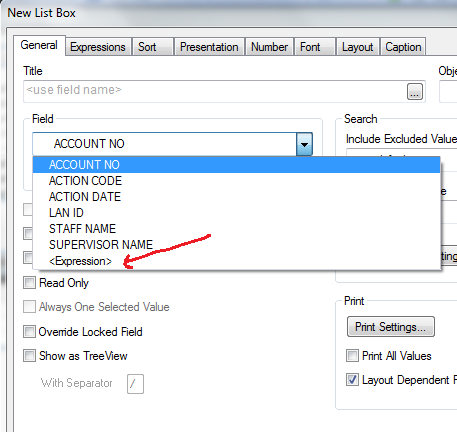
No. See the screenshot:
- Mark as New
- Bookmark
- Subscribe
- Mute
- Subscribe to RSS Feed
- Permalink
- Report Inappropriate Content
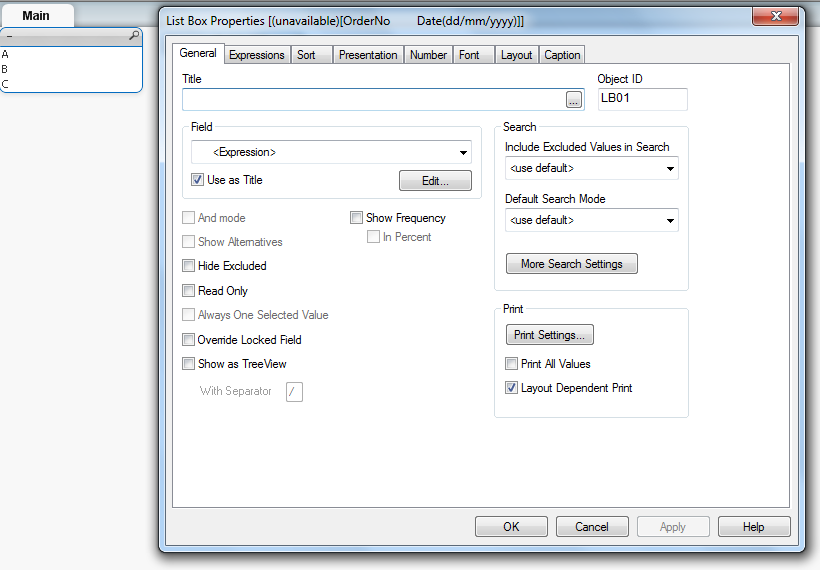
TAKE ONE LIST BOX
AND GOTO LIST BOX PROPERTY AND IN THE EXPRESSION TYPE THE BELOW CODE(
=IF(OrderNo <>'D', OrderNo)
CHECK THE SCREEN SHOT (ATTACHED).

 suniljain
- Mark as New
- Bookmark
- Subscribe
- Mute
- Subscribe to RSS Feed
- Permalink
- Report Inappropriate Content
You can use following expression
if(Len(ListBoxfield)>1,ListboxField)
- Mark as New
- Bookmark
- Subscribe
- Mute
- Subscribe to RSS Feed
- Permalink
- Report Inappropriate Content
I didn't scroldown that much before have too many fields in the table 
Thanks