Unlock a world of possibilities! Login now and discover the exclusive benefits awaiting you.

- Qlik Community
- :
- All Forums
- :
- QlikView
- :
- Re: How To change Row Value while creating Straigh...
- Subscribe to RSS Feed
- Mark Topic as New
- Mark Topic as Read
- Float this Topic for Current User
- Bookmark
- Subscribe
- Mute
- Printer Friendly Page

 sspawar88
- Mark as New
- Bookmark
- Subscribe
- Mute
- Subscribe to RSS Feed
- Permalink
- Report Inappropriate Content
How To change Row Value while creating Straight table
Hi Community,
How I can replace
* as CurrentYear
? as PreviousYear
# as PreviousYear
| Data | Revenue |
|---|---|
| *ACTUAL | 2 |
| ?ACTUAL | 3 |
| Revenue# | 4 |
Table Should be like this
| Data | Revenue |
|---|---|
| 2017ACTUAL | 2 |
| 2016ACTUAL | 3 |
| REVENUE2016 | 4 |
Accepted Solutions

 antoniotiman
- Mark as New
- Bookmark
- Subscribe
- Mute
- Subscribe to RSS Feed
- Permalink
- Report Inappropriate Content
Hi Satish,
may be like (in Script)
LOAD Field,
Replace(Replace(Replace(Data,'*',Year(Today())),'?',Year(Today())-1),'#',Year(Today())-1) as Data
From Table;
Or You can use Expression directly in straight table.
Regards,
Antonio
antoniotiman
- Mark as New
- Bookmark
- Subscribe
- Mute
- Subscribe to RSS Feed
- Permalink
- Report Inappropriate Content
Hi Satish,
may be like (in Script)
LOAD Field,
Replace(Replace(Replace(Data,'*',Year(Today())),'?',Year(Today())-1),'#',Year(Today())-1) as Data
From Table;
Or You can use Expression directly in straight table.
Regards,
Antonio


- Mark as New
- Bookmark
- Subscribe
- Mute
- Subscribe to RSS Feed
- Permalink
- Report Inappropriate Content
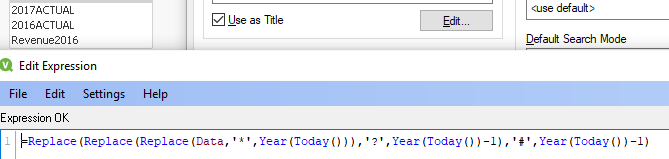
May be this?
=Replace(Replace(Replace(Data,'*',Year(Today())),'?',Year(Today())-1),'#',Year(Today())-1)
- Mark as New
- Bookmark
- Subscribe
- Mute
- Subscribe to RSS Feed
- Permalink
- Report Inappropriate Content
But not sure, How many field values you need to change?
