Unlock a world of possibilities! Login now and discover the exclusive benefits awaiting you.

- Qlik Community
- :
- All Forums
- :
- QlikView
- :
- How to exclude values from List Box
- Subscribe to RSS Feed
- Mark Topic as New
- Mark Topic as Read
- Float this Topic for Current User
- Bookmark
- Subscribe
- Mute
- Printer Friendly Page

- Mark as New
- Bookmark
- Subscribe
- Mute
- Subscribe to RSS Feed
- Permalink
- Report Inappropriate Content
How to exclude values from List Box
How to easily exclude unwanted values from List Box Window. Here is a list of values taken directly from datasource. How to hide some values that I don't want to see, for example -1,1,2,3,4,5. The rest should be visible.
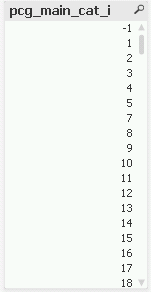
I bet there is an easy way to do this. Thanks.

 whiteline
- Mark as New
- Bookmark
- Subscribe
- Mute
- Subscribe to RSS Feed
- Permalink
- Report Inappropriate Content
You can always use an expression for list box.
For example: =if(pcg_main_cat_i>5, pcg_main_cat_i, null())

 nilesh_gangurde
- Mark as New
- Bookmark
- Subscribe
- Mute
- Subscribe to RSS Feed
- Permalink
- Report Inappropriate Content
Hiii Pawel,
You can use the below expression to hide
the specific value from List box (i.e. Number as well as String value)if(pcg_main_cat_i <> '1' or pcg_main_cat_i <> '2' or pcg_main_cat_i <> '3' or pcg_main_cat_i <>'4' or
pcg_main_cat_i <> '5',pcg_main_cat_i)
Regards,
Nilesh Gangurde
 jchoucq
- Mark as New
- Bookmark
- Subscribe
- Mute
- Subscribe to RSS Feed
- Permalink
- Report Inappropriate Content
hi,
to avoid creating IF expression in your list, i think you'd better create, in your script, another field which will contain only the values you want.
Then, it will be so easy to create a Selection list on this new Field.
Regards
Jo

 senpradip007
- Mark as New
- Bookmark
- Subscribe
- Mute
- Subscribe to RSS Feed
- Permalink
- Report Inappropriate Content
Hi pawel.sabaj
You can use the following expressions
if(pcg_main_cat_i>5, pcg_main_cat_i)
Regards
PRADIP