Unlock a world of possibilities! Login now and discover the exclusive benefits awaiting you.

- Qlik Community
- :
- All Forums
- :
- QlikView
- :
- List box expression null remove
- Subscribe to RSS Feed
- Mark Topic as New
- Mark Topic as Read
- Float this Topic for Current User
- Bookmark
- Subscribe
- Mute
- Printer Friendly Page

 kstroupe
- Mark as New
- Bookmark
- Subscribe
- Mute
- Subscribe to RSS Feed
- Permalink
- Report Inappropriate Content
List box expression null remove
Hello all,
I have created a list box with an Employee field. I created an expression which works. It shows the Employee and the count of Assets they have.
=If(Count(DISTINCT {<status = {'Active'}>}Asset_ID)>1,Count(DISTINCT {<status = {'Active'}>}Asset_ID))
My issue is the counts that aren't greater then 1 have a dash next to the Employee field. I don't want those to show up on the list.
Do you know how I can remove them? I only want to see Employee 1 below
| Employee | Asset | status |
|---|---|---|
| 1 | 215369 | Active |
| 1 | 36985 | Active |
| 2 | 36895 | Active |
I see in list box
1 2
2 -
Thank you for your assistance.
Kim
- Tags:
- qlikview_scripting
Accepted Solutions
 parimikittu
- Mark as New
- Bookmark
- Subscribe
- Mute
- Subscribe to RSS Feed
- Permalink
- Report Inappropriate Content
Hi, If you want to have only the emplpoyees which has more than 1 Asset_ID? You also need to have the similar expression for Employee as well. create a list box with expression below:
aggr(if(Count(DISTINCT {<status = {'Active'}>}Asset_ID)>1,Employee ),Employee)
and then in expression tab give ur count logic "Count(DISTINCT {<status = {'Active'}>}Asset_ID)"
check this doc

 ger_alegria
- Mark as New
- Bookmark
- Subscribe
- Mute
- Subscribe to RSS Feed
- Permalink
- Report Inappropriate Content
Try with:
=If(Count(DISTINCT {<status = {'Active'}>}Asset_ID)=>1,Count(DISTINCT {<status = {'Active'}>}Asset_ID))
When you are evaluating you only take when the count is > 1, so if is only one value you count anything.
kstroupe
- Mark as New
- Bookmark
- Subscribe
- Mute
- Subscribe to RSS Feed
- Permalink
- Report Inappropriate Content
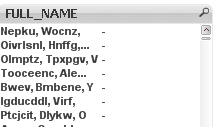
Thank you for your Quick response. I put that in and it turns all the expression values to dashes. Here is what I was getting. Then I put a picture of the change.
Thanks


parimikittu
- Mark as New
- Bookmark
- Subscribe
- Mute
- Subscribe to RSS Feed
- Permalink
- Report Inappropriate Content
Hi, If you want to have only the emplpoyees which has more than 1 Asset_ID? You also need to have the similar expression for Employee as well. create a list box with expression below:
aggr(if(Count(DISTINCT {<status = {'Active'}>}Asset_ID)>1,Employee ),Employee)
and then in expression tab give ur count logic "Count(DISTINCT {<status = {'Active'}>}Asset_ID)"
check this doc
kstroupe
- Mark as New
- Bookmark
- Subscribe
- Mute
- Subscribe to RSS Feed
- Permalink
- Report Inappropriate Content
Thank you this worked perfectly. I'm sorry I wasn't able to find the example you gave me. I'll mark it for future reference. Have a great day.
