Unlock a world of possibilities! Login now and discover the exclusive benefits awaiting you.

- Qlik Community
- :
- All Forums
- :
- QlikView
- :
- Re: Multiple attributes in single List Box
- Subscribe to RSS Feed
- Mark Topic as New
- Mark Topic as Read
- Float this Topic for Current User
- Bookmark
- Subscribe
- Mute
- Printer Friendly Page

 ashishpalkar
- Mark as New
- Bookmark
- Subscribe
- Mute
- Subscribe to RSS Feed
- Permalink
- Report Inappropriate Content
Multiple attributes in single List Box
Hi There
Can we have more than one attributes in single list box.
e.g I have 4 columns in database
Player, Rank , State, City
I want to create one list box for all above attributes
Thanks in advance,
- Tags:
- new_to_qlikview

 sunny_talwar
- Mark as New
- Bookmark
- Subscribe
- Mute
- Subscribe to RSS Feed
- Permalink
- Report Inappropriate Content
You can concatenate them in the script and create a Link table to do this.

- Mark as New
- Bookmark
- Subscribe
- Mute
- Subscribe to RSS Feed
- Permalink
- Report Inappropriate Content
Or maybe use a Multi Box.
sunny_talwar
- Mark as New
- Bookmark
- Subscribe
- Mute
- Subscribe to RSS Feed
- Permalink
- Report Inappropriate Content
May be something along these lines:
Table:
LOAD *,
AutoNumber(Player&'|'&Rank&'|'&State&'|'&City) as UI
Inline [
Player, Rank, State, City
A, 2, NJ, xyz
B, 5, NY, 32
];
LinkTable:
LOAD Player as Field,
UI
Resident Table;
Concatenate(LinkTable)
LOAD Rank as Field,
UI
Resident Table;
Concatenate(LinkTable)
LOAD State as Field,
UI
Resident Table;
Concatenate(LinkTable)
LOAD City as Field,
UI
Resident Table;
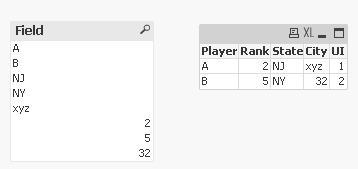
Data Model:

ashishpalkar
- Mark as New
- Bookmark
- Subscribe
- Mute
- Subscribe to RSS Feed
- Permalink
- Report Inappropriate Content
Thanks Sunny,, the 4 columns are coming from different tables.. still same solution will work?
ashishpalkar
- Mark as New
- Bookmark
- Subscribe
- Mute
- Subscribe to RSS Feed
- Permalink
- Report Inappropriate Content
Multi Box wont help in this situation.

 Peter_Cammaert
- Mark as New
- Bookmark
- Subscribe
- Mute
- Subscribe to RSS Feed
- Permalink
- Report Inappropriate Content
A combination of multiple list boxes is usually called a table box. Try it out.
Best,
Peter
sunny_talwar
- Mark as New
- Bookmark
- Subscribe
- Mute
- Subscribe to RSS Feed
- Permalink
- Report Inappropriate Content
Some modifications will be required (the UI will be associated to the UI from that table and a Link table will be need), but the idea is still going to be same. If you can share a sample of how the data is, we might be able to help better 
ashishpalkar
- Mark as New
- Bookmark
- Subscribe
- Mute
- Subscribe to RSS Feed
- Permalink
- Report Inappropriate Content
Hi Sunny
Please find attachment, would like City , State , Name and Rank in one single list box.
sunny_talwar
- Mark as New
- Bookmark
- Subscribe
- Mute
- Subscribe to RSS Feed
- Permalink
- Report Inappropriate Content
Not sure what the idea is, but may be this:
LOAD Name,
Age,
Married
FROM
Book1.xlsx
(ooxml, embedded labels, table is Players);
LOAD City,
Population
FROM
Book1.xlsx
(ooxml, embedded labels, table is City);
LOAD Rank,
Team
FROM
Book1.xlsx
(ooxml, embedded labels, table is Rank);
LOAD State,
Region
FROM
Book1.xlsx
(ooxml, embedded labels, table is State);
ListBox:
LOAD Name as Field,
Name
Resident Players;
Concatenate(ListBox)
LOAD City as Field,
City
Resident City;
Concatenate(ListBox)
LOAD State as Field,
State
Resident State;
Concatenate(ListBox)
LOAD Rank as Field,
Rank
Resident Rank;