Unlock a world of possibilities! Login now and discover the exclusive benefits awaiting you.

- Qlik Community
- :
- All Forums
- :
- QlikView
- :
- Re: Number Format
- Subscribe to RSS Feed
- Mark Topic as New
- Mark Topic as Read
- Float this Topic for Current User
- Bookmark
- Subscribe
- Mute
- Printer Friendly Page

 qlikviewaf
- Mark as New
- Bookmark
- Subscribe
- Mute
- Subscribe to RSS Feed
- Permalink
- Report Inappropriate Content
Number Format
Hi Guys,
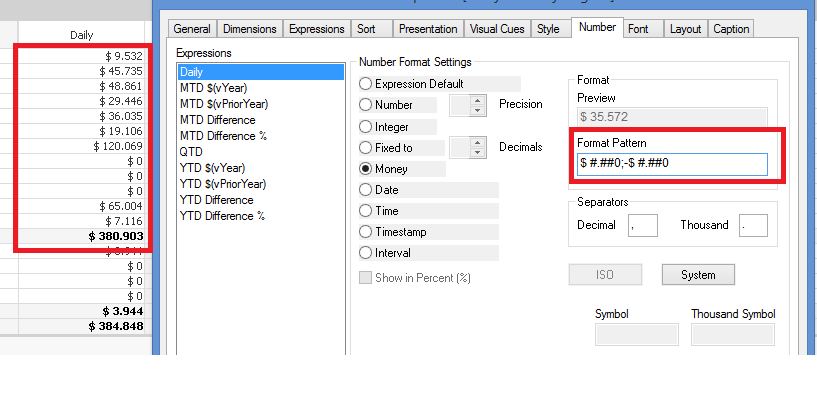
this is what i have in my app.
I would like to have just thousand , for example 9.532, i would like to see only 10 (rounded)
for 45.735 i would like to see 46
for 19.106 i would like to see 19
I tried to change the format pattern, but i didnt get the result expected.
Any advice how to setup the format pattern?
Thank you!
- « Previous Replies
-
- 1
- 2
- Next Replies »

 vinieme12
- Mark as New
- Bookmark
- Subscribe
- Mute
- Subscribe to RSS Feed
- Permalink
- Report Inappropriate Content
Use Round()
example =Round(Field)
If a post helps to resolve your issue, please accept it as a Solution.
qlikviewaf
- Mark as New
- Bookmark
- Subscribe
- Mute
- Subscribe to RSS Feed
- Permalink
- Report Inappropriate Content
what about having only the K ? (e.g. for 45.735 i would like to see 46)

 avinashelite
- Mark as New
- Bookmark
- Subscribe
- Mute
- Subscribe to RSS Feed
- Permalink
- Report Inappropriate Content
What you mean by having only the K??

 prma7799
- Mark as New
- Bookmark
- Subscribe
- Mute
- Subscribe to RSS Feed
- Permalink
- Report Inappropriate Content
You can use Num also
=Num(45.735,'##')
qlikviewaf
- Mark as New
- Bookmark
- Subscribe
- Mute
- Subscribe to RSS Feed
- Permalink
- Report Inappropriate Content
as you see now i have on the table 45.735 - i would like to see only 45
avinashelite
- Mark as New
- Bookmark
- Subscribe
- Mute
- Subscribe to RSS Feed
- Permalink
- Report Inappropriate Content
Try like this
Round(Field/expression) this will give the desired result
qlikviewaf
- Mark as New
- Bookmark
- Subscribe
- Mute
- Subscribe to RSS Feed
- Permalink
- Report Inappropriate Content
in this way i have 46.000 i would like to have only 46, without the 000
avinashelite
- Mark as New
- Bookmark
- Subscribe
- Mute
- Subscribe to RSS Feed
- Permalink
- Report Inappropriate Content
Did you tries the way we suggested it will give the exact result what your excepting

 marcus_malinow
- Mark as New
- Bookmark
- Subscribe
- Mute
- Subscribe to RSS Feed
- Permalink
- Report Inappropriate Content
Hi,
change your format pattern to remove everything after the decimal point:
$ #;-$ #
Marcus

- « Previous Replies
-
- 1
- 2
- Next Replies »