Unlock a world of possibilities! Login now and discover the exclusive benefits awaiting you.

- Qlik Community
- :
- All Forums
- :
- QlikView
- :
- Re: Pivot table column collapse
- Subscribe to RSS Feed
- Mark Topic as New
- Mark Topic as Read
- Float this Topic for Current User
- Bookmark
- Subscribe
- Mute
- Printer Friendly Page

- Mark as New
- Bookmark
- Subscribe
- Mute
- Subscribe to RSS Feed
- Permalink
- Report Inappropriate Content
Pivot table column collapse
Hi Frnz,
I am facing an issue with the pivot table.please understand the issue
Sheet1:once i click on the employee,pivot table on sheet 2 displays proper looks.
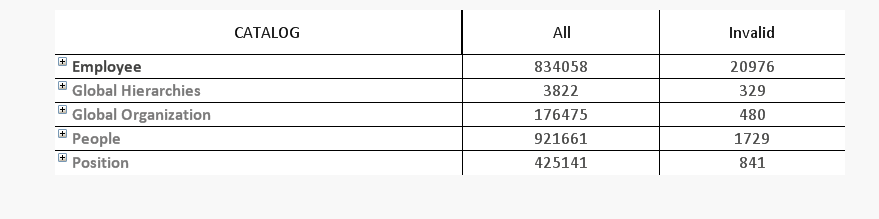
Sheet2: on sheet 2 pivot table should look like same
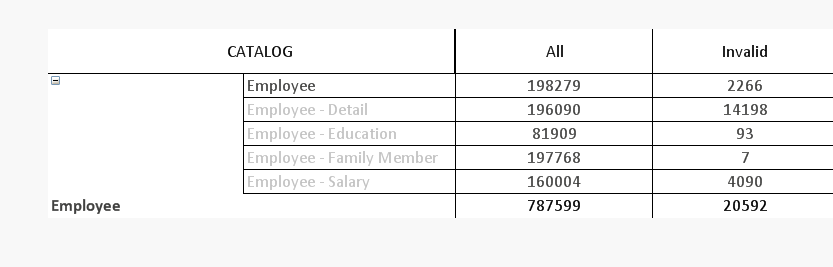
but when we click on any 'CATEGORY' like employee-Detail it collapse and display outpus as:
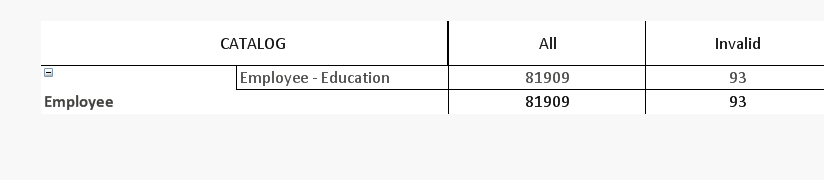
but what i want is it should appear same as above should not collapse and current selection persist.
please find attached .qvw
Thanks
Manish Madan

 whiteline
- Mark as New
- Bookmark
- Subscribe
- Mute
- Subscribe to RSS Feed
- Permalink
- Report Inappropriate Content
Hi.
So why don't you use the set analysis on Sheet2 as on Sheet1 ?
- Mark as New
- Bookmark
- Subscribe
- Mute
- Subscribe to RSS Feed
- Permalink
- Report Inappropriate Content
yes,previously when i was trying it was not working might be i was trying something wrong,now it is fixed.
could you please help me with below case:
http://community.qlik.com/thread/118924
I am still facing issue in above case.
Thanks