Unlock a world of possibilities! Login now and discover the exclusive benefits awaiting you.

- Qlik Community
- :
- All Forums
- :
- QlikView
- :
- Regarding Bar chart
- Subscribe to RSS Feed
- Mark Topic as New
- Mark Topic as Read
- Float this Topic for Current User
- Bookmark
- Subscribe
- Mute
- Printer Friendly Page

 skiruthigadevi
- Mark as New
- Bookmark
- Subscribe
- Mute
- Subscribe to RSS Feed
- Permalink
- Report Inappropriate Content
Regarding Bar chart
Hi Friends,
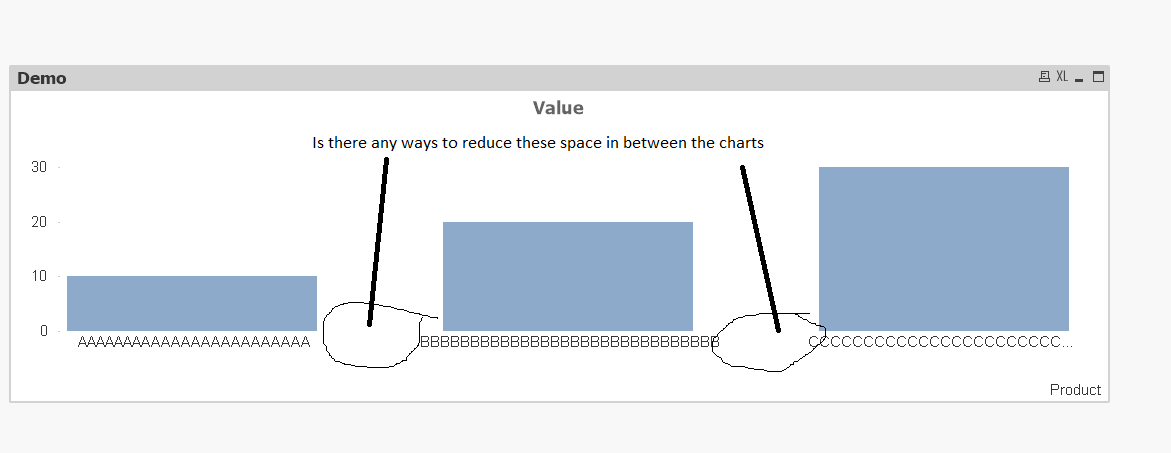
I appreciate your time; I have a bar chart with large dimension names. So I have to limit the legend or increase the size of the chart to see all the dimension values in a single line. I have noticed some free space between the bars ,so is there any way through which we could reduce the space between the dimension names. Attached a screen shot and application for your reference. Kindly share your thoughts.
Thanks,
Kiruthiga
Accepted Solutions

- Mark as New
- Bookmark
- Subscribe
- Mute
- Subscribe to RSS Feed
- Permalink
- Report Inappropriate Content
Hi Kiruthigadevi Subramaniam,
You can go to Properties--> 'Presentation' tab and under presentation you can set the bat distance to zero 0 or reduce until it suits your requirement.
Hope that works for you.
- Mark as New
- Bookmark
- Subscribe
- Mute
- Subscribe to RSS Feed
- Permalink
- Report Inappropriate Content
Hi Kiruthigadevi Subramaniam,
You can go to Properties--> 'Presentation' tab and under presentation you can set the bat distance to zero 0 or reduce until it suits your requirement.
Hope that works for you.
skiruthigadevi
- Mark as New
- Bookmark
- Subscribe
- Mute
- Subscribe to RSS Feed
- Permalink
- Report Inappropriate Content
Sure, Thanks!