Unlock a world of possibilities! Login now and discover the exclusive benefits awaiting you.

- Qlik Community
- :
- All Forums
- :
- QlikView
- :
- Re: Remove Null values from Straight Table Chart w...
- Subscribe to RSS Feed
- Mark Topic as New
- Mark Topic as Read
- Float this Topic for Current User
- Bookmark
- Subscribe
- Mute
- Printer Friendly Page

- Mark as New
- Bookmark
- Subscribe
- Mute
- Subscribe to RSS Feed
- Permalink
- Report Inappropriate Content
Remove Null values from Straight Table Chart with Expressions
I have a straight table chart with 17 dimensions and 4 expressions. The 4 expressions are just SUMs. I am getting one complete row with null values I do not want to see. I checked Suppress When Value Is Null for all Dimension, but that row with null values still display. How can I remove this row.
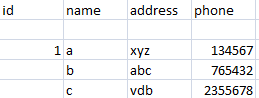
please help me out for same.
Thanks advance.

 neelamsaroha157
- Mark as New
- Bookmark
- Subscribe
- Mute
- Subscribe to RSS Feed
- Permalink
- Report Inappropriate Content
May be you can try it in your expression like -
If( (Your Sum Expression here) >0, (Your Sum Expression here))

 satish25
- Mark as New
- Bookmark
- Subscribe
- Mute
- Subscribe to RSS Feed
- Permalink
- Report Inappropriate Content
Hi,
Why don't you change the script in the Data Load Editor using a where Clause
From ...... (qvd)
Where (Your Dimension)<>Null();
 thannila
- Mark as New
- Bookmark
- Subscribe
- Mute
- Subscribe to RSS Feed
- Permalink
- Report Inappropriate Content
QlikView or QlikSense?
QlikSense-You can able to find one option.
Click on Add-ons->Data Handling->disable the option include null values.
 ChennaiahNallan
- Mark as New
- Bookmark
- Subscribe
- Mute
- Subscribe to RSS Feed
- Permalink
- Report Inappropriate Content

 pooja_prabhu_n
- Mark as New
- Bookmark
- Subscribe
- Mute
- Subscribe to RSS Feed
- Permalink
- Report Inappropriate Content
Hi,
=if(len(trim(id))>0,id) as dimension and check suppress null value
Thanks,
Pooja