Unlock a world of possibilities! Login now and discover the exclusive benefits awaiting you.

- Qlik Community
- :
- All Forums
- :
- QlikView
- :
- Search for a text string but not another text stri...
- Subscribe to RSS Feed
- Mark Topic as New
- Mark Topic as Read
- Float this Topic for Current User
- Bookmark
- Subscribe
- Mute
- Printer Friendly Page

- Mark as New
- Bookmark
- Subscribe
- Mute
- Subscribe to RSS Feed
- Permalink
- Report Inappropriate Content
Search for a text string but not another text string
In the search dialog box, how would you search for a text string like 'mac' but not for text string like 'machine' or don't show the results with 'machine'?
Accepted Solutions

.png "Former Employee") hic
hic
- Mark as New
- Bookmark
- Subscribe
- Mute
- Subscribe to RSS Feed
- Permalink
- Report Inappropriate Content
If you want 'mac' but not 'mach', then you can use
(*mac* ^ *mach*)
HIC

 MayilVahanan
- Mark as New
- Bookmark
- Subscribe
- Mute
- Subscribe to RSS Feed
- Permalink
- Report Inappropriate Content
Hi
Please refer this
http://community.qlik.com/blogs/qlikviewdesignblog/2013/10/16/text-searches
Please close the thread by marking correct answer & give likes if you like the post.
- Mark as New
- Bookmark
- Subscribe
- Mute
- Subscribe to RSS Feed
- Permalink
- Report Inappropriate Content
Thanks Mayil for your quick response. Very useful link and info. However, I still don't see how to do the search that I want. Again, I want to search for 'mac' in the text, but I do not want to see results that have 'machine' or 'macon' or 'macdonald'. Basically, I would like to search for records matching Text1 but don't show any records matching Text2, Text3, or Text4.

 jonathandienst
- Mark as New
- Bookmark
- Subscribe
- Mute
- Subscribe to RSS Feed
- Permalink
- Report Inappropriate Content
Hi
=WildMatch(field, '*mac*') = 1 And WildMatch(field, '*machine*', '*macon*', '*macdonald*') = 0
HTH
Jonathan
MayilVahanan
- Mark as New
- Bookmark
- Subscribe
- Mute
- Subscribe to RSS Feed
- Permalink
- Report Inappropriate Content
Hi
Try like this
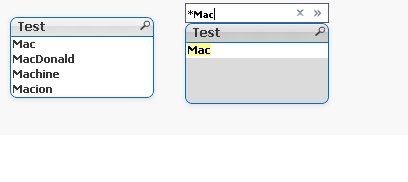
*Mac
= WildMatch(Test,'*Mac') in Textbox
Please close the thread by marking correct answer & give likes if you like the post.
hic
- Mark as New
- Bookmark
- Subscribe
- Mute
- Subscribe to RSS Feed
- Permalink
- Report Inappropriate Content
If you want 'mac' but not 'mach', then you can use
(*mac* ^ *mach*)
HIC
- Mark as New
- Bookmark
- Subscribe
- Mute
- Subscribe to RSS Feed
- Permalink
- Report Inappropriate Content
I tried this method too, but I kept running into runtime error. The syntax makes sense. I'll try again later. In the meantime, I used the other suggestion since it is working. Thanks.