Unlock a world of possibilities! Login now and discover the exclusive benefits awaiting you.

- Qlik Community
- :
- All Forums
- :
- QlikView
- :
- Section Access Problem
- Subscribe to RSS Feed
- Mark Topic as New
- Mark Topic as Read
- Float this Topic for Current User
- Bookmark
- Subscribe
- Mute
- Printer Friendly Page

 marjan_it
- Mark as New
- Bookmark
- Subscribe
- Mute
- Subscribe to RSS Feed
- Permalink
- Report Inappropriate Content
Section Access Problem
Hi All
I have a document with different Access for users.
I have 3 sheets. and a field paylocationId with 2 values 6007 and 6397.
User A should be access Sheet 1 with ID 6397
User B should be access Sheet 2 with ID 6007
User B should be access Sheet 2 with ID 6397 and 6007.
I should add expression in conditional show sheet. what should I add?!!

 robert_mika
- Mark as New
- Bookmark
- Subscribe
- Mute
- Subscribe to RSS Feed
- Permalink
- Report Inappropriate Content
Maybe is approach will work?
 Vegar
Vegar
- Mark as New
- Bookmark
- Subscribe
- Mute
- Subscribe to RSS Feed
- Permalink
- Report Inappropriate Content
You can't apply diffrent section access by sheet, but if you first do your section access allowing
A to see 6397
B to see 6397 and 6007
you can tweak the presentation to only calculate for the desired accounts.
create a access matrix similar to this giving sheet1 value 1 if the user is allowed to see the account on that sheet.
| User | paylocationId | Sheet1 | Sheet2 |
|---|---|---|---|
| A | 6397 | 1 | 0 |
| B | 6397 | 0 | 1 |
| B | 6007 | 1 | 1 |
On each sheet put the set {<SheetX={1}>} in your expression.
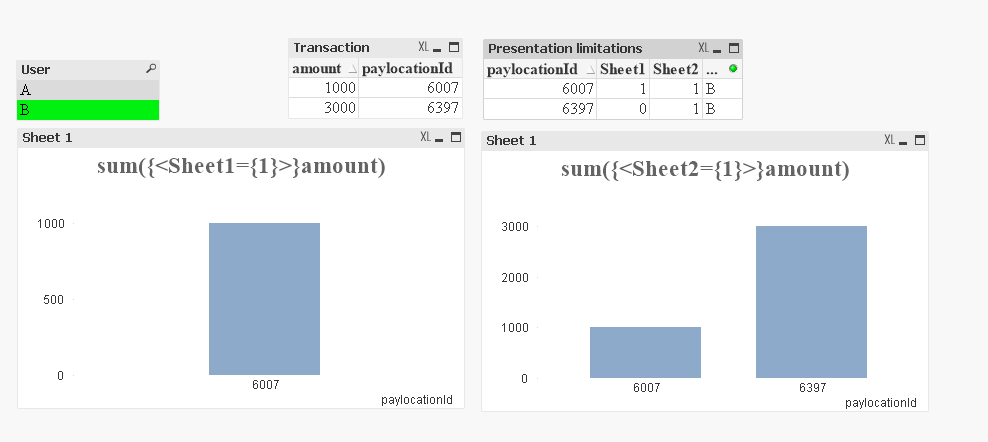
See attached file.
Qlik Community MVP
marjan_it
- Mark as New
- Bookmark
- Subscribe
- Mute
- Subscribe to RSS Feed
- Permalink
- Report Inappropriate Content
No Its not good for me. I have 3 group people not 3 people.

 srivastalans
- Mark as New
- Bookmark
- Subscribe
- Mute
- Subscribe to RSS Feed
- Permalink
- Report Inappropriate Content
Hi Marjan,
In Sheet --> Properties --> General --> Show sheet --> Select Conditional --> write below code and try it
For Sheet 1
=IF(GetFieldSelections(User)='A' and GetFieldSelections(PaylocationID)='6397',1,0)
For Sheet 2
=IF(GetFieldSelections(User)='B' and GetFieldSelections(PaylocationID)='6007',1,0)
For Sheet 3
=IF(GetFieldSelections(User)='B' and (GetFieldSelections(PaylocationID)='6397' or GetFieldSelections(PaylocationID)='6007'),1,0)
marjan_it
- Mark as New
- Bookmark
- Subscribe
- Mute
- Subscribe to RSS Feed
- Permalink
- Report Inappropriate Content
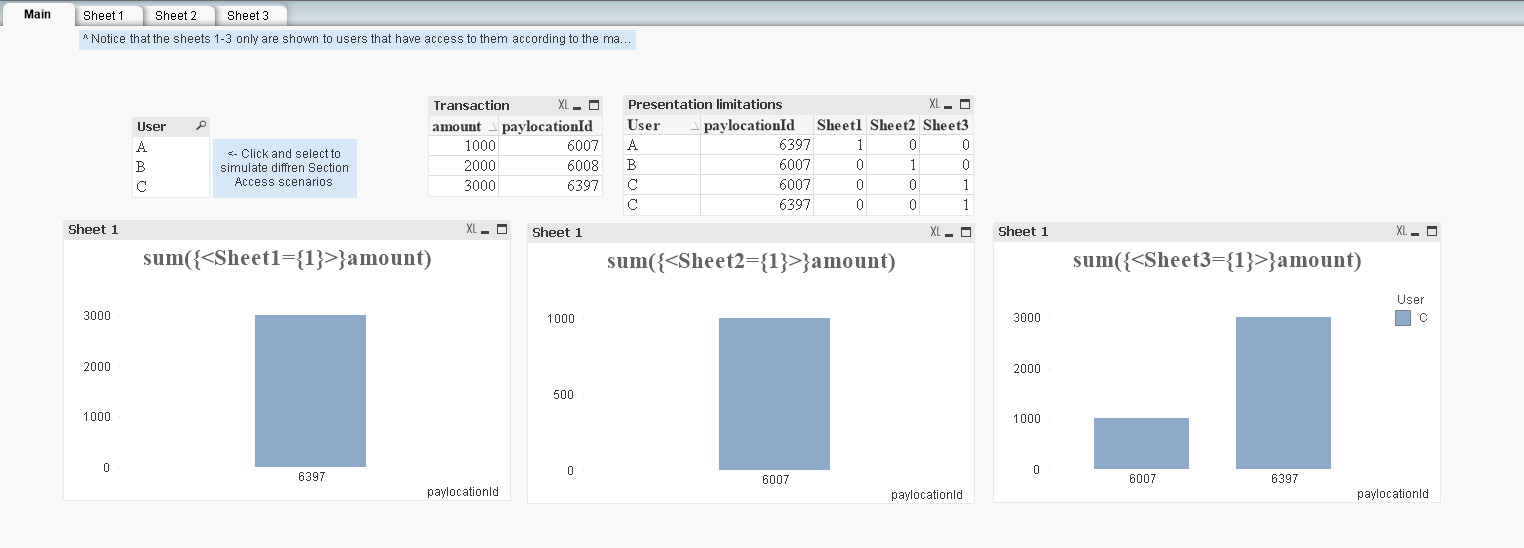
I want this matrix
| User | paylocationId | Sheet1 | Sheet2 | Sheet3 |
|---|---|---|---|---|
| A | 6397 | 1 | 0 | 0 |
| B | 6007 | 0 | 1 | 0 |
| c | 6397 | 0 | 0 | 1 |
| C | 6007 | 0 | 0 | 1 |
for Sheet 1 we can add conditional =paylocationId=6397
for Sheet 2 we can add conditional =paylocationId=6007
for Sheet 3 we can add conditional =?????????????
Vegar
- Mark as New
- Bookmark
- Subscribe
- Mute
- Subscribe to RSS Feed
- Permalink
- Report Inappropriate Content
No I don´t think it is a good idea to put conditional shows on the sheets with this logic. If you add sheet3 then you should add the {<Sheet3={1}>} on all the expressions on sheet 3.
Qlik Community MVP
Vegar
- Mark as New
- Bookmark
- Subscribe
- Mute
- Subscribe to RSS Feed
- Permalink
- Report Inappropriate Content
I think I understand your problem a bit better now. Take a look at this attached application where I've implemented conditional show on the tabs.
Qlik Community MVP
