Unlock a world of possibilities! Login now and discover the exclusive benefits awaiting you.

- Qlik Community
- :
- All Forums
- :
- QlikView
- :
- Re: Set Analysis for Modifiers not present
- Subscribe to RSS Feed
- Mark Topic as New
- Mark Topic as Read
- Float this Topic for Current User
- Bookmark
- Subscribe
- Mute
- Printer Friendly Page

 passionate
- Mark as New
- Bookmark
- Subscribe
- Mute
- Subscribe to RSS Feed
- Permalink
- Report Inappropriate Content
Set Analysis for Modifiers not present
Hi Geeks,
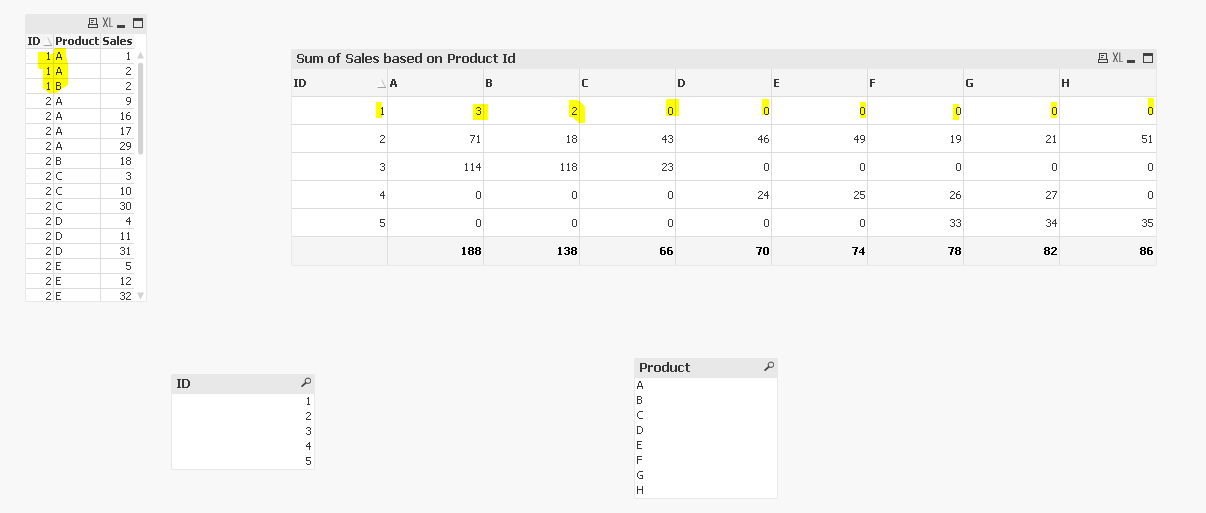
I am using Set analysis to show Product wise sales for every ID.
Eg:- Sum({<Product={'A'}>}Sales)
Please find attached QVW and data file.
Question:
I want to display Sum as Null if no Products are available for a particular id like in below example:
For ID 1 products available are A and B so I don't Want to Show "0" but Null().
Sum(Sales) for a particular product can be Zero or Null()
Appreciate your help.
Thanks and Regards,
Pankaj
Accepted Solutions

 antoniotiman
- Mark as New
- Bookmark
- Subscribe
- Mute
- Subscribe to RSS Feed
- Permalink
- Report Inappropriate Content
You wrote
Sum(Sales) for a particular product can be Zero or Null()
May be this
If(Count({<Product={'A'}>} Product)> 0,Sum({<Product={'A'}>} Sales))

 sunny_talwar
- Mark as New
- Bookmark
- Subscribe
- Mute
- Subscribe to RSS Feed
- Permalink
- Report Inappropriate Content
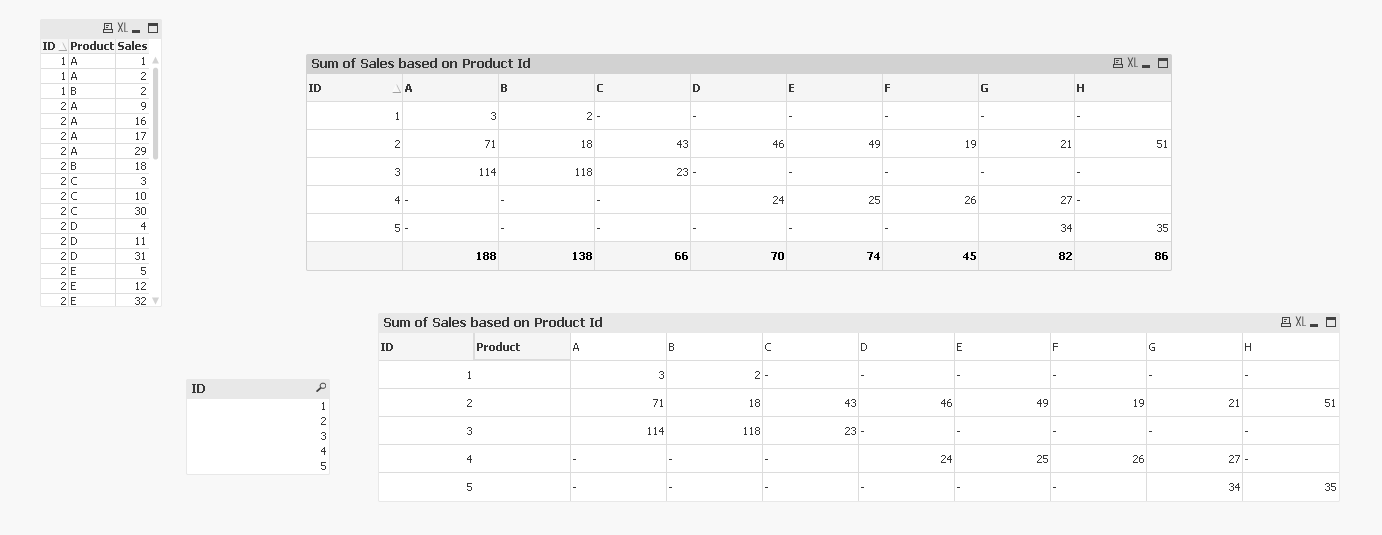
May be use a pivot table or use an expression like this
If(Sum({<Product={'A'}>}Sales), Sum({<Product={'A'}>}Sales))
passionate
- Mark as New
- Bookmark
- Subscribe
- Mute
- Subscribe to RSS Feed
- Permalink
- Report Inappropriate Content
Thanks Sunny.
What if i also want to show Sum(Sales) as Zero as Well?
antoniotiman
- Mark as New
- Bookmark
- Subscribe
- Mute
- Subscribe to RSS Feed
- Permalink
- Report Inappropriate Content
You wrote
Sum(Sales) for a particular product can be Zero or Null()
May be this
If(Count({<Product={'A'}>} Product)> 0,Sum({<Product={'A'}>} Sales))
sunny_talwar
- Mark as New
- Bookmark
- Subscribe
- Mute
- Subscribe to RSS Feed
- Permalink
- Report Inappropriate Content
What do you mean that you want to show it as 0 and null both at the same time?
passionate
- Mark as New
- Bookmark
- Subscribe
- Mute
- Subscribe to RSS Feed
- Permalink
- Report Inappropriate Content
Thanks, You both are Gem
Cheers!!!!
