Unlock a world of possibilities! Login now and discover the exclusive benefits awaiting you.

- Qlik Community
- :
- All Forums
- :
- QlikView
- :
- Re: Set analysis filter on function values within ...
- Subscribe to RSS Feed
- Mark Topic as New
- Mark Topic as Read
- Float this Topic for Current User
- Bookmark
- Subscribe
- Mute
- Printer Friendly Page

- Mark as New
- Bookmark
- Subscribe
- Mute
- Subscribe to RSS Feed
- Permalink
- Report Inappropriate Content
Set analysis filter on function values within a range
Hello, I am trying to create a bar chart where the bars are the sum of the sales over a subset of entries selected based on the average margin. For example, the data points used are like:
| customer | margin (gross) | amount |
|---|---|---|
| a | 10 | 20 |
| a | 2 | 22 |
| b | -7 | 51 |
| c | 5 | 15 |
| c | 37 | 37 |
| c | 14 | 28 |
| d | 6 | 12 |
| d | -10 | 19 |
I want to find the amount summed over the customers with the following attributes:
- negative average margin percentage ie. customer b has an average -7/51
- average margin perc. between 0% and 20%
- average margin perc. between 20% and 50%
- average margin perc. >50%
I have 1. and 4. ie.:
sum({<customer={"=avg(margin/amount)<=0"}>} amount)
but all attempts to create a range have failed ie.:
sum({1<customer={"=avg(margin/amount)>=.2"},customer={"=avg(margin/amount)<=.50"}>} amount)
sum({1<customer={"=avg(margin/amount)>=.2"} AND customer={"=avg(margin/amount)<=.50"}>} amount)
sum({1<customer={"avg(margin/amount)>=.2, avg(margin/amount)<=.50"}>} amount)
and many more but I've lost track and am obviously missing one particular version...
Bonus: how do I create a pie chart with this info without coding the margin range into the load statement?
Accepted Solutions

 maxgro
- Mark as New
- Bookmark
- Subscribe
- Mute
- Subscribe to RSS Feed
- Permalink
- Report Inappropriate Content
maybe this
sum({$<customer={"=avg(margin/amount)>=.0"}*{"=avg(margin/amount)<=.2"}>} amount)
EDIT: PFA
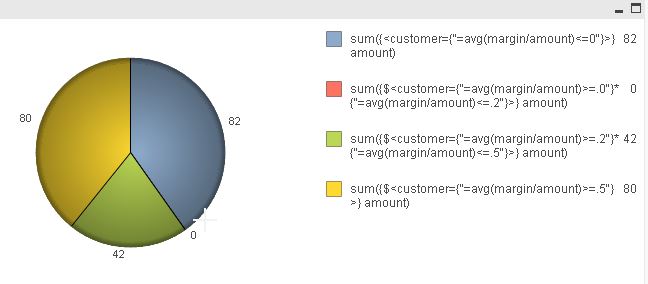
maxgro
- Mark as New
- Bookmark
- Subscribe
- Mute
- Subscribe to RSS Feed
- Permalink
- Report Inappropriate Content
maybe this
sum({$<customer={"=avg(margin/amount)>=.0"}*{"=avg(margin/amount)<=.2"}>} amount)
EDIT: PFA

 martinpohl
- Mark as New
- Bookmark
- Subscribe
- Mute
- Subscribe to RSS Feed
- Permalink
- Report Inappropriate Content
see attached
Regards
- Mark as New
- Bookmark
- Subscribe
- Mute
- Subscribe to RSS Feed
- Permalink
- Report Inappropriate Content
Hello, thanks-this is nice and very close but I need to find customers with average margins in the given buckets as opposed to counting distinct instances. I am trying to modify with the aggr function-I will post above...
- Mark as New
- Bookmark
- Subscribe
- Mute
- Subscribe to RSS Feed
- Permalink
- Report Inappropriate Content
I have now also tried aggregated expressions:
sum(aggr(if(avg(margin/amount)>.2 and avg(margin/amount)<=.45,customer), amount))
which produces wildly large sums. I just don't know how to approach this-calculated dimension, expression, aggregation...can't seem to get anything to return appropriate amounts.
- Mark as New
- Bookmark
- Subscribe
- Mute
- Subscribe to RSS Feed
- Permalink
- Report Inappropriate Content
Thanks Massimo! This 'seems' to work-at least my numbers add up now...I used Year (I have it in my data set) as the dimension and then used your expressions. One question so I can be comfortable with what this is doing:
What does the '*' between sets mean?
- Mark as New
- Bookmark
- Subscribe
- Mute
- Subscribe to RSS Feed
- Permalink
- Report Inappropriate Content
* returns the set of records that only belong to the overlapping data from the first and second sets (similar to an INTERSECT in SQL)