Unlock a world of possibilities! Login now and discover the exclusive benefits awaiting you.

- Qlik Community
- :
- All Forums
- :
- QlikView
- :
- Re: Showing Top 10 Values in Separate Textboxes
- Subscribe to RSS Feed
- Mark Topic as New
- Mark Topic as Read
- Float this Topic for Current User
- Bookmark
- Subscribe
- Mute
- Printer Friendly Page

- Mark as New
- Bookmark
- Subscribe
- Mute
- Subscribe to RSS Feed
- Permalink
- Report Inappropriate Content
Showing Top 10 Values in Separate Textboxes
Hi, I have a datatable that consists of 3 separate areas and corresponding dates. I need to show the top 10 comments for each area in 10 separate textboxes.
My Datatable look like :
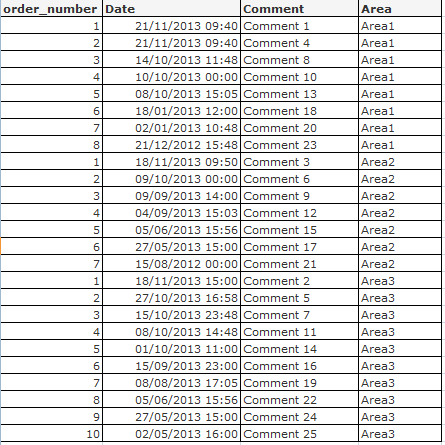
The 10 texboxes should only be populated when the user has selected an Area from ListBox.
So, Im guessing that the set analaysis for Texbox 1 should resemble something like :
Only when a Distinct Area has been selected show Comment where the Order_Number = 1
TexBox 2 : Only when a Distinct Area has been selected show Comment where the Order_Number = 2
and so on for 10 textboxes
Hope someone can advise?
Thanks,
Tom
Accepted Solutions

 Nicole-Smith
- Mark as New
- Bookmark
- Subscribe
- Mute
- Subscribe to RSS Feed
- Permalink
- Report Inappropriate Content
For textbox 1:
=if(GetSelectedCount(Area)=1, only({<order_number={1}>}Comment))
For textbox 2:
=if(GetSelectedCount(Area)=1, only({<order_number={2}>}Comment))
and etc.
Nicole-Smith
- Mark as New
- Bookmark
- Subscribe
- Mute
- Subscribe to RSS Feed
- Permalink
- Report Inappropriate Content
For textbox 1:
=if(GetSelectedCount(Area)=1, only({<order_number={1}>}Comment))
For textbox 2:
=if(GetSelectedCount(Area)=1, only({<order_number={2}>}Comment))
and etc.
- Mark as New
- Bookmark
- Subscribe
- Mute
- Subscribe to RSS Feed
- Permalink
- Report Inappropriate Content
perfect thank you!